

Open a mature HubSpot portal and you'll find automation everywhere. Work that once took hours, moving deals, updating records, and triggering follow-ups, now happens automatically. Reward delivery is the exception. Instead of flowing through the same systems, many teams still run it by hand: someone exports a CSV, copies an email address, logs into a rewards platform, and sends the gift card. That's fine once or twice a week, but quickly becomes a bottleneck as programs grow.
RevOps and marketing teams are now looking at ways to connect HubSpot directly to their rewards platform. So the question is less whether the process can be automated, and more which approach makes the most sense. Should you use a native integration, build a Zapier workflow, or connect through a gift card API integration? The right answer depends on how your team works, how often you send rewards, and how much control you need.
This guide explains how each option works, where it fits best, and the trade-offs to consider before choosing one.
The business case for automating rewards
Over the past decade, revenue teams have pulled manual work out of nearly every process: payments run themselves, emails fire on customer behavior, and meetings self-schedule. Reward delivery is one of the last touchpoints to make that transition, and it's worth making. Once it's automated, three things change:
- Recognition lands when it matters. A reward goes out the moment a deal closes or a referral comes in, not days or weeks later in a batch.
- Nothing slips through the cracks. Rewards reach everyone who qualifies, every time, so no advocate or new customer gets missed.
- Admin drops. No more exports, logins, and one-by-one sends eating hours of your team's time every week.
The payoff? A touchpoint that consistently reinforces the behavior you want to incentivize and recognize, on autopilot.
The automated reward stack
Before comparing platforms and tools, it helps to see how rewards actually flow, because the underlying architecture determines whether a program scales smoothly or breaks down. Each layer has a distinct role. A customer event occurs, such as a deal closing or a survey being completed, and HubSpot detects it as a trigger. Your business rules then determine who qualifies and what they should receive, helping you control eligibility and spending. A reward platform handles fulfillment, recipient choice, and delivery (the part of the process your customer actually experiences).
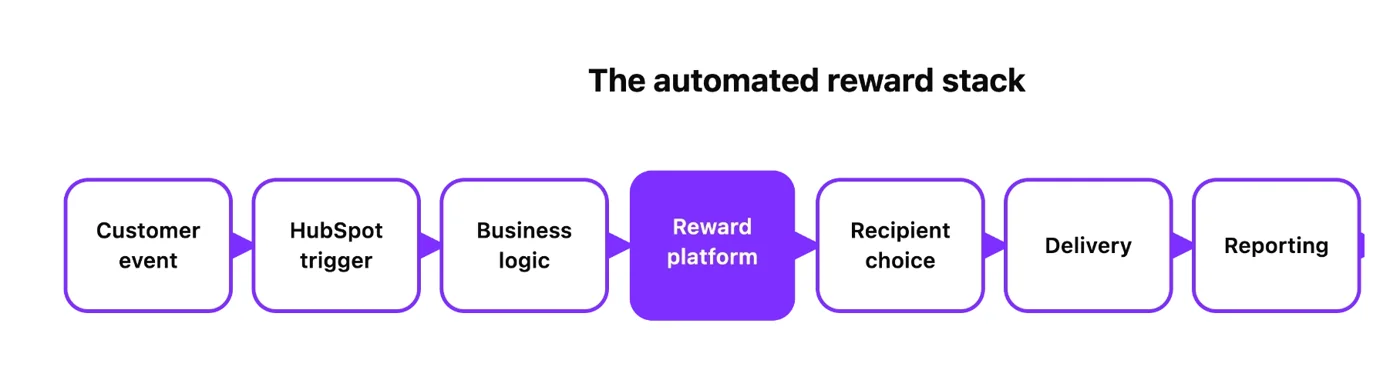
Giftogram sits in this layer, allowing you to deliver gift cards, prepaid cards, and cash disbursements through one reward platform. Depending on the program and location, recipients can choose from available gift and prepaid card options. This lets you manage several common reward types without stitching together a different platform for every use case. Structured in this way, HubSpot remains the source of your customer and campaign data, while Giftogram handles reward delivery and reporting.
Design your reward logic before choosing a vendor
A common mistake is picking a provider and integration method before defining your workflow. Technology should follow strategy, not lead it. Answer these four questions first:
- What behavior are you reinforcing? Referrals, advocacy, survey completion, renewal, onboarding, loyalty? The reward sends a signal, so be clear about the behavior it is meant to reinforce.
- Which HubSpot event triggers it? Be specific: a stage change, a property update, a form submission, a workflow enrollment.
- Which contacts qualify? Segment in HubSpot, where your data already lives, rather than bolting it on later.
- Which reward fits? A quick survey and a signed enterprise deal call for very different gestures.
Get these right and the integration choice becomes straightforward: you're automating a defined process, not wiring tools together and hoping one emerges.
Define which HubSpot events should trigger rewards
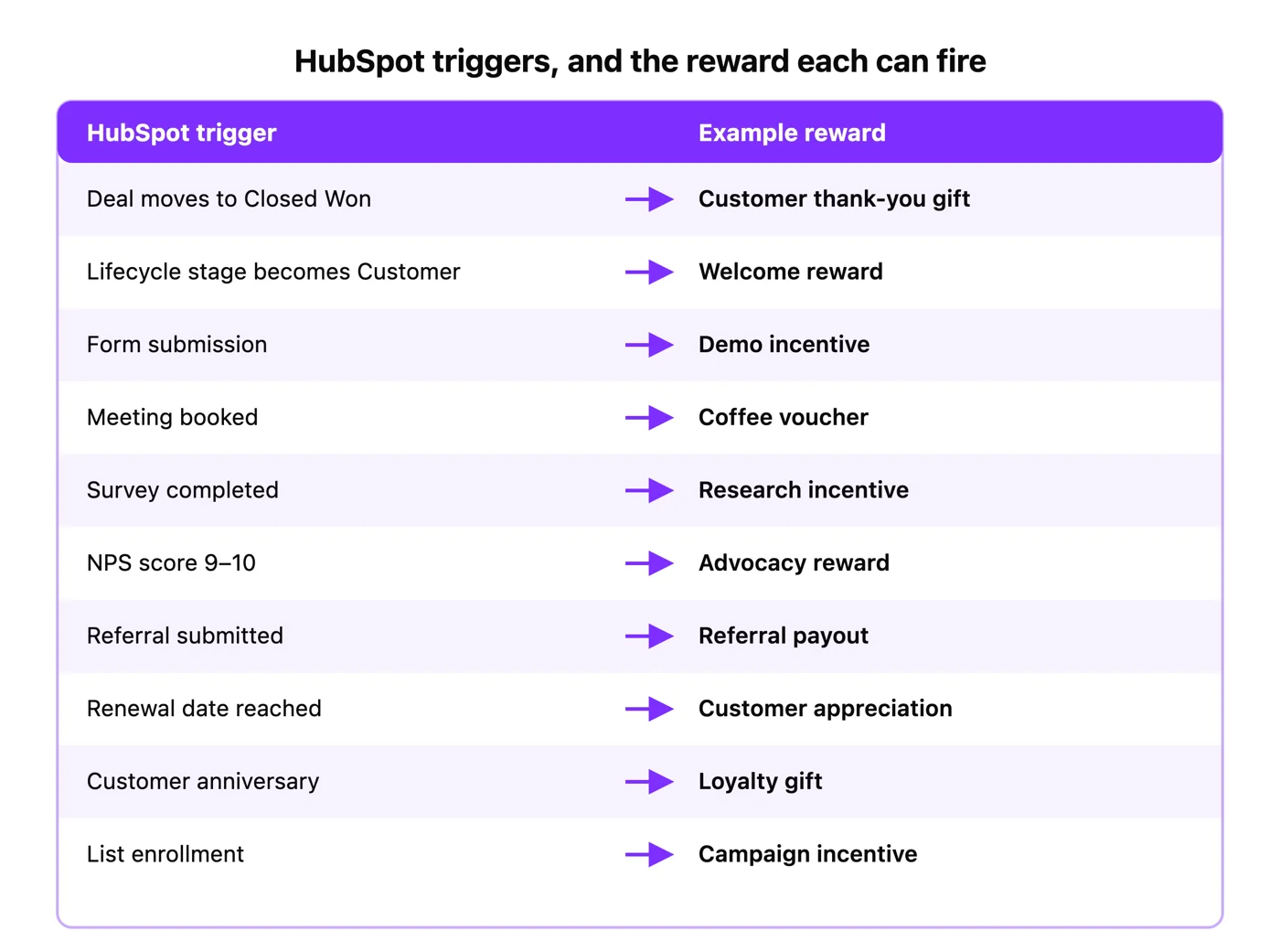
You can trigger a reward on almost any moment or “event” your CRM can detect, without requiring a manual send each time: a deal reaching Closed Won, a lifecycle change, a completed survey, a submitted referral, or a renewal date. Once you've decided what to detect and what should happen next, the workflow generally follows one of two paths: a webhook action that calls the reward platform's API directly, or a HubSpot-to-Zapier step that hands it to a no-code Zap. Same trigger, two ways to deliver it.
One caveat: HubSpot's “Send a webhook” workflow action requires Data Hub Professional or Enterprise, so check your subscription before planning around it.
Choose your integration
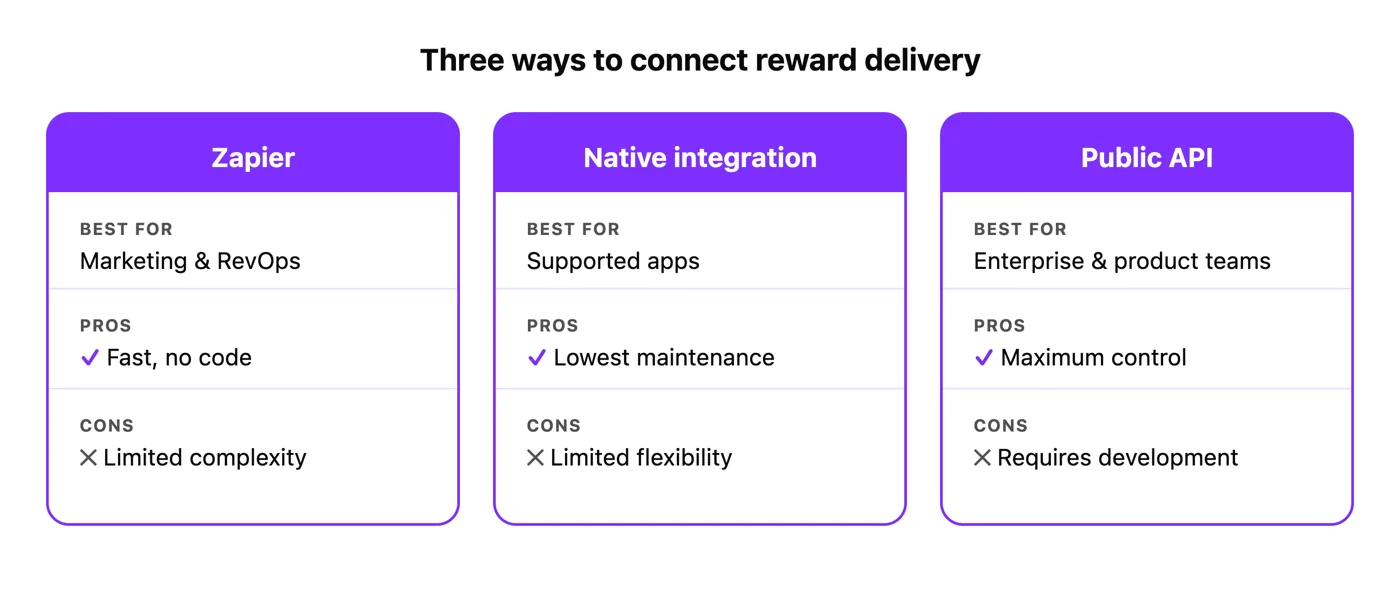
Zapier suits marketing and ops teams who want no-code automation for standard HubSpot workflows. It's quick, non-technical, and connects to thousands of apps, so most triggers can be live in an afternoon. The trade-off is the usual one: less flexibility once logic gets intricate. Through Zapier, common HubSpot events can trigger Giftogram's “Send Giftogram” action without developer work.
Native integrations suit commonly supported apps and simpler workflows, with lower maintenance because someone else owns the connector. The catch is scope: you're bound by what the integration exposes, and not every reward platform ships a native HubSpot app, so confirm the path before assuming a one-click option exists.
A public API suits embedded product experiences, complex logic, and enterprise automation. It gives full control to send rewards from your own code, ideal when reward delivery becomes part of the product. Giftogram's public gift card API integration issues gift cards, prepaid cards, and cash disbursements, not just a card-only endpoint. An API isn't “better” than Zapier. It's the right tool when workflows outgrow no-code, and the wrong one when they haven't.
Questions to ask before choosing reward infrastructure
Evaluate any reward layer against your architecture, asking whether it can:
- Integrate with HubSpot, via Zapier and a public API?
- Automate delivery end to end?
- Deliver globally and offer recipient choice?
- Support both gift cards and prepaid cards?
- Provide reporting and visibility while scaling from a handful of sends to enterprise volume?
The best answer supports more than one integration path, so you can start simple and grow without replatforming. Giftogram covers most of this list from a single platform.
For an outside view of which platforms customers rate highest, see G2's Best Software Awards, then weigh any shortlist against your own requirements.
Conclusion
The best RevOps teams don't just automate marketing, they automate customer experiences, and reward delivery is becoming another workflow in the revenue engine rather than a task someone has to remember. Whether you start with Zapier, a native integration, or a public API, the goal is the same: the right reward, to the right person, at the right moment, automatically. That's how rewards become part of a modern, automated GTM stack.



 How INSIDEA works




