

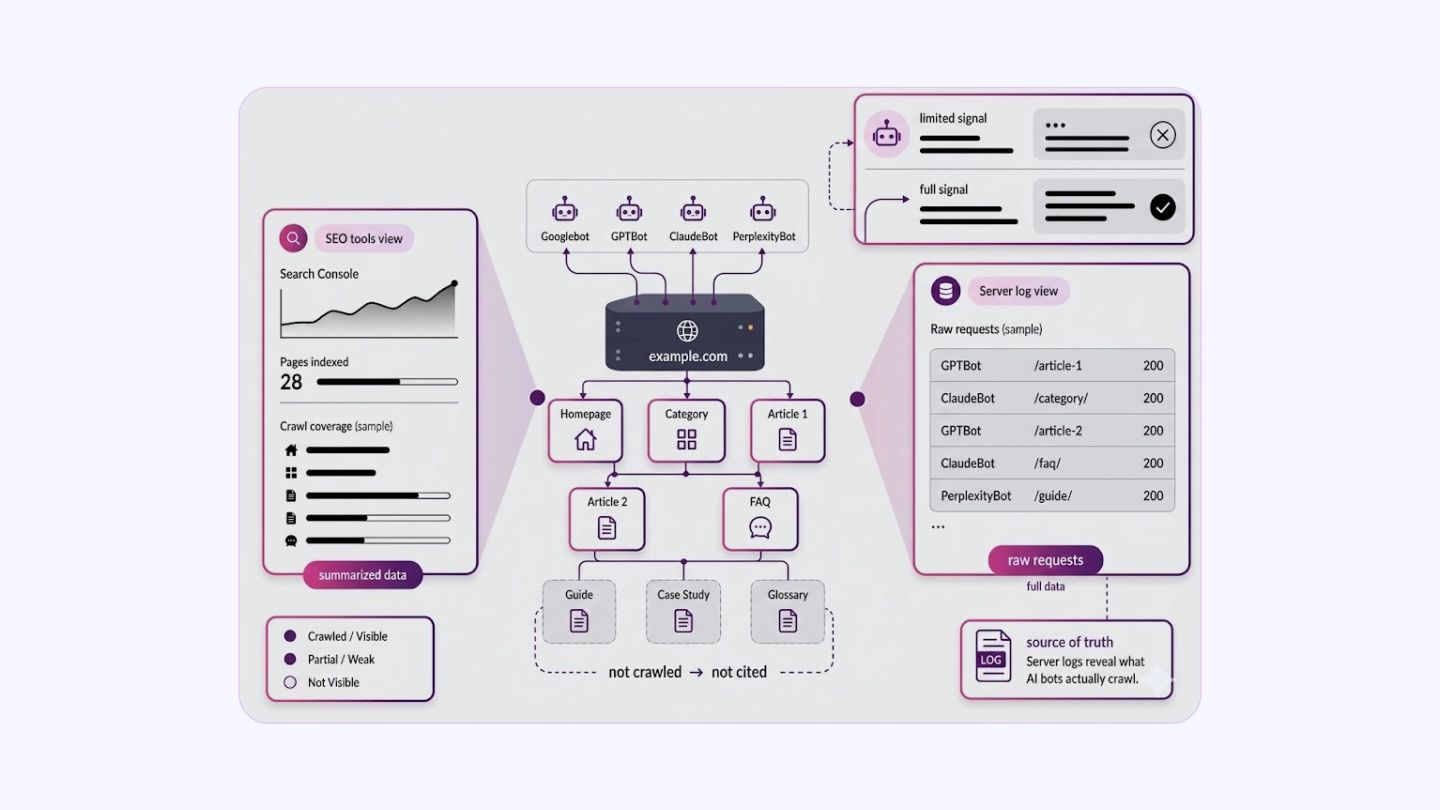
Most website owners focus on Google Search Console or third-party SEO tools to check how their site is crawled. These tools give useful summaries, but they do not show the full picture, especially for AI-powered answer engines that use their own crawlers.
Server log files record every HTTP request hitting your server, including those from Googlebot, GPTBot, ClaudeBot, PerplexityBot, and others. This raw data is available to you by default. Very few site owners actually analyze it.
AEO has changed what it means to rank well online. Answer engines like ChatGPT, Perplexity, and Google’s AI Overviews pull content from the web and surface it directly in responses.
If your pages are not being crawled efficiently by AI bots, your content will not appear in those answers. The gap between publishing content and its citation in AI answers is almost always due to a crawl problem, and log files are the only place where it is clearly visible.
This blog explains how log file analysis connects to AI crawler behavior and what actions you can take based on what you find.
How Log Files Expose AI Crawler Access Patterns?
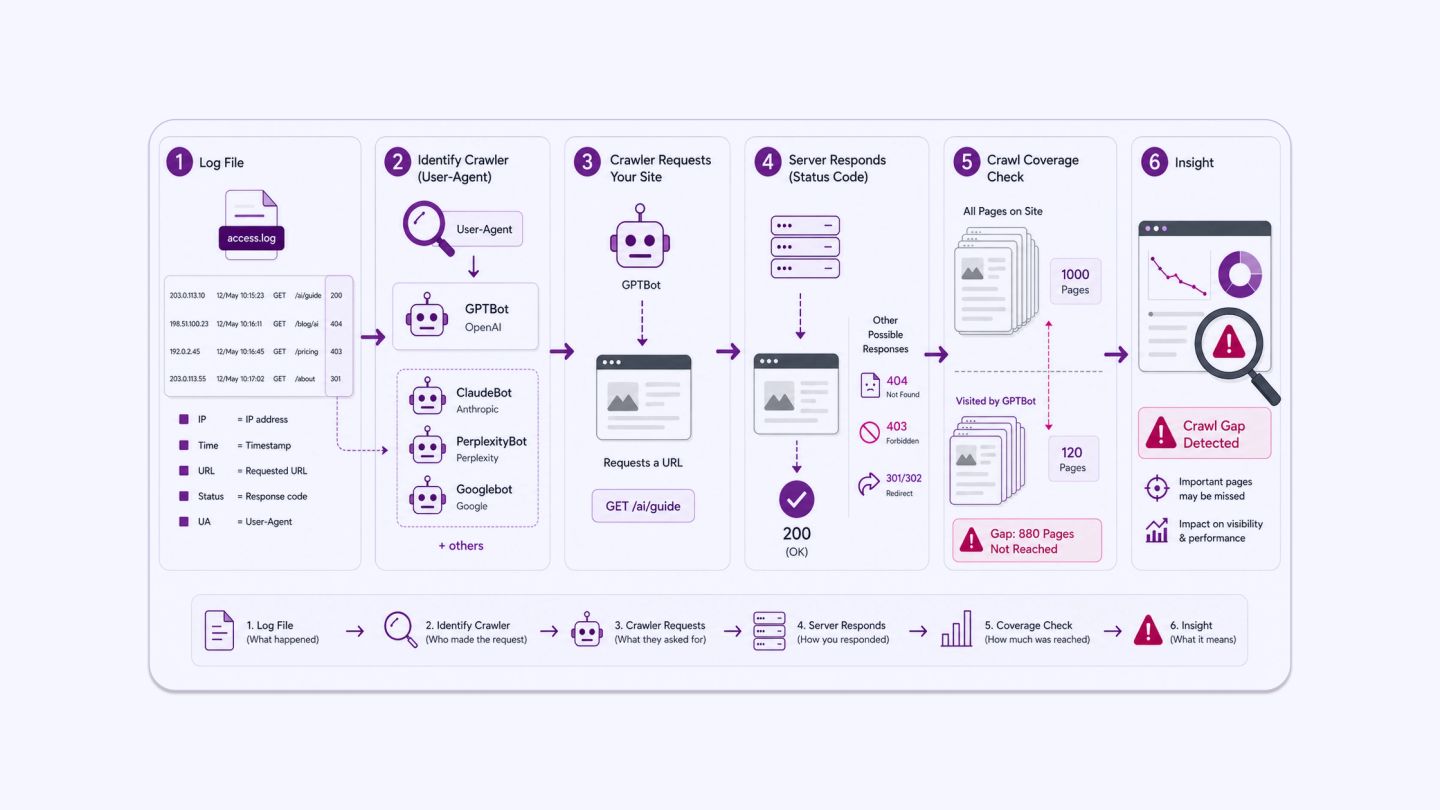
A server log file records one line per request. Each line typically includes: the requester’s IP address, the timestamp, the HTTP method, the requested URL, the HTTP status code returned, the response size, and the user-agent string.
The user-agent string identifies the bot or browser making the request. GPTBot, OpenAI’s web crawler, identifies itself as GPTBot/1.1. Anthropic’s crawler appears as ClaudeBot. Perplexity uses PerplexityBot. Google’s crawlers include Googlebot and Google-Extended, which specifically crawl for Gemini and Vertex AI model training.
This means your log files contain a factual record of which AI systems have visited your site, which pages they requested, and what status codes they received. A 200 status means the page loaded successfully. A 404 means the page was not found. A 403 means access was blocked. A 301 or 302 means the request was redirected.
When you begin a log audit, the first thing to check is direct: filter by AI bot user-agents and look at how many unique URLs they hit versus the total number of pages on your site. A large discrepancy between those two numbers is an immediate signal that something in the crawl path is broken or inefficient.
Knowing this allows you to audit AI crawler access with precision.
How AI Crawlers Differ from Traditional Search Bots
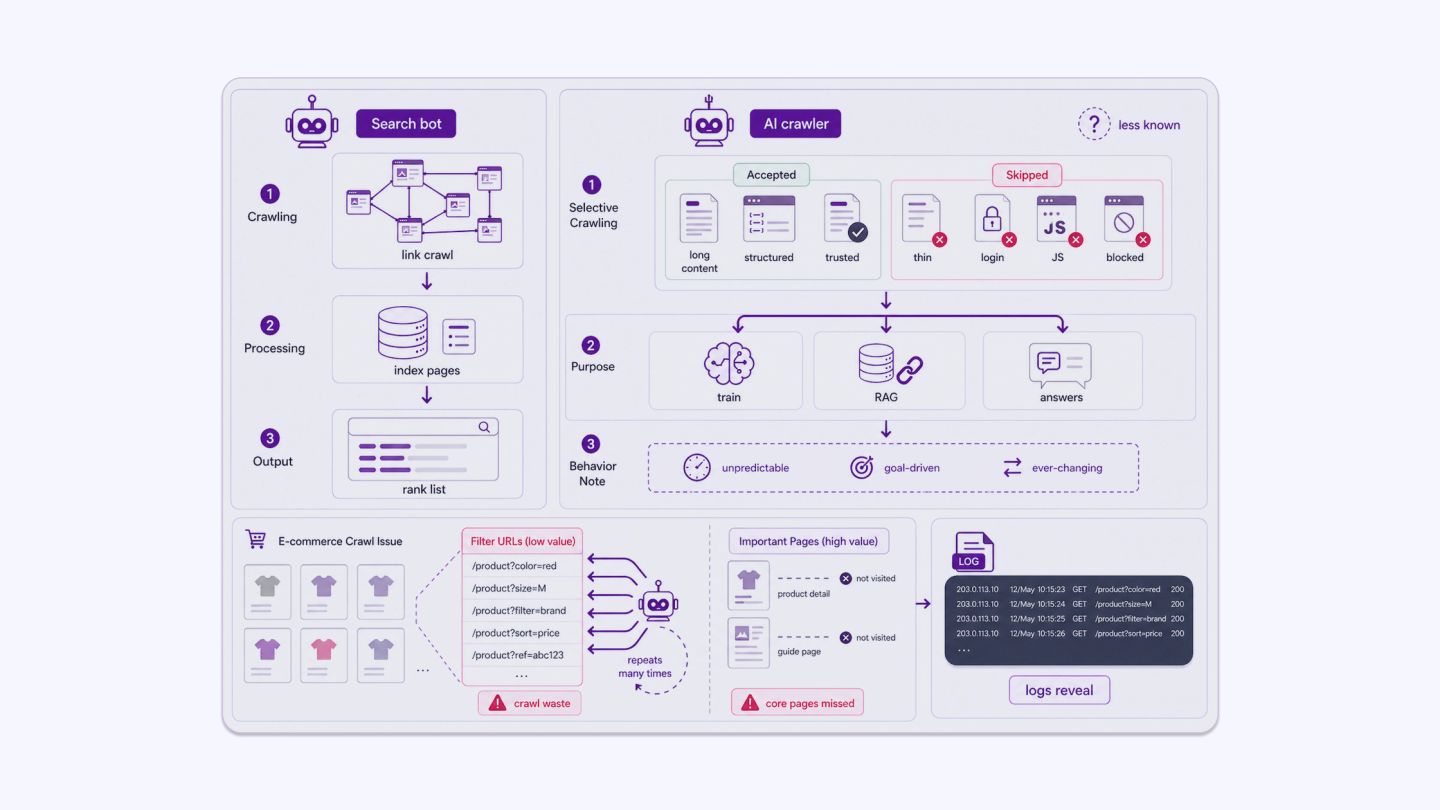
Google’s crawler focuses on link discovery and indexing for search rankings. AI crawlers have a different objective. They are often collecting content for:
- Training large language models
- Building retrieval-augmented generation (RAG) systems
- Powering real-time answer engines that cite live sources
This means AI bots often prioritize long-form content, structured data, factual pages, and authoritative sources. They may skip thin pages, pages behind login walls, pages with heavy JavaScript rendering, or pages explicitly blocked in robots.txt.
Unlike Googlebot, which has decades of infrastructure and documented behavior, AI crawlers are newer, and their crawl logic is less publicly documented. Log analysis becomes more important, not less, because of this uncertainty. You cannot assume an AI bot behaves like Googlebot. You need to verify.
A practical illustration: an e-commerce site with faceted navigation might have thousands of filter-generated URLs such as /products?colour=red&size=M. If AI bots are burning their crawl budget on these parameter pages instead of the core product or guide pages, the site’s most useful content never gets seen.
That pattern will not appear in Google Search Console. It will appear in the logs.
What Log Analysis Reveals About AI Crawler Behavior and AEO Performance
Log file analysis provides a direct view of how AI crawlers interact with your site. When segmented and interpreted correctly, it highlights where access is working, where it is breaking down, and what that means for your visibility in AI-generated answers.
Which Pages AI Bots Actually Visit
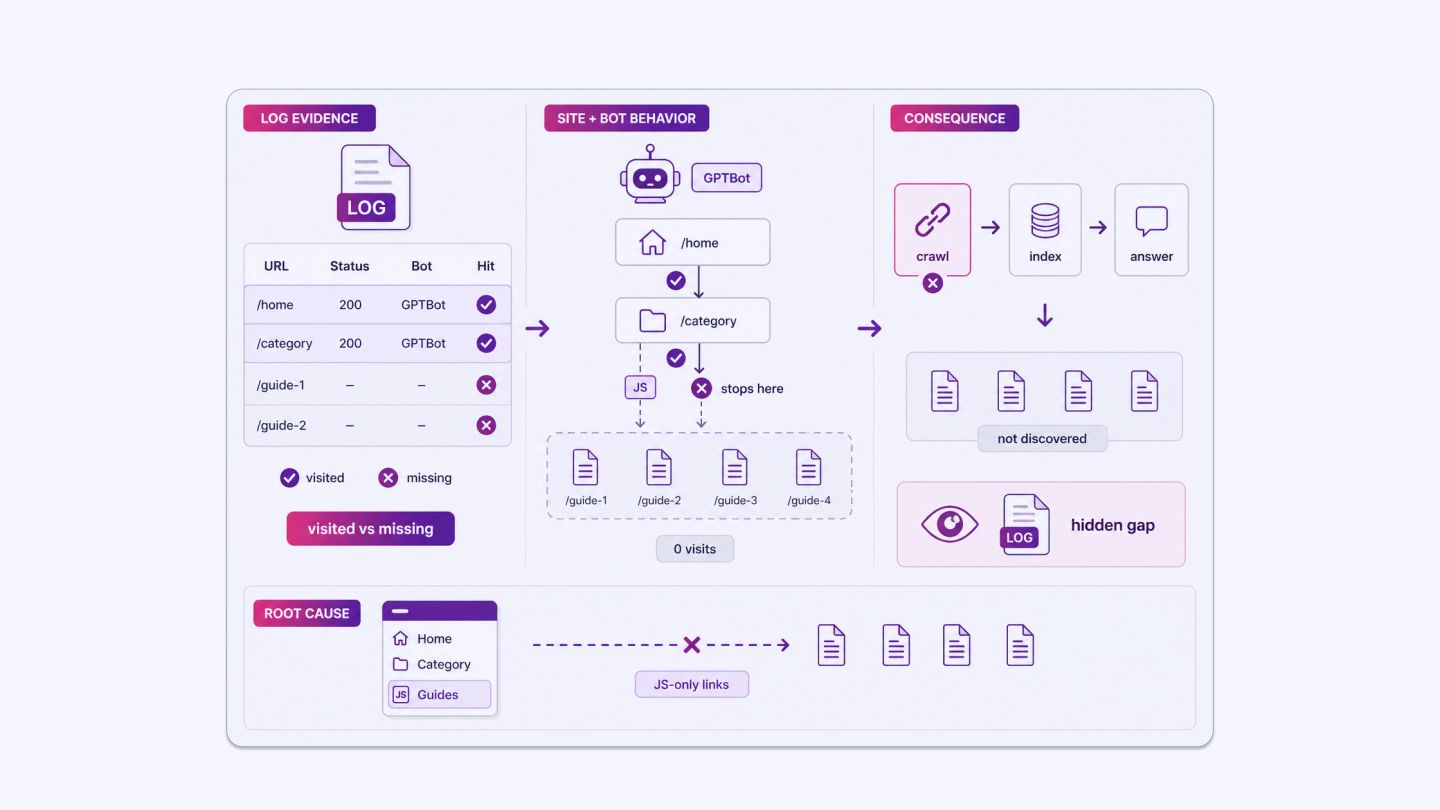
Log files show you the exact URLs requested by each bot. If GPTBot is visiting your homepage and category pages but not your detailed how-to articles or FAQ pages, that is an actionable gap.
AEO relies on the discovery of structured, specific content. If that content is not in the logs, it is not being accessed. Content that is not accessed cannot be indexed by that system. Content that is not indexed cannot appear in its answers.
The entire chain breaks at the crawl stage.
Consider a site that publishes detailed technical guides. GPTBot logs show 200-status visits to the homepage and top-level service pages, but zero visits to 40 individual guide pages over a 60-day period. Those guides are internally linked only from a JavaScript-rendered sidebar that bots do not execute.
The content exists, but from GPTBot’s perspective, it does not. No log analysis, no awareness of the problem.
Crawl Frequency Patterns
If an AI bot last visited a page months ago, that page’s content in any AI-generated answer may be outdated. Log files show you the date and time of each visit.
This tells you which content is being refreshed regularly by AI systems and which content is stale in their indexes. For AEO, freshness matters. An AI answer engine citing an old version of your pricing page or a deprecated product specification is worse than not being cited at all.
Low crawl frequency on time-sensitive pages is a direct signal to improve internal linking and update recency signals on that content.
HTTP Status Codes Returned to AI Crawlers
A common issue found in log audits is that AI bots receive a high volume of redirect chains or 404 errors. If a bot follows three redirects to reach a page, the crawl is inefficient and the final content may not be fully processed
If it receives a 403, it is blocked entirely. These errors appear in log files and can be fixed systematically.
A direct warning sign: if more than 10-15% of AI bot requests in your logs return non-200 status codes, that is a problem worth addressing before any other AEO work.
Fixing the infrastructure is always a priority before optimizing the content on top of it.
Crawl Budget Allocation
Crawl budget matters even for AI bots. If a significant portion of bot requests is spent on URL parameters, duplicate pages, or low-value filters, important content pages receive fewer visits. Log analysis shows you exactly how the budget is distributed across your site.
A realistic example: a media site adds session ID parameters to URLs for analytics tracking. Logs show GPTBot hitting /article-slug?sid=abc123, /article-slug?sid=def456, and so on, treating each as a separate URL. The bot spends its budget on parameter variants of five articles rather than visiting 200 other articles on the site.
Canonicalization or parameter handling in robots.txt fixes this immediately, but only once the log data reveals it.
Robots.txt and Access Conflicts
Some site owners intentionally block specific AI crawlers in robots.txt. Others do it accidentally, especially after bulk edits to the file. Log files show whether AI bots are respecting disallowed rules, attempting to access blocked paths, or encountering errors.
Cross-referencing your robots.txt entries against log data for specific bots can surface unintended blocks on content you want indexed. If a bot is receiving 403 responses on pages you consider high-value, that exclusion is directly costing you visibility in AI-generated answers.
Tools for Log File Analysis
Raw log files are text files and can be large. For sites with significant traffic, a single day’s log can be several gigabytes in size. Practical analysis requires either:
- Log analysis software: Tools like Screaming Frog Log Analyzer, Splunk, or GoAccess can parse raw log files and segment requests by bot, URL, status code, and time period. Screaming Frog’s log tool is specifically built for SEO and AEO use cases and allows filtering by user-agent to isolate individual AI bots.
- Server-side logging setups: If your site runs on Apache or Nginx, log files are generated automatically. If you use a CDN like Cloudflare or Fastly, logs may need to be enabled separately because they are sometimes disabled by default.
- Custom scripts: Python scripts using pandas can process log files quickly and produce filtered summaries for specific bots. This is useful for ongoing monitoring rather than one-off audits.
When starting out, focus on four initial outputs from any tool: total AI bot requests segmented by user-agent, status code distribution for those requests, the top 50 URLs visited by each AI bot, and a list of high-priority pages from your sitemap that received zero AI bot visits. Those four outputs alone will surface the most significant problems on most sites.
Prioritizing Content Based on Log Insights
Log data does not just diagnose problems. It also informs content decisions. If you see that AI bots frequently revisit a specific cluster of pages, those pages are likely being used as sources in AI-generated answers.
Keeping those pages accurate, well-structured, and up to date is a direct AEO action. When those pages change, AI systems will retrieve the updated version, and your cited answers will reflect current information rather than stale data.
If high-value content pages show no AI bot visits in the last 90 days, that is a signal to check internal linking, page load times, and indexing status. Pages that are internally isolated or slow to load are often deprioritized by crawlers.
Combining log data with your content inventory lets you build a priority list: pages that are crawled frequently deserve investment in structure and accuracy; pages that are never crawled need technical review before content investment.
Structuring Content for AI Crawler Efficiency
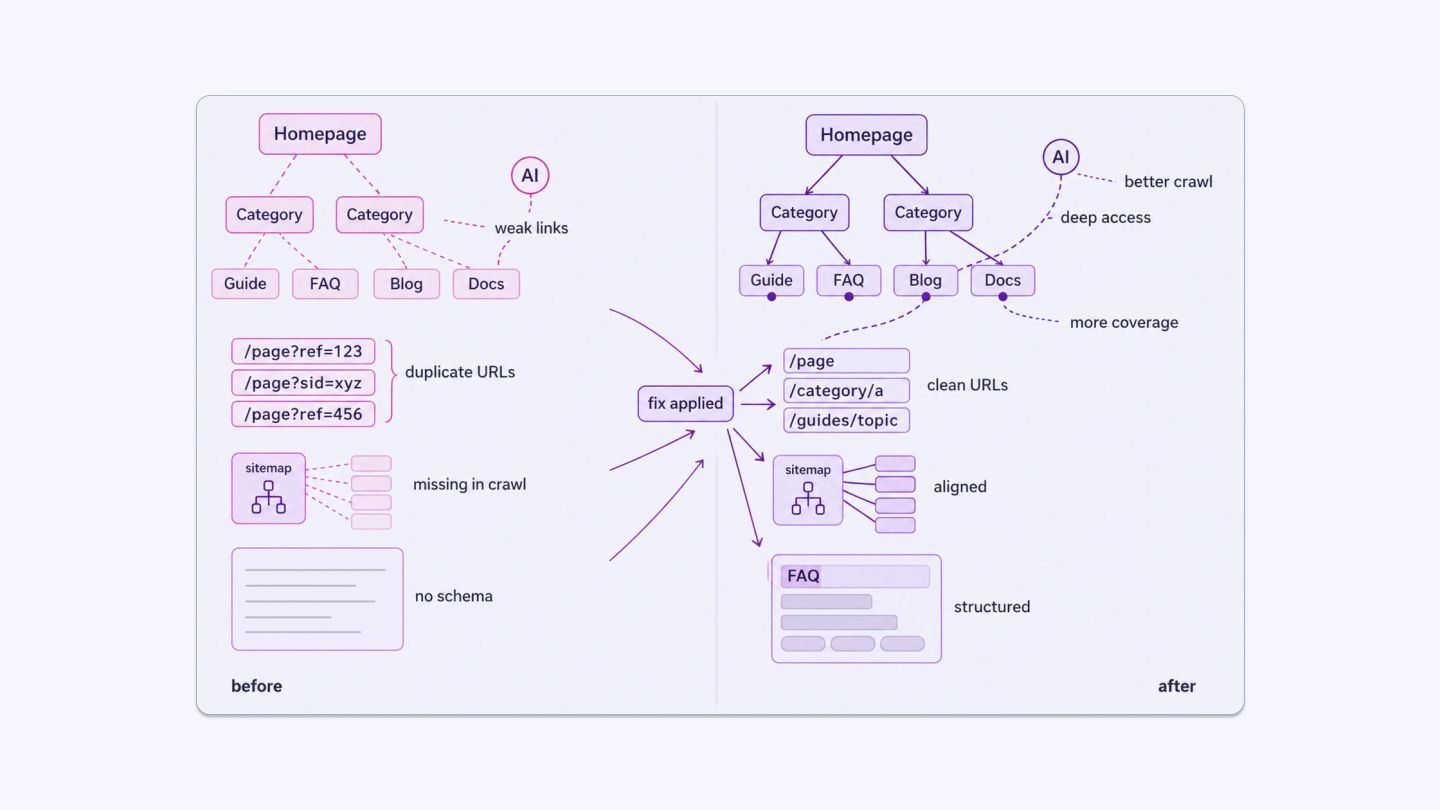
Log analysis tells you what is happening. The structural changes you make to the site based on those findings affect what happens next. Some specific adjustments:
- Consistent internal linking from high-traffic, frequently crawled pages toward less-visited content pages helps AI bots discover depth in your site.
- Clean URL structures with no excessive parameters reduce wasted crawl budget on duplicate content.
- Sitemap accuracy ensures your declared important pages match what bots are actually visiting. If a page is in your sitemap but missing from AI bot logs, that is worth investigating.
- Schema markup helps AI systems parse page content more accurately once they visit a page. Log analysis tells you which pages they visit; schema helps them understand those pages.
Define Your Position in AI Search Through Logs
Log file analysis is one of the few sources of ground-truth data about how AI systems interact with your website. It does not require third-party tools to collect and does not rely on platform-reported summaries. The data is already being recorded on your server.
What requires effort is parsing it, segmenting it by bot type, and acting on the results.
For AEO specifically, visibility in AI-generated answers depends on your content being discovered and processed by AI crawlers.
Log data lets you verify that this is happening, identify where it is breaking down, and make targeted corrections. Without it, you are making assumptions about a crawl process you have never directly observed.
AI search is growing as a channel. More users are receiving answers directly from systems like Perplexity, ChatGPT, and Google’s AI Overviews rather than clicking through to organic results. The sites that appear in those answers are the ones that AI crawlers can access, parse, and retrieve without friction.
Sites that ignore crawl data will keep publishing content that never enters that pipeline. The longer that gap persists, the harder it becomes to close because AI systems build retrieval patterns over time, and unfamiliar sources start at a disadvantage. Your logs tell you exactly where you stand. Reading them is the first concrete step.
INSIDEA
Ready to get found by people and AI?
Search and answer-engine visibility that compounds, built to be cited.

 How INSIDEA works




