

JavaScript is widely used in modern websites. It also remains one of the most common reasons technically sound sites struggle with organic visibility.
Search engines have improved their ability to process JavaScript, but that hasn’t eliminated the underlying risk. Rendering delays, incomplete indexing, and crawl inefficiencies still affect how and when content gets discovered. In fact, JavaScript-heavy websites can take up to 9x longer to crawl than static HTML, a gap that directly affects how quickly new or updated content appears in search results.
At the same time, the search itself has shifted. It’s no longer just about rankings. Answer Engine Optimization (AEO) is now part of the equation, with platforms like ChatGPT, Perplexity, and Google AI Overviews extracting and surfacing content directly. These systems rely on clean, structured, and immediately accessible HTML. If your content is delayed, hidden, or dependent on JavaScript execution, it’s far less likely to be cited.
This is where most JavaScript-heavy sites fall short. Not because the content is weak, but because it isn’t delivered in a way crawlers, especially non-Google ones, can reliably access.
This blog walks through factors that impact a JavaScript site’s performance and visibility, including crawlability, rendering strategy, Core Web Vitals, structured data, and AEO considerations. If your site depends on JavaScript, this is how you make sure it doesn’t cost you visibility.
The Impact of JavaScript on Search Visibility
Before the checklist, a quick orientation to what the actual risks are, because they’ve changed in the past few years.
Googlebot uses an evergreen Chromium-based rendering engine and can process JavaScript. Vercel, in collaboration with MERJ, analyzed over 100,000 Googlebot fetches and found that 100% of pages on Next.
JS-based sites were fully rendered, including pages with complex JavaScript interactions. So the old myth that “Google can’t read JavaScript” is dead.
But that doesn’t mean JavaScript is SEO-neutral.
The real problems are:
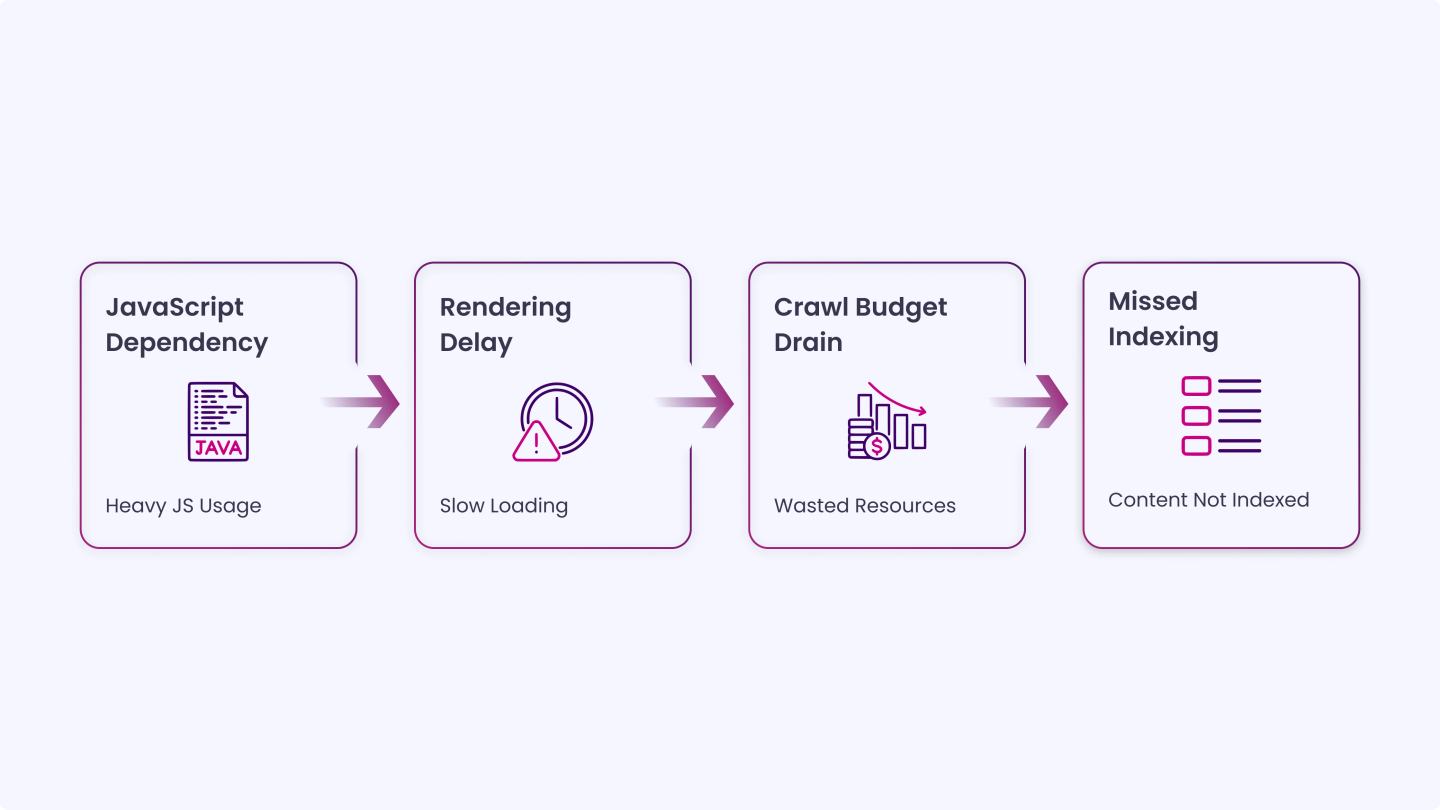
- Rendering delay: JavaScript content can get pushed to a rendering queue, taking minutes, hours, or even longer, delaying indexing. This rendering process is especially risky for time-sensitive pages like product launches, news updates, or limited-time campaigns.
- Crawl budget drain: When your site relies heavily on JavaScript, rendering each page becomes more resource-heavy for Google. That means you could burn through your crawl budget fast, especially if your site is large.
- Non-Google bots: Bing, DuckDuckGo, and AI crawlers like ChatGPT cannot process JavaScript and only see static HTML. If your product content is client-side rendered, these bots won’t index it, and users may never find it.
These challenges show that JavaScript can affect how quickly and reliably your content is discovered and indexed.
Full Checklist for Optimizing JavaScript Sites for SEO and AEO
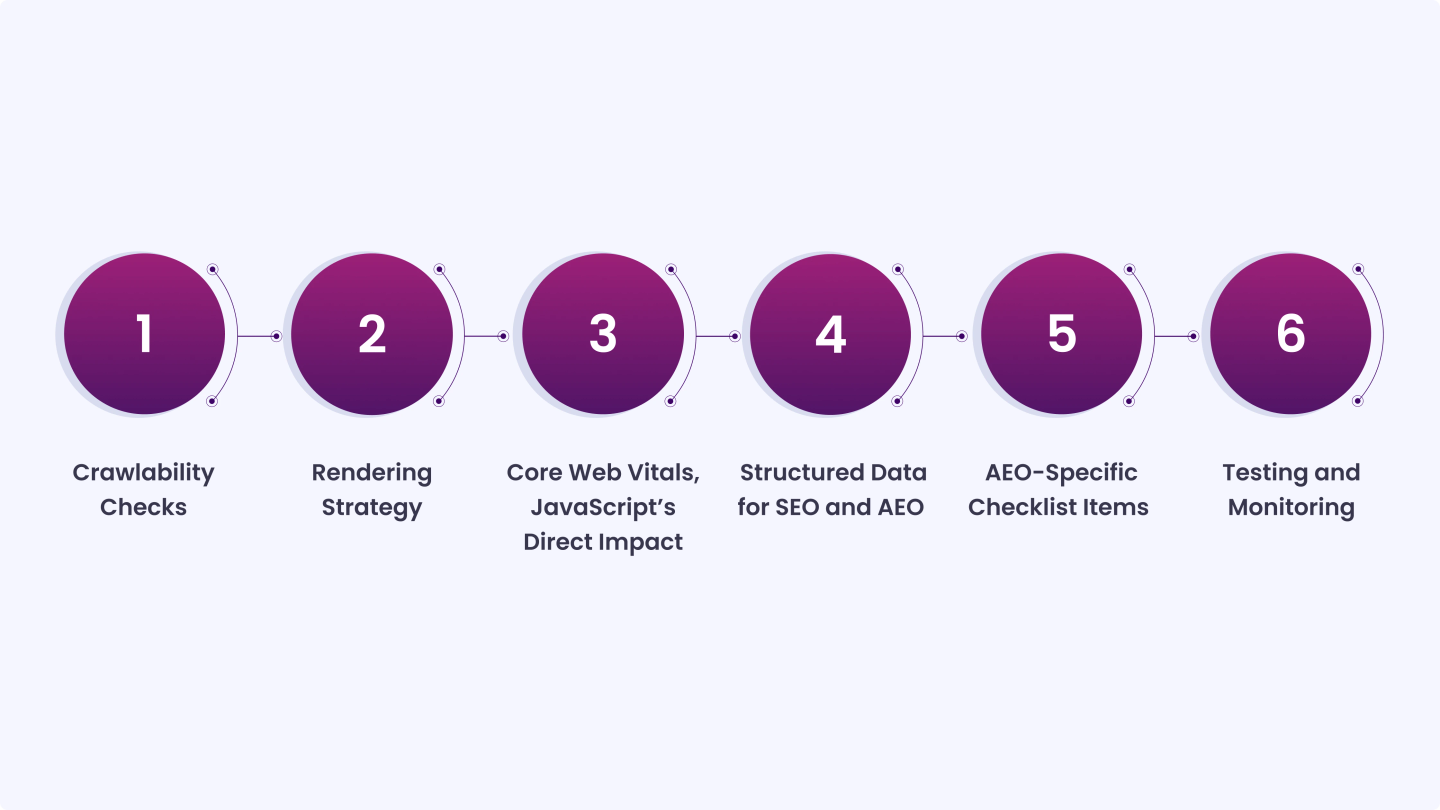
Use this checklist to make sure your content is fully accessible, properly rendered, and optimized for both search engines and AI systems that provide direct answers.”
1. Crawlability Checks
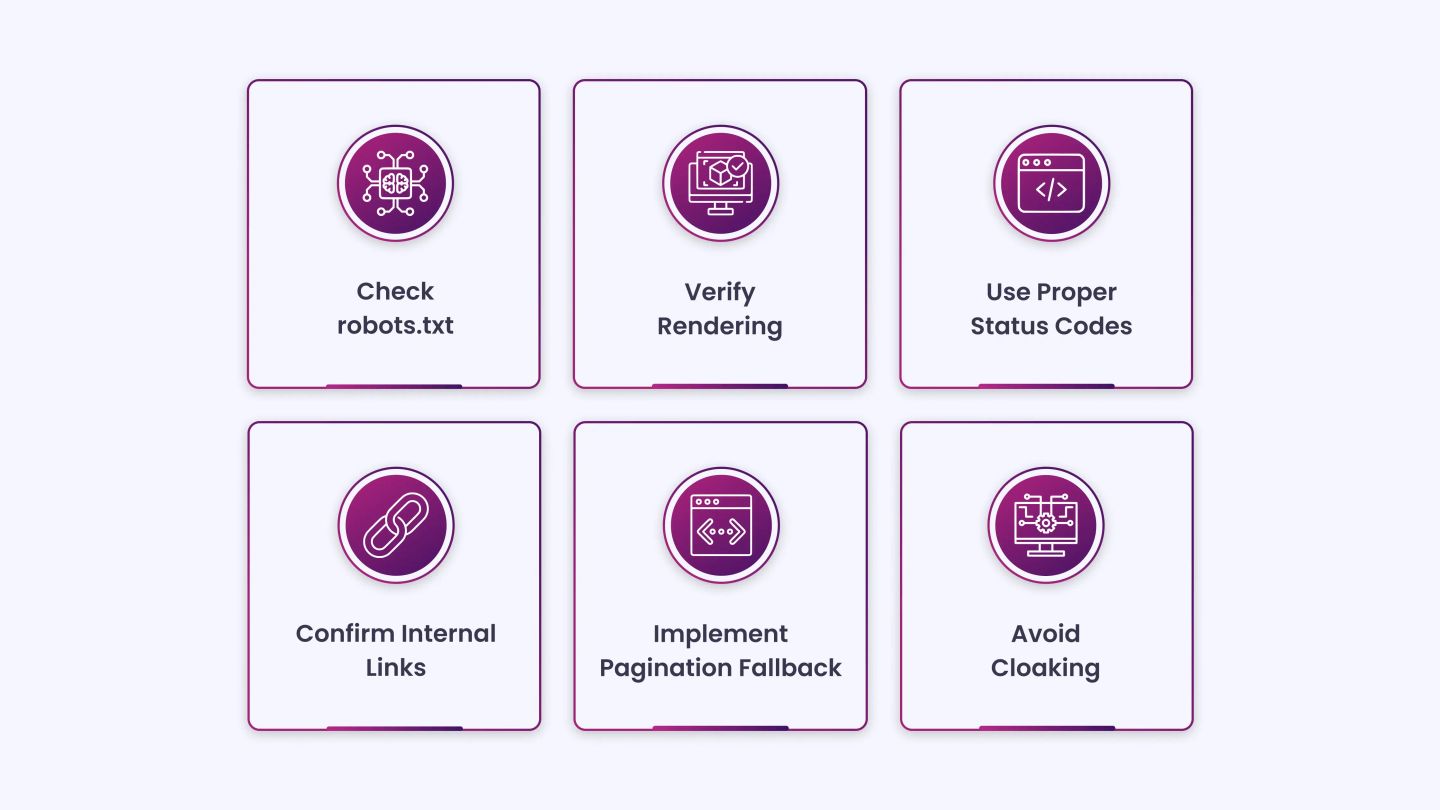
These are the foundational items. If Googlebot can’t fetch your JavaScript resources, nothing downstream works correctly.
Don’t block JS or CSS files in robots.txt: Blocking .js files in your robots.txt file can prevent Googlebot from crawling them, so it can’t render and index them. This is more common than it should be; it often happens when developers copy an old robots.txt template that blocks all resource files by default.
Check your robots.txt and confirm that your JavaScript and CSS files are accessible to crawlers. There is no SEO benefit to blocking these resources. Google doesn’t index .js or .css files in search results anyway; they’re used to render pages.
Verify rendering with the URL Inspection Tool: Open Google Search Console and run the URL Inspection Tool on your most important pages. Click “Test Live URL” and then “View Tested Page” to see a screenshot of how Google actually renders the page. Compare the rendered output to what a real user sees.
Look for missing content, broken layouts, or any section of the page that appears blank in the rendered version. If there’s a discrepancy, the content in that gap is likely not being indexed.
Use meaningful HTTP status codes in client-side routing: In client-side-rendered single-page apps, routing is often implemented on the client side. Using meaningful HTTP status codes can be impossible or impractical. To avoid soft 404 errors when using client-side rendering and routing, use a JavaScript redirect to a URL that returns a 404 HTTP status code.
Soft 404s, pages that return a 200 status code but display “page not found” content, confuse Googlebot and waste crawl budget on pages that shouldn’t be indexed.
Confirm internal links are crawlable: Search engines discover pages through links. Search engines don’t click buttons. Use internal links to help Googlebot discover your site’s pages.
If your navigation, pagination, or internal linking is JavaScript-dependent and requires a user click or interaction to trigger, Googlebot won’t follow those links. Use standard <a href=”…”> links wherever navigation matters for indexability. JavaScript-based routing is fine for user experience, but your critical pages should be reachable via static anchor links.
Fix infinite scroll with pagination fallback: When JavaScript is disabled for an infinite-scrolling feature, the site may be missing paginated links (or broken links), preventing crawlers from indexing content on pages 2, 3, and so forth.
Even if infinite scroll is your UX pattern, implement a pagination fallback. Create discoverable links to /page/2, /page/3, etc., so crawlers can access content deeper in the list without needing to scroll.
Avoid cloaking: Cloaking is prohibited. Avoid code that alters content based on User-Agent. Instead, optimize your app’s stateless rendering for Google. Showing different content to Googlebot than to users, even with good intentions like speed optimizations, violates Google’s guidelines and can result in manual penalties.
2. Rendering Strategy
How you render pages is one of the biggest variables in JavaScript SEO. The right approach depends on your content type.
- Use SSR or SSG for SEO-critical pages: Client-side rendering (CSR) puts the burden of page construction on the browser. From the perspective of optimizing LCP, server-side rendering has two primary advantages: your image resources will be discoverable in the HTML source, and your page content won’t require additional JavaScript requests to finish rendering.
The guidance here is practical:
- Content-heavy pages (blog posts, landing pages, product pages): use SSR or SSG
- Authenticated dashboards and user-specific pages: CSR is acceptable since these aren’t typically indexed
- E-commerce category and product pages: SSG for category pages, SSR for product detail pages
- Serve critical content in the initial HTML response: The single most important rule in JavaScript SEO: your most important content should be present in the raw HTML response, not injected after JavaScript executes. Whenever possible, deliver important page content in the initial HTML.
This includes: page title, main heading, body text, canonical tag, meta description, and any structured data (JSON-LD). These should never depend on JavaScript to appear. - Handle meta tags server-side: Facebook and Twitter’s link preview crawlers do not run JavaScript, meaning if your page’s <meta> tags or Open Graph data are injected via JS, social platforms won’t see them. A shared link might appear on Twitter with a missing title or image.
Even among search engines, Bing and most secondary crawlers process JavaScript poorly compared to Google. Render your <title>, <meta description>, <og: title>, <og: image>, and canonical tags server-side, every time. - Implement content fingerprinting for cached assets: Googlebot aggressively caches to reduce network requests and resource usage, which may lead it to use outdated JavaScript or CSS resources. Content fingerprinting avoids this problem by making the content fingerprint part of the filename, such as main.2bb85551.js.
The fingerprint depends on the file’s contents, so updates generate a different filename each time.
Most modern build tools (Vite, Webpack, Next.js) handle this automatically. Confirm that your deployment pipeline is generating content-hashed filenames for JS and CSS bundles.
3. Core Web Vitals, JavaScript’s Direct Impact
Core Web Vitals now account for most of the ranking signals. JavaScript has a direct and often outsized effect on all three metrics.
The current targets:
LCP (Largest Contentful Paint): under 2.5 seconds
INP (Interaction to Next Paint): under 200ms, this replaced FID in March 2024
CLS (Cumulative Layout Shift): under 0.1
- Don’t lazy-load your LCP image: Of pages where the LCP element was an image, 35% of those images had source URLs that were not discoverable in the initial HTML response, which would allow the browser’s preload scanner to discover them as soon as possible.If your hero image or largest above-the-fold element is injected via JavaScript or uses data-src lazy loading, fix it. Use a standard <img src=”…”> element with fetchpriority=”high” and loading=”eager”. Never lazy-load your LCP element.
- Preload critical resources: Use <link rel=”preload”> in your <head> for fonts, hero images, and any CSS required to render above-the-fold content. This tells the browser to start fetching those resources before the HTML is fully parsed, which directly reduces LCP time.
- Split and defer non-critical JavaScript: Heavy JavaScript that runs on page load blocks the main thread and delays rendering. Use code splitting to load only the JavaScript needed for the current route. Defer or async-load scripts that aren’t needed for the initial render using the defer or async attributes. Eliminate render-blocking CSS and JS: inline critical CSS and defer loading the rest with async or defer.
- Fix INP by breaking up long tasks: INP is the metric most directly tied to JavaScript architecture. Break up long tasks: if any JavaScript task runs longer than ~50ms, it blocks responsiveness. Angle your code so it often yields control back to the main thread. Avoid unnecessary JavaScript: eliminate unused code or redundant libraries. Use code splitting so only essential scripts load early.
INP is the hardest metric to fix because it touches the very architecture of your JavaScript code. If your INP score is poor, the fix isn’t a configuration tweak; it requires reviewing event handlers, reducing DOM complexity, and restructuring how interactions are processed.
Reserve space for dynamically loaded content.
If JavaScript injects images, ads, or any content that shifts the layout after the initial render, you’ll accumulate CLS. Reserve explicit width and height attributes on images. Set a minimum height on containers that will be populated by JavaScript after the page loads. Avoid inserting content above existing content once the page has loaded.
4. Structured Data for SEO and AEO
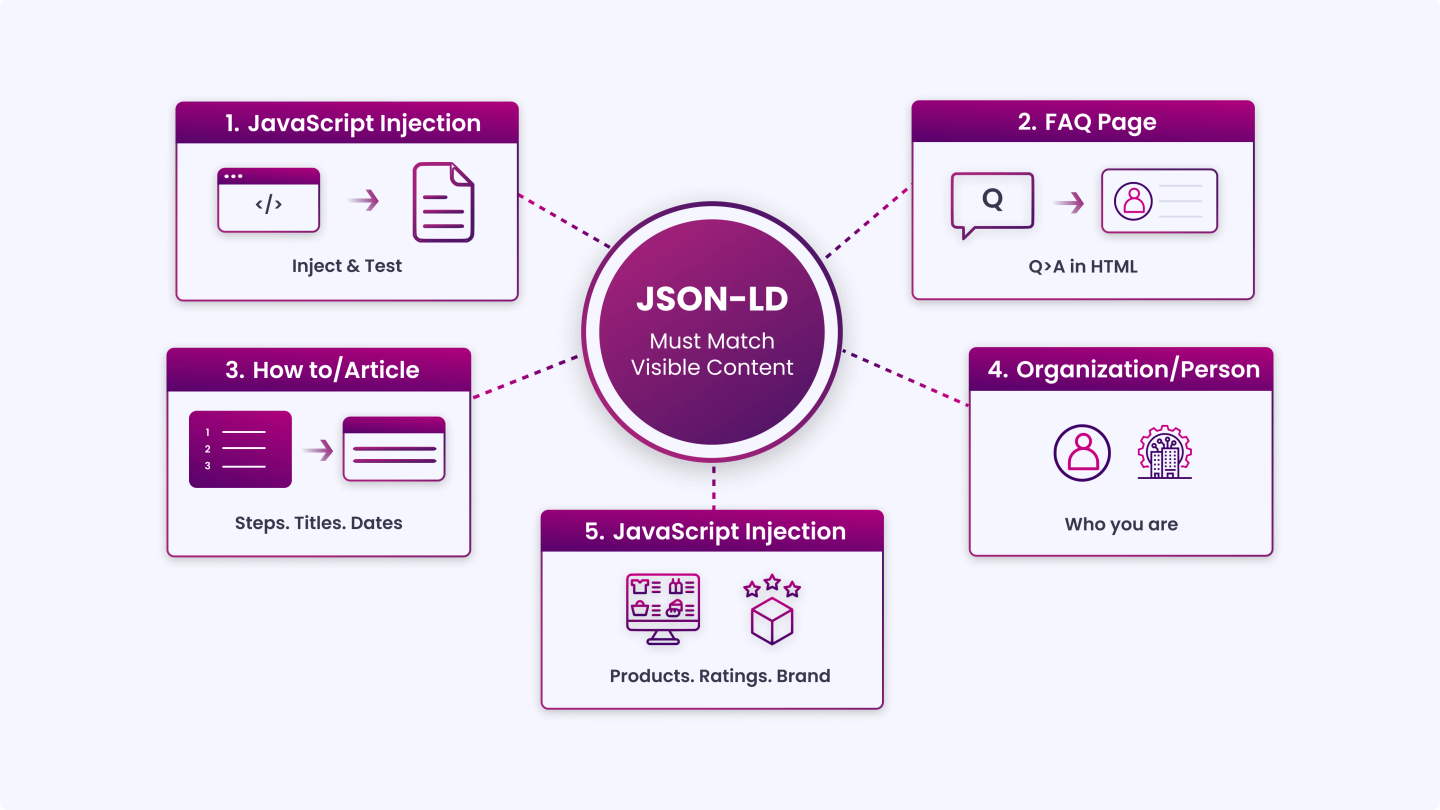
This is where JavaScript SEO and AEO intersect most directly. Structured data is the primary signal AI answer engines use to extract, verify, and cite content.
- Inject JSON-LD via JavaScript where needed, but test it: When using structured data on your pages, you can use JavaScript to generate the required JSON-LD and inject it into the page. Make sure to test your implementation to avoid issues.
Google supports JavaScript-injected JSON-LD. But test every implementation using the Rich Results Test. The rendered output is what matters, not what’s in your source code. - Implement the right schema types for AEO: For AEO, the schema types that carry the most weight with AI answer engines are:
FAQPage wraps Q&A content in a structure that AI can extract as direct answers
HowTo, signals step-by-step instructional content
Article / BlogPosting establishes authorship, publish date, and topic
Organization / Person, entity-level schema that helps AI systems identify who you are
Product / Review, critical for e-commerce pages targeting AI shopping queries
Using the FAQPage schema around questions and answers is particularly helpful for direct-answer optimization. Structure your JSON-LD in three layers: entity-level (who you are), content-level (what type of content this page is), and relationship-level (how entities connect, author to article, product to brand). - Match schema markup to on-page content exactly: This is the most commonly broken rule in structured data implementation. Make sure details under your website’s Schema match your on-page copy to maintain strong trust signals. If your FAQPage schema contains answers that don’t appear in the visible page text, Google will either ignore the schema or treat it as misleading.
Whatever is in your schema must be readable on the page. AI answer engines cross-reference the structured markup against the surrounding content; mismatches reduce the likelihood of citation. - Don’t rely on JavaScript to deliver your canonical tag: Canonical URL issues potentially affect duplicate content handling and PageRank distribution, making them high-priority corrections for sites with significant JavaScript implementations.
If your canonical tag is injected by JavaScript after page load, crawlers that don’t fully execute JavaScript will miss it, and your page may be treated as a duplicate.
The canonical tag belongs in the <head> of the initial HTML response, rendered on the server.
5. AEO-Specific Checklist Items
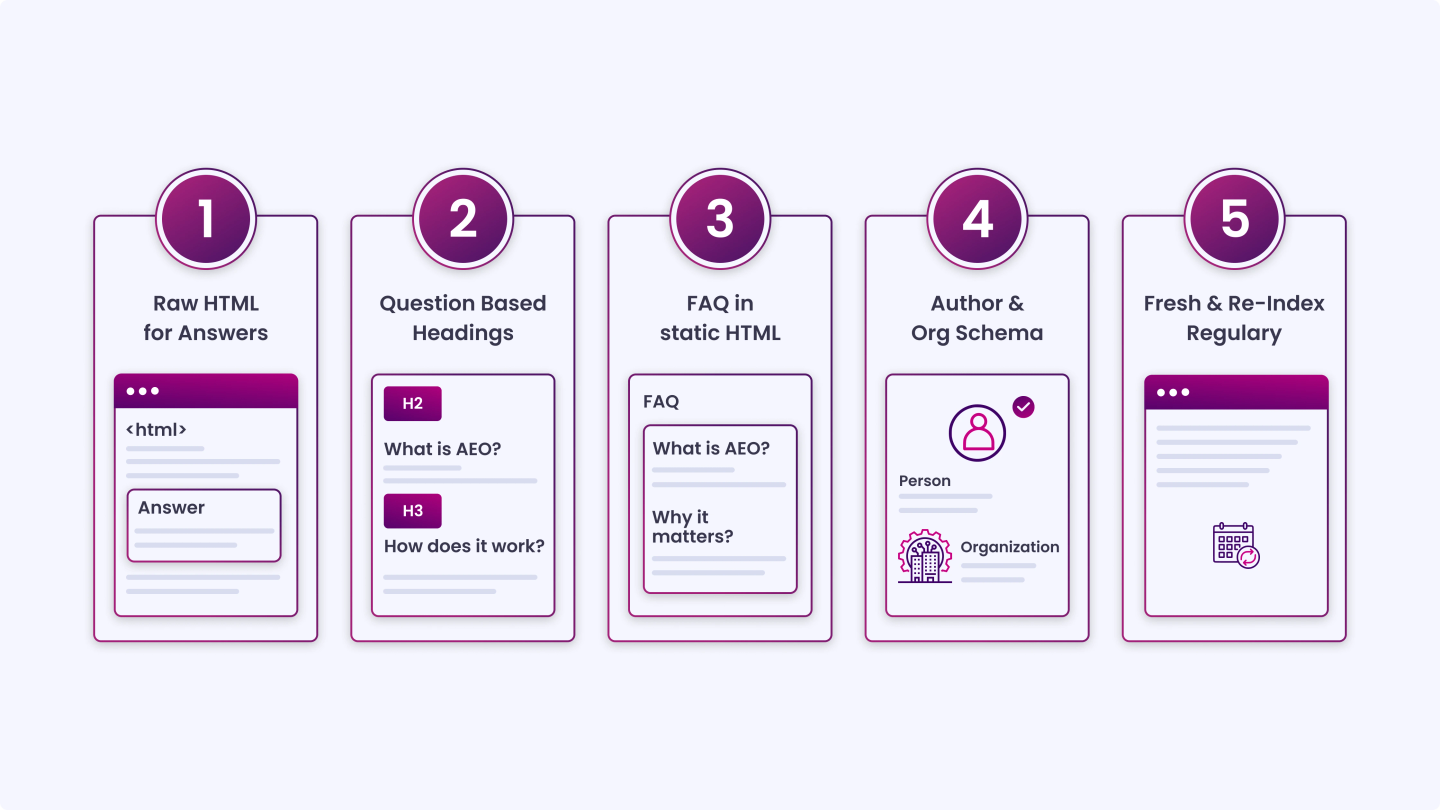
AEO is what happens when you optimize content not just to rank, but to be extracted and cited as the answer. Here’s what JavaScript-heavy sites specifically need to get right.
- The AEO Context: OpenAI reported over 700 million weekly active users on ChatGPT as of August 2025. These systems are answering questions directly, and if your content is buried behind JavaScript, they won’t cite you because they can’t read it.
AI crawlers like ChatGPT cannot process JavaScript and only see static HTML. If your product content is client-side rendered, these bots won’t index it. - Make your answer content available in raw HTML: This is the non-negotiable starting point. For any content you want AI systems to extract, definitions, process steps, FAQ answers, and pricing information, that content must be present in the initial HTML response.
It cannot live behind a JavaScript event, a tab interaction, or a modal. Googlebot will eventually render client-side content. ChatGPT, Perplexity, and Bing bots will not. - Structure content with question-based headings: One internal study on AI Overview answers revealed that pages in AI Overview results score 19.95% better on subheadings and navigation structures compared to non-included pages.
Use H2’s and H3’s phrased as questions. Follow each question-heading immediately with a direct, concise answer in the first sentence of that section. Forty to sixty words is the target length for a section answer, short enough to be extractable, complete enough to be accurate. - Keep FAQ sections in static HTML, not JavaScript-rendered tabs: FAQ sections are among the highest-value AEO content types. But many sites implement them as accordion components or tabbed interfaces that require JavaScript to expand. If the answer text isn’t in the initial HTML, even if it’s visually “hidden” but present in the DOM, test it.
The safest approach: render FAQ answers in the HTML even if they’re visually collapsed. Use CSS to handle the accordion behavior rather than JavaScript that inserts content into the DOM on click. - Add Author and Organization schema with verifiable credentials: Strong E-E-A-T signals and authority increase the likelihood of being cited in AI answers. Implement Person schema for your content authors with links to their external profiles (LinkedIn, Twitter/X, professional bio pages).
Implement Organization schema with consistent NAP data, a sameAs array linking to your verified profiles, and a logo property. AI systems use these entity signals to assess whether your content is from a credible source worth citing. - Keep content fresh and re-index regularly: Freshness is mandatory, and regular content updates are crucial. Brands leading in AEO update their content quarterly. Stale content, even if well-structured, loses ground to fresher sources in AI citation rankings. Update statistics, review claims, and refresh the publish date with each substantive update. Use dateModified in your Article schema alongside datePublished.
6. Testing and Monitoring
Implementing all of the above means nothing without a verification process.
- Test with Google’s Rich Results Test: After implementing or changing any structured data, run the Rich Results Test. This tool renders the page and validates your schema against Google’s supported types. Fix every error before deploying, invalid schema is silently ignored by both Google and AI crawlers.
- Check rendering in Search Console regularly: Use Google Search Console’s URL Inspection Tool on a sample of your most important pages monthly. Compare the rendered screenshot to the live page. If they diverge after a code update, you’ll catch it before rankings drop.
- Use Screaming Frog to audit JavaScript rendering at scale: Screaming Frog can be configured to render pages using JavaScript (it uses a headless browser). Crawl your site in JavaScript rendering mode and compare the output to a raw HTML crawl. Pages where content appears in the rendered version but not the raw HTML are at risk. Googlebot will eventually index them, but non-Google crawlers won’t.
- Run PageSpeed Insights on your top pages: PageSpeed Insights shows field data from real users via Chrome UX Report, alongside lab-based diagnostics. Review LCP, INP, and CLS scores for your most important page templates, homepage, category pages, product pages, and blog posts. Prioritize any template where more than 25% of page loads fail to meet a Core Web Vitals threshold.
- Monitor AI referral traffic in GA4: An analysis of referral patterns revealed a significant increase in traffic from ChatGPT since mid-2024. AEO-driven visitors often show lower bounce rates, longer sessions, and stronger conversion intent.
Set up a custom channel group or segment in GA4 to track traffic from AI sources (ChatGPT, Perplexity, Claude, Gemini). Watch session quality metrics; this tells you whether your AEO efforts are driving meaningful traffic, not just citation appearances.
A Quick Reference: JavaScript SEO + AEO Checklist SummaryCrawlability
Rendering
Core Web Vitals
Structured Data
AEO
Testing
|
The Role of JavaScript in SEO and AEO Success
JavaScript SEO and AEO are not separate concerns; they share the same foundation. Content that loads fast, appears in the initial HTML, and is wrapped in accurate structured data performs better in both traditional search and AI-generated answers.
The sites that will hold ranking and citation visibility in 2026 aren’t the ones with the most complex JavaScript. They’re the ones where JavaScript has been built with the crawler in mind from the start, making content accessible, structured, and fast for every bot that visits, not just the one that can wait for a render queue.
INSIDEA
Ready to get found by people and AI?
Search and answer-engine visibility that compounds, built to be cited.

 How INSIDEA works




