

You’re running your business on a typical day when a product issue suddenly triggers a surge of customer inquiries. Your support team, already busy with their usual tasks, is overburdened.
Calls go on hold, emails pile up, and stress levels rise for your team and your waiting customers. Despite your team’s best efforts, response times slow, frustrations mount, and every delayed response could mean a lost sale. This increasing frustration is reflected in customer expectations.
- 75% of customers expect responses within five minutes of reaching out online.
- 62% of companies do not respond to customer service emails, and those who do often take over 12 hours to reply.
It’s crucial to have efficient and effective customer service solutions to ensure your customers are not left waiting.
Continuing from the challenges of delayed responses, this is where AI-powered solutions like HubSpot’s Breeze Customer Agent can make a significant difference. The Breeze Customer Agent handles the surge of queries efficiently, ensuring that no customer feels neglected.
This blog will introduce the Breeze Customer Agent, an AI-driven tool that will revolutionize customer service and why it’s essential for businesses aiming to improve customer support.
What Is Breeze Customer Agent?
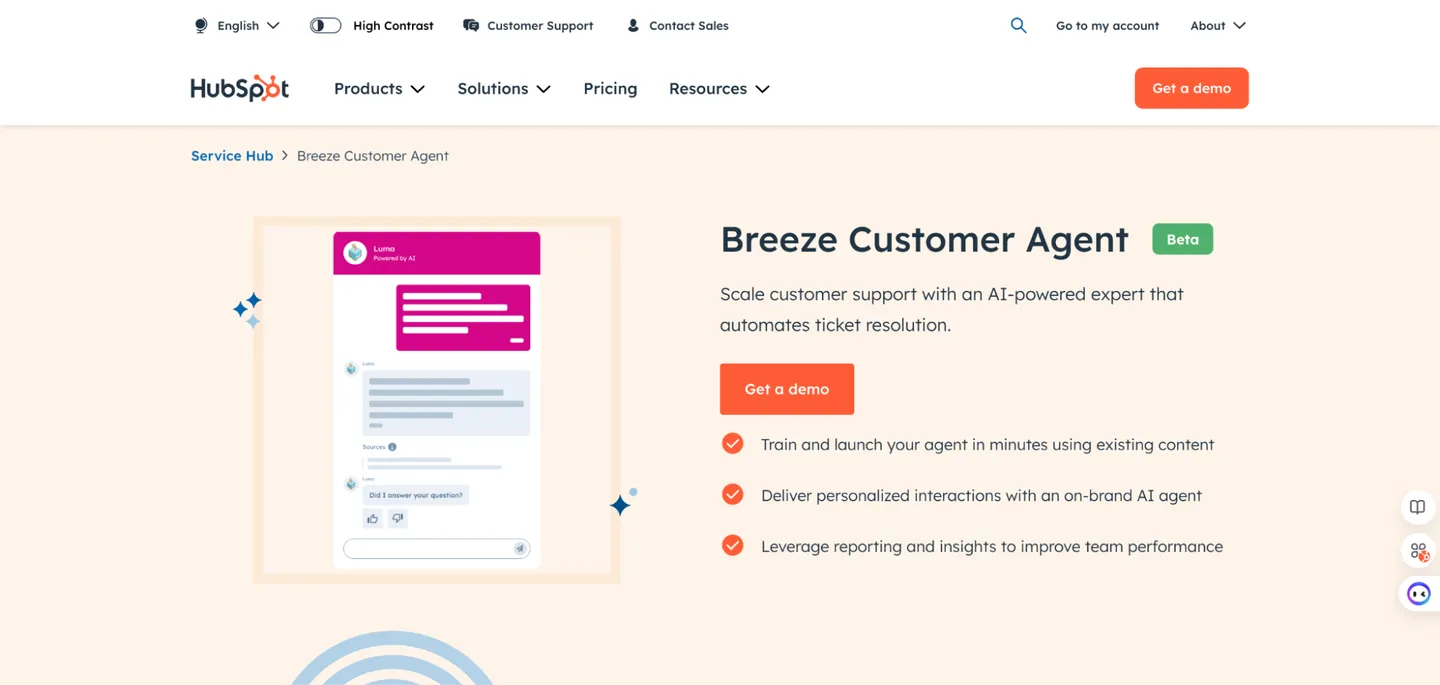
Breeze Customer Agent is an advanced, always-on digital assistant that provides personalized customer service. This highly customizable AI-powered agent can rapidly reflect your brand’s voice and learn your business specifics.
It efficiently manages routine inquiries, freeing your team to handle more complex issues. The system also includes mechanisms for seamless escalation to human representatives when necessary.
Important features include
- The ability to train quickly
- Adaptable to user needs
- Generate detailed reports on its performance, such as resolution success rates and customer satisfaction.
What Improvements Has the Breeze Customer Agent Brought to Customer Interactions?
For businesses using HubSpot, this update means you can offer quick, natural conversations to your visitors without spending much time setting things up.
The Breeze Customer Agent takes care of the routine tasks, freeing up your front-office staff to focus on bringing in more business and improving customer relations. This is great for keeping your operations running smoothly and ensuring your customers are happy, which can help your business grow.
Here’s a before and after comparison to show how the Breeze Customer Agent has simplified customer service tasks:
|
Aspect |
Without Breeze Customer Agent Implementation |
With Breeze Customer Agent Implementation |
|
Setup Time |
Lengthy setup processes involving manual rule creation. |
Quick setup with automated learning to match brand specifics. |
|
Customer Interaction |
Dependent on manual intervention for initial customer responses. |
Immediate, personalized responses 24/7, without waiting. |
|
Task Management |
Manual sorting and handling of routine inquiries. |
Automated handling of routine tasks, freeing up staff. |
|
Escalation |
Unclear escalation paths lead to potential delays. |
Clear, automated escalation to human agents when needed. |
|
Performance Tracking |
Sporadic and manual tracking of customer interactions. |
Automated, detailed reports on customer interactions and sentiment. |
|
Team Focus |
Staff overburdened with repetitive queries. |
The team focuses on complex, revenue-generating activities. |
To discover how Breeze AI simplifies CRM tasks and enhances customer interactions, read our detailed exploration on Breeze AI Has Arrived: HubSpot’s Latest Innovation in SMART And Effortless CRM Automation.
The Role of Breeze Customer Agent in Modernizing Customer Support
Breeze Customer Agent helps automate interactions and streamline support processes. Here is how it can help your business to improve its customer experience:
1. Automated 24/7 Customer Engagement
The Breeze Customer Agent provides instant customer support anytime, significantly reducing wait times and enhancing customer satisfaction. It efficiently manages large volumes of support tickets, freeing your team to concentrate on more complex inquiries that require human intervention.
2. Easy Setup with Existing Resources
You can quickly train the Breeze Customer Agent using existing knowledge base articles, URLs, help sites, and blogs. This rapid deployment allows it to deliver accurate and personalized responses to common customer issues tailored to your brand’s voice and content.
3. Improved Customer Interaction Quality
You can customize the Breeze Customer Agent to engage in natural, human-like conversations that accurately represent your brand and resonate with customers. The agent utilizes only approved content, citing sources where appropriate, to ensure accurate and trustworthy responses, boosting customer confidence.
4. Efficient Issue Routing
The Breeze Customer Agent adeptly handles initial inquiries and identifies when issues need to be escalated to human representatives. This seamless routing prevents customer frustration by ensuring complex issues are addressed promptly by the appropriate team members.
5. Enhanced Insight Through Data
With Breeze, you gain access to detailed analytics on various metrics such as resolution rates, handoff percentages, and customer sentiment. These insights allow you to identify areas for improvement, optimize performance, and continuously refine your customer support processes to maintain and build trust with your customers.
How to Set Up Breeze Customer Agent?
To set up your Breeze Customer Agent, there are a few things you need to have in place first:
|
Here’s how you can do it step-by-step, ensuring you make the most of the Breeze AI capabilities for enhancing your customer interactions:
Step 1: Start the Setup
Log into your HubSpot account. Go to Breeze AI and select Customer Agent. Click on ‘Create agent’ in the upper right corner.
Step 2: Configure General Information
On the General Information page, enter a unique name for your customer agent in the Name field.
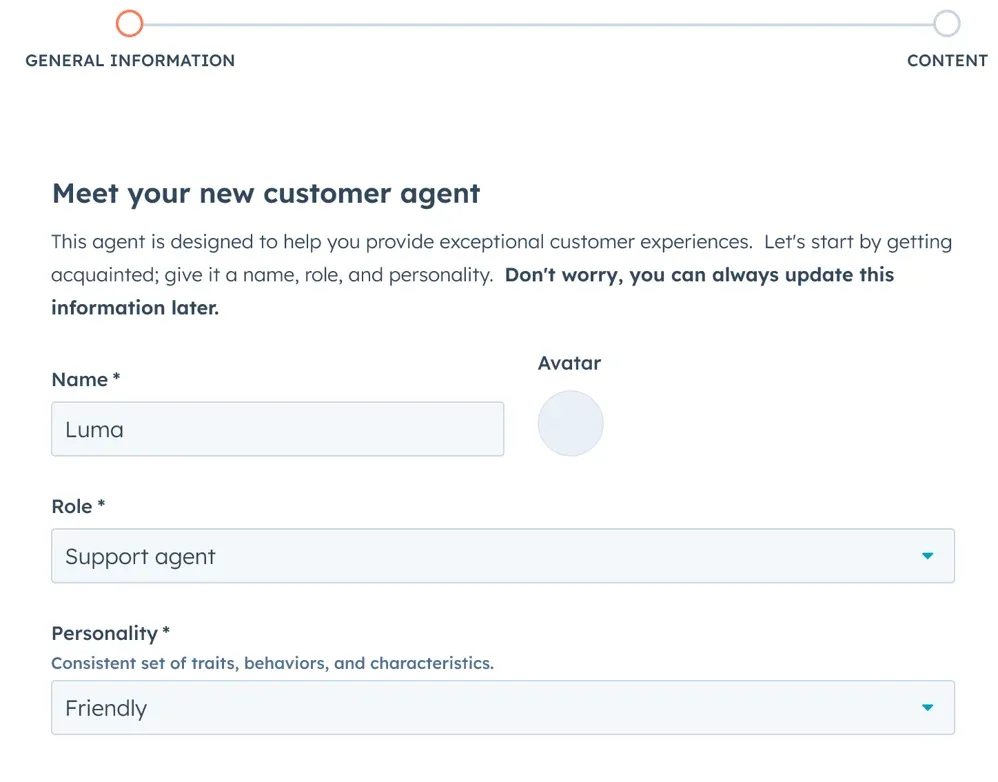
You can choose a role for your agent from the Role dropdown menu. Options include Customer Support, Marketing Specialist, or Sales Representative. Define the agent’s personality by selecting traits like Friendly, Professional, Casual, Empathetic, or Witty from the ‘Personality‘ dropdown menu.
Step 3: Add Content Sources
Use the Add existing content dropdown to select articles from your HubSpot knowledge base, website pages, landing pages, and blogs. If you want to include content from outside of HubSpot, enter the URL in the ‘Public URL’ field.
Step 4: Create Your Agent
After adding your content sources, click Create Agent at the bottom right of the page.
Step 5: Assign the Agent to a Chatflow
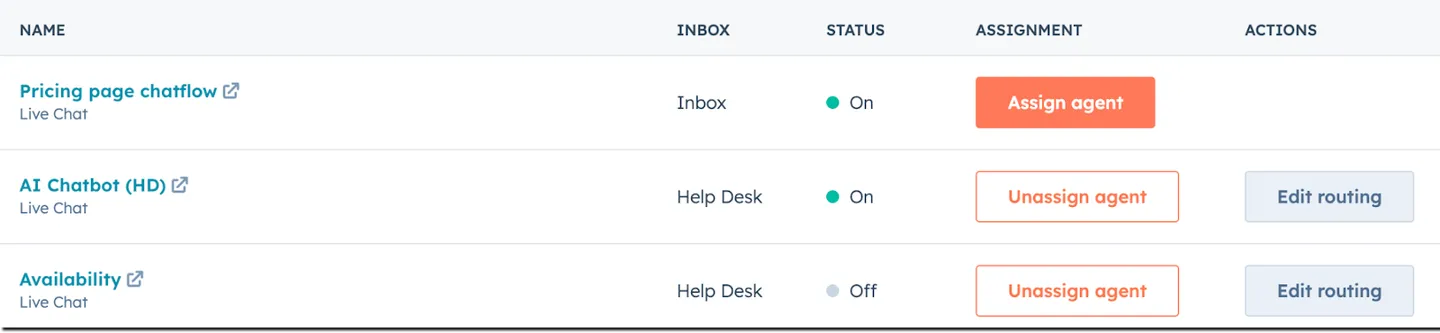
Ensure you have a chat flow with live chat set up; if not, create one connected to the conversations inbox or help desk workspace. Navigate to Breeze AI > Customer Agent, and go to the Overview tab. Click Assign Agent next to the chat flow under the Channels tab. Before assigning the agent, you can edit or turn on the chat flow.
Step 6: Manage Transfer Settings
If the agent can’t answer a question, the visitor will be prompted to rephrase or transfer the chat to a human agent.
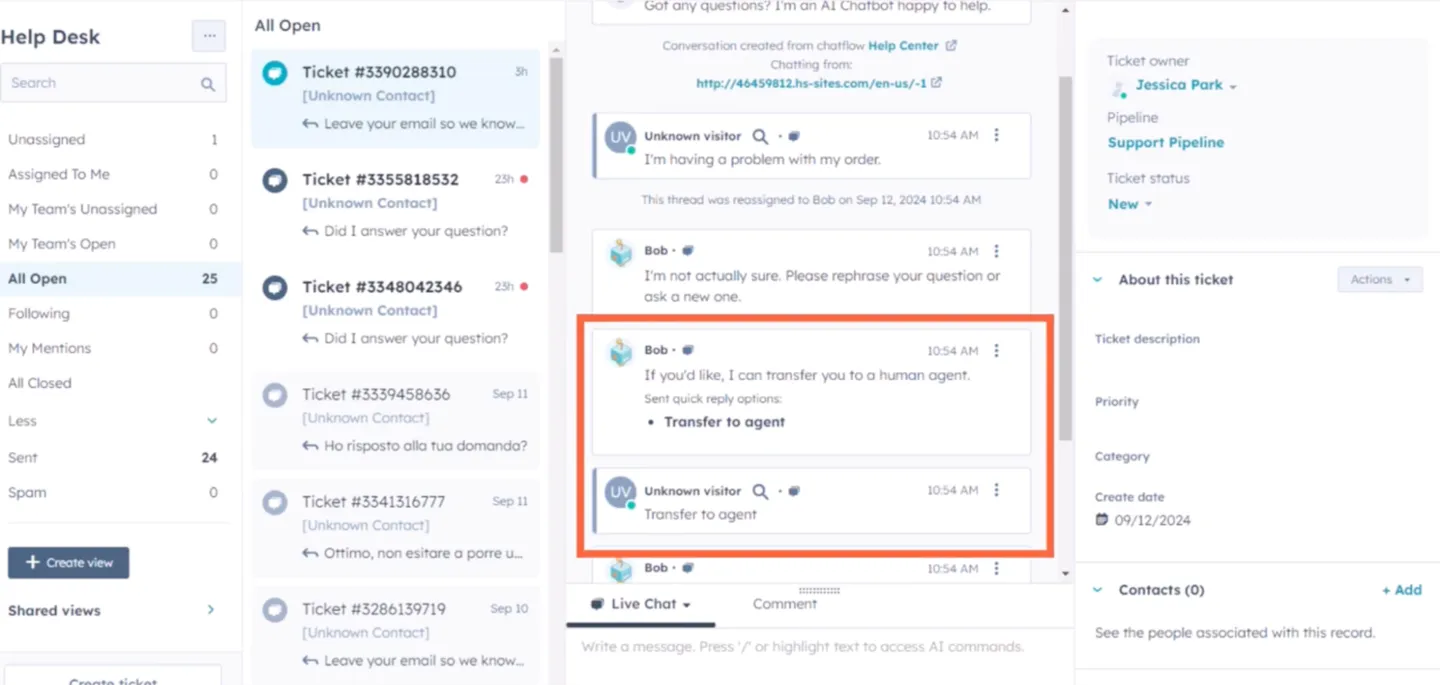
Update the transfer settings by selecting who will receive the unanswerable conversations from the AI. If the AI can’t answer, assign them to the dropdown menu. You can send conversations to No one, leaving them unassigned, or select specific users and teams. If you don’t want the chat’s avatar photo to change to the newly assigned user, clear the Update chat heading avatar checkbox.
Step 7: Preview and Publish
Click Preview to review the responses your customer agent will generate. Then, toggle the switch to add it to your website pages.
Once satisfied, your customer agent will be ready to interact with visitors, providing answers, citing sources, or transferring to a human if needed.
By following these steps, your Breeze Customer Agent is up and running, ready to enhance customer service operations and provide timely support to visitors.
Is Your Customer Agent Meeting Performance Goals?
To determine whether your Breeze Customer Agent effectively handles customer interactions, you can analyze its performance using the metrics provided in the Performance tab of your HubSpot account. This overview helps you understand several key aspects of your agent’s effectiveness and efficiency.
How to Access Performance Metrics:
- Log into your HubSpot account.
- Navigate to Breeze AI > Customer Agent.
- Click on the Performance tab.
| Metric | Description |
| Conversations Resolved | Shows the total issues the agent has resolved, indicating effective management of inquiries. |
| Conversations Deflected | Reflects the number of queries handled independently, reducing load on human teams. |
| AI to Human Handoff | Counts the transfers to human agents, highlighting when the AI encounters complex issues. |
| Agent Workload | Tracks the number of conversations or tickets the agent assigns, showing its utilization. |
| Unanswered Questions | Indicates queries the agent couldn’t resolve, pointing to potential training needs. |
These metrics are crucial for evaluating the efficiency of your Breeze Customer Agent. By analyzing trends in these areas, you can identify strengths and pinpoint opportunities for improvement.
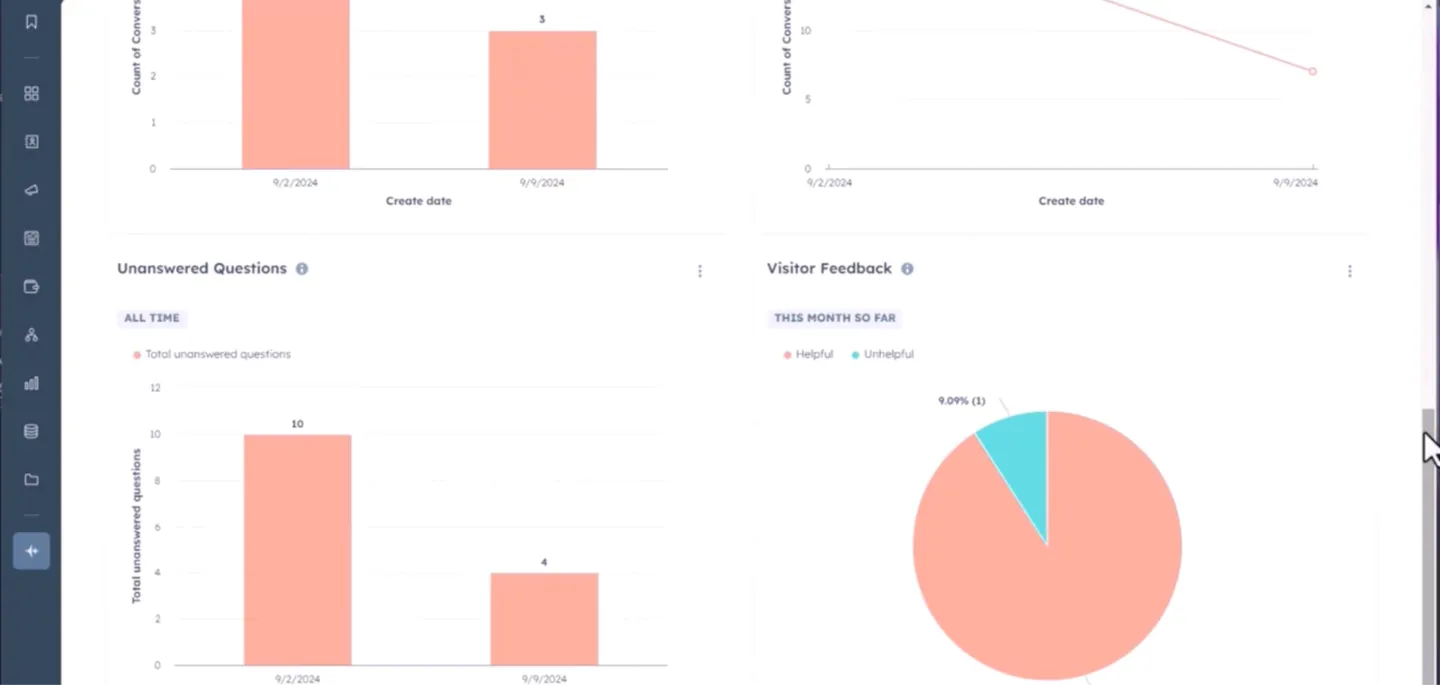
For instance, many AI-to-human handoffs might suggest better training or updating the AI’s capabilities. Conversely, a high-resolution rate indicates your agent effectively addresses your customers’ needs. Regularly reviewing these metrics enables you to make informed decisions to enhance your customer agent’s performance and ensure it continually aligns with your customer service goals.
Best Practices for Optimizing Content for Breeze Customer Agent
When setting up your Breeze Customer Agent, it’s important to use content that enhances its ability to deliver accurate and helpful responses. Here are some guidelines to ensure the content is effective:
- Utilize Comprehensive and Updated Content Sources: Choose content like FAQs and knowledge base articles that address common user queries and are regularly updated to reflect the latest information.
- Structure Content Clearly: Organize your content with clear headers and subheaders. This helps the customer agent navigate the information and improves the user’s understanding.
- Enhance Readability: Use bullet points and lists to make the content easier to read and understand. This format helps in breaking down complex information into digestible parts.
- Keep Language Simple: Avoid complex sentences and jargon. Use plain language that is easy for all users to understand, ensuring the customer agent can relay information effectively.
- Incorporate Common Search Phrases: Include phrases and keywords that users will likely use when seeking information. This aligns the content with common search terms and improves discoverability.
- Use Variations of Search Terms: Employ synonyms and related terms to cover a broader range of user searches. This increases the chances that the customer agent can respond accurately to varied queries.
By following these best practices, you can enhance the functionality of your Breeze Customer Agent and improve the overall user experience.
Ready to turn HubSpot into an AI-powered growth engine? Sign up for HubSpot’s free CRM today and start exploring its powerful tools for marketing, sales, and customer success.
With AI-powered features and Breeze Intelligence built right in, you’ll have smarter insights and automation at your fingertips. As a HubSpot Implementation and CRM Partner, INSIDEA can help you set it up the right way, so you don’t just adopt HubSpot, you actually make it work for your business.
INSIDEA
Ready to get more out of HubSpot?
We are an Elite HubSpot Partner rated 4.99 across 500+ verified reviews. Let's make your portal work harder.



 How INSIDEA works




