Most companies purchaseHubSpotexpecting immediate results, but adoption often stalls when onboarding is incomplete or misaligned with actual business processes. Without a clear plan, teams spend weeks configuring tools that don’t align with theirworkflows, and important data can be lost or mismanaged.
This blog explains every step of the onboarding process, covering preparation, setup, training, realistic timelines, common mistakes, and how to measure success, so your team can start using HubSpot effectively right away.
| Quick Answer Box
What is HubSpot onboarding? HubSpot onboarding is the structured process of configuring your HubSpot portal, migrating your data, setting up automation, and training your team, so the platform works the way your business actually operates. It typically takes 6–12 weeks and covers technical setup, process alignment, and team adoption. Without it, most companies end up paying for a tool they barely use. |
What is HubSpot Onboarding?
Most people thinkHubSpot onboardingstarts and ends with clicking through the setup wizard. It doesn’t. The setup wizard helps you connect a domain, import a contact list, and send a test email. That’s configuration, not onboarding.
The actualHubSpot onboardingis a structured implementation process that maps your business’ssalesprocess, marketing workflows, and service operations onto the HubSpot platform. It includes technical configuration, yes, but also data migration, process translation, and team training. Those last two are where most implementations fall apart.
According to HubSpot’s2025 ROI report, teams that complete structured onboarding achieve 92% platform adoption and over 93% daily usage. Without a guided onboarding process, teams often fail to activate key workflows, populate accurate data, or leverage automation effectively, which limits the platform’s value.
HubSpot Onboarding vs. HubSpot Setup: What’s the Difference?
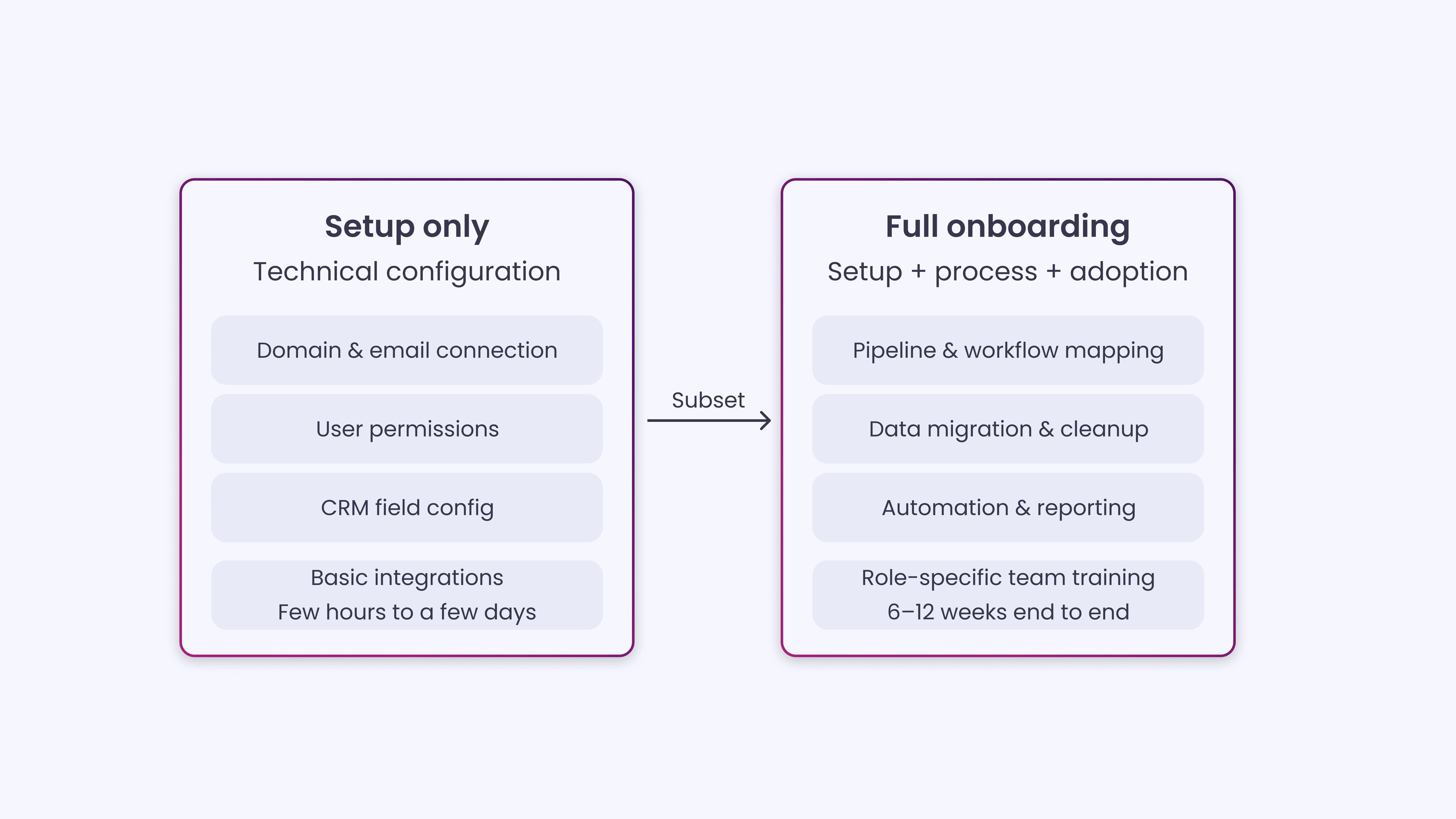
Setup refers to the technical steps required to get HubSpot connected and functional: domain verification, user permissions,CRMfield configuration, and integration with existing tools. You can complete a basic setup in a few hours or a few days, depending on your tech stack.
Onboarding is the broader effort of making HubSpot work for your business. It includes translating your existing sales pipeline stages into HubSpot deal stages, rebuilding your lead nurturing sequences within HubSpot’s workflow engine, training your SDRs to use sequences and tasks, and ensuring your reporting dashboards reflect the KPIs your leadership actually cares about. Setup is a subset of onboarding, not a synonym for it.
A company that completes “setup” but skips the rest of onboarding will have a technically functional portal that nobody uses correctly. The CRM will fill up with bad data. Workflows will go untouched. And three months later, someone on the leadership team will ask why they’re paying for HubSpot.
What HubSpot Onboarding Covers and What It Misses
When you purchase a Professional or Enterprise HubSpot subscription, you get access to HubSpot’s own onboarding program. This includes a dedicated onboarding specialist, a series of guided calls, and access to HubSpot Academy resources. It’s a solid starting point, but it’s built around HubSpot’s standard process rather than your specific business.
HubSpot’s default onboarding covers:
- Tool orientation and basic portal configuration
- Connecting your existing tools
- Getting your first campaign or pipeline up and running
It does not cover:
- Deep CRM customization for niche industries
- Rebuilding complex legacy workflows
- Migrating large or messy contact databases
- Training non-technical team members
- Ongoing post-launch support
If your business has specific requirements, unusual sales cycles, multiple product lines, or a complex service delivery model, HubSpot’s default program will leave gaps that your team will spend weeks trying to fill on their own.
Who Needs HubSpot Onboarding?
The short answer is that anyone who buysHubSpotneeds some form of structured onboarding. But the depth and complexity of that onboarding depends on your company size, team structure, and what you’re migrating from.
Company Types and Onboarding Needs
- Early-stage startups:These companies usually require a lighter onboarding focused on core CRM setup, basic deal pipelines, and initial email marketing. The biggest hurdle is adoption; small teams often wear multiple hats and rarely have a dedicated HubSpot administrator, which can slow initial usage and reporting accuracy.
- Small and Medium-sized Businesses (SMBs, 20-200 employees):SMBs often have existing tools, processes, and contact databases. Onboarding is more involved, including data cleanup, integration with existing systems, workflow mapping, and alignment between sales and marketing teams. Teams migrating from another CRM, like Salesforce,Zoho, orPipedrive, may require additional configuration and custom pipeline mapping.
- Mid-market companies (200-1,000 employees):These organizations typically face multi-team rollouts, complex CRM migrations, and a need for HubSpot customization before it can fully support sales, marketing, and service operations. Adoption challenges are compounded by multiple stakeholders, existing workflows, and cross-department dependencies.
- Companies re-onboarding:Businesses that had a poor initial setup or inconsistent usage often need a full re-onboarding. This includes cleaning data, redefining pipelines, rebuilding workflows, and retraining teams to ensure adoption and proper usage.
Team Types and Onboarding Requirements
- Marketing teams:Require campaign workflows, landing pages, email sequences, lead scoring, and reporting dashboards configured to support real marketing goals.
- Sales teams:Need pipelines, deal properties, task automation, sequences, and meeting links set up to reflect actual sales processes.
- Customer success teams:Require ticket pipelines, SLA rules, knowledge base setup, and reporting dashboards to manage support operations effectively.
Signs Your HubSpot Portal Needs Re-Onboarding
|
The Complete HubSpot Onboarding Checklist
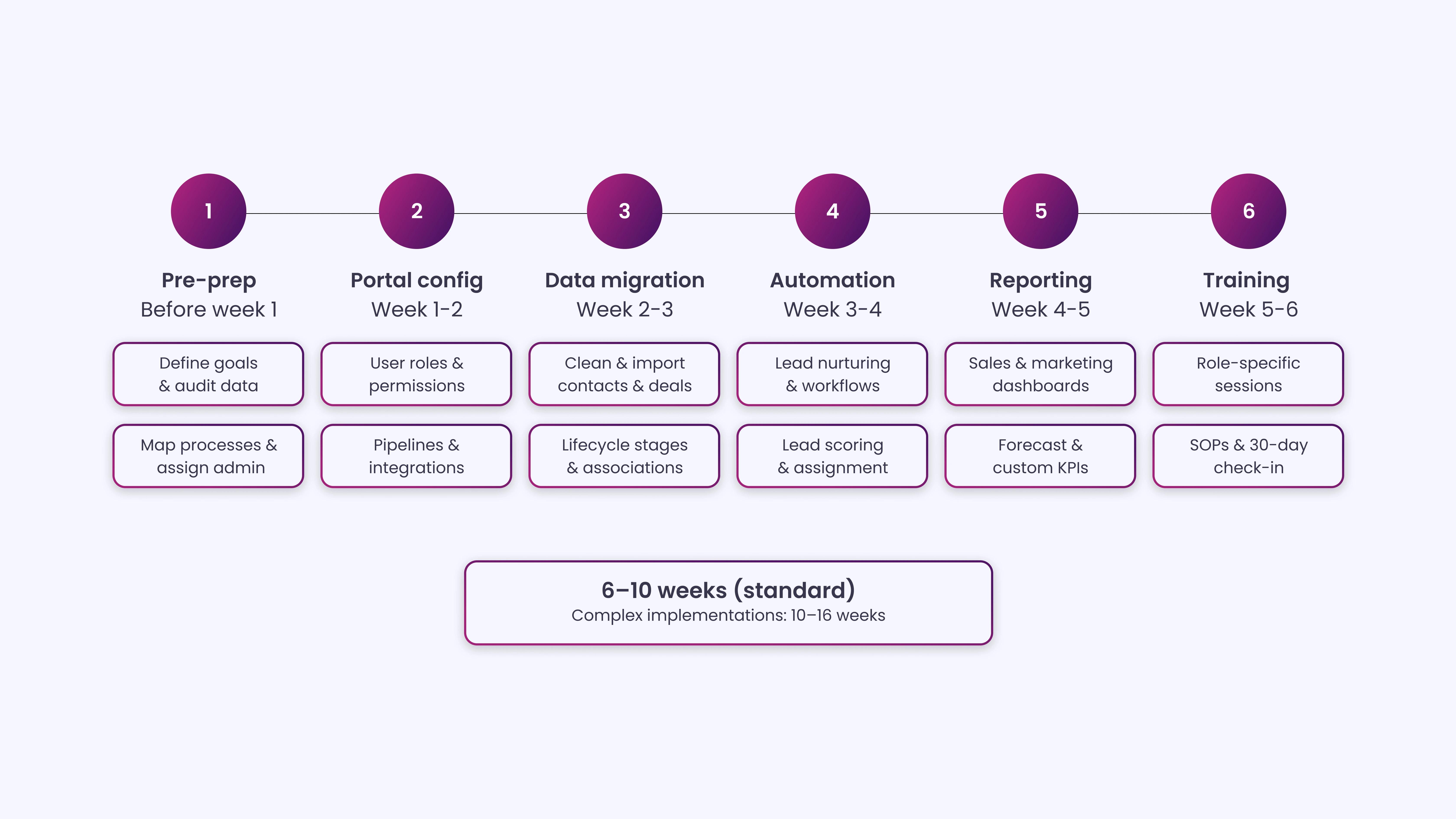
This checklist is structured in six phases across a standard six-week implementation. Adjust the timeline based on your team’s availability and the complexity of your setup.
Phase 1: Pre-Onboarding Preparation
This phase happens before anyone touches HubSpot. It’s the planning work that determines how smooth (or chaotic) everything else will be:
1. Define your goals and success metrics:Before configuring anything, document exactly what you need HubSpot to do. Are you replacing a CRM? Centralizing marketing automation? Building a customer support portal?
Write down three to five specific outcomes you expect within 90 days; these will guide every configuration decision and serve as the benchmark for measuring onboarding success later.
2. Audit your existing data:Pull your contact, company, and deal records from your current system, whether that’s Salesforce, Pipedrive, a spreadsheet, or a combination of tools. Identify duplicates, missing fields, outdated records, and any data that needs cleaning or standardization before it moves to HubSpot. Importing dirty data is one of the most common causes of long-term CRM failure.
3. Map your existing sales and marketing processes:Document how a lead enters your pipeline, how it moves through stages, and what triggers it to advance or be disqualified. This is the blueprint your HubSpot configuration will follow; without it, you’re building a system that reflects HubSpot’s default structure rather than your actual process.
4. Identify your HubSpot admin and project stakeholders:Every successful HubSpot onboarding has one person who owns the portal. Designate a HubSpot admin who will be responsible for configuration decisions, user management, and ongoing maintenance. Also, identify who from sales, marketing, and leadership needs to be involved in decisions and approvals during the process.
5. Confirm your tech stack and integrations:List every tool your team currently uses, your email provider, marketing automation platform, customer support system, billing software, ERP, or any other systems that will need to connect to HubSpot. Check HubSpot’s native integrations marketplace and identify which connections will require custom API work.
Phase 2: Portal Configuration (Week 1-2)
This is where the hands-on technical work begins. The goal is to get your HubSpot portal set up to reflect your business, not HubSpot’s defaults:
1. Set up user roles and permissions:Add your team members to the portal and assign roles that reflect what each person actually needs access to. Over-permissioning creates risk; under-permissioning frustrates users and creates workarounds. For most B2B teams, you’ll have at least three tiers: admin, manager, and standard user.
2. Configure custom CRM properties:HubSpot’s default contact, company, and deal properties are a starting point, not a finished product. Build out the custom fields your team needs to qualify leads, track deal details, and segment contacts. Every property you add should have a clear purpose; unnecessary fields add friction and reduce data quality over time.
3. Build your pipeline stages:Map your actual sales process into HubSpot deal stages, with clear entry and exit criteria for each stage. Most B2B pipelines have five to eight stages. Include the probability weighting for each stage; this directly affects the accuracy of your revenue forecasting in HubSpot’s reporting.
4. Connect your domain and email sending infrastructure:Verify your domain in HubSpot, connect your sending domain for marketing emails, and authenticate with DKIM and SPF records. Skipping this step can severely affect email deliverability.
5. Integrate your existing tools:Connect the integrations identified in your pre-onboarding audit. Test each one to confirm data is flowing correctly in both directions. For critical integrations (like Salesforce or your billing system), test with a small data sample before enabling the full sync.
6. Set up your team’s email inboxes and meeting links:Connect each sales rep’s Google or Outlook inbox to HubSpot, configure their HubSpot Meeting links with the right calendar availability, and confirm that email logging is working as expected. These small configurations have an outsized effect on daily adoption.
Phase 3: Data Migration (Week 2-3)
The following steps will help ensure your records are clean, properly associated, and ready for accurate reporting in HubSpot:
1. Clean your data before importing:Run a final deduplication pass on your contact and company records. Standardize field formats (country names, phone number formats, industry categories) so they map cleanly to HubSpot properties. Fix or remove records with missing required fields.
2. Import contacts, companies, and deals in the right order:Import companies first, then contacts (associated with companies), then deals (associated with contacts). Doing this out of order creates association gaps that are tedious to fix retroactively. Use HubSpot’s import tool with a properly formatted CSV template and validate the column-to-property mapping before confirming each import.
3. Verify association accuracy post-import:After importing, spot-check a random sample of records to confirm that contacts are correctly associated with companies, deals are linked to the right contacts, and all key properties are populated correctly. Run a filter for records with missing lifecycle stages or deal stages and address them before moving forward.
4. Set lifecycle stages and lead statuses:Assign the appropriate lifecycle stage (subscriber, lead, MQL, SQL, opportunity, customer) to each contact based on their history. Accurate lifecycle-stage data is the foundation of your funnel reporting; if these are wrong, your pipeline metrics will be wrong, too.
5. Handle historical activity data:Decide what historical activity (call notes, past deal history, email threads) needs to be preserved in HubSpot. Some teams import this as notes; others use custom properties. Document what’s been migrated and what’s been archived externally so your reps know where to find historical context.
Phase 4: Automation and Workflow Setup (Week 3-4)
The following steps will guide you through setting up workflows, automation, and lead management to streamline your sales and marketing processes:
1. Build lead nurturing workflows:Create automated email sequences for each stage of your buyer journey, top-of-funnel educational content, mid-funnel consideration content, and bottom-funnel decision content. Each workflow should have a clear enrollment trigger, defined exit conditions, and a goal event that marks the workflow’s success.
2. Set up internal notification and task workflows:Build workflows that automatically assign tasks to sales reps when leads hit qualification criteria, notify the right person when a deal stage changes, or alert a manager when a high-value deal goes stale. These process automation steps are what make HubSpot feel like an active system rather than a passive database.
3. Configure lead scoring:Define the behaviors and attributes that indicate a lead is sales-ready, such as website visits, content downloads, email engagement, company size, or industry. Set up HubSpot’s lead scoring model to reflect these signals, and build a workflow that triggers when a lead crosses your MQL threshold.
4. Set up deal rotation or assignment rules:If your team has multiple sales reps, configure how inbound leads or newly created deals get assigned, whether that’s round-robin rotation, territory-based routing, or account-based assignment. Test the assignment logic with real scenarios before going live.
5. Test every workflow before activation:Run each workflow in test mode or enroll a test contact and trace every step. Confirm that enrollment triggers fire correctly, emails are sent from the right sender, and exit conditions remove contacts as expected. One misconfigured workflow can enroll thousands of contacts incorrectly.
Phase 5: Reporting and Dashboards (Week 4-5)
With your workflows in place, it’s time to focus on measurement. The following steps will help you set up dashboards and reports to track performance, forecast revenue, and gain actionable insights.
1. Build your core sales dashboard:Create a dashboard that shows your team’s pipeline value by stage, number of open deals, average deal size, close rate, and individual rep activity. This dashboard should update in real time and be the first thing your sales manager checks in the morning.
2. Set up your marketing reporting dashboard:Build reports that show traffic sources, contact acquisition by channel, email performance, and landing page conversion rates. Map these to the goals you defined in pre-onboarding to track progress against what actually matters.
3. Configure revenue and forecast reports:Use HubSpot’s forecast tool to project monthly and quarterly revenue based on your pipeline’s deal probability weighting. Set up a report that shows actual closed revenue versus target so leadership has a live view of performance.
4. Create custom reports for your specific KPIs:Every business has metrics that don’t fit neatly into HubSpot’s default reports. Build custom single-object or cross-object reports for the KPIs specific to your business, whether that’s time-to-close by industry, email response rate by rep, or deal source by channel.
5. Set up scheduled report delivery:Configure HubSpot to automatically email key dashboards to leadership on a weekly or monthly cadence. This reduces the need for manual reporting and keeps stakeholders informed without requiring them to log into HubSpot directly.
Phase 6: Training and Enablement (Week 5-6)
This final phase focuses on training your team and establishing ongoing processes. The following steps cover role-specific sessions, documentation, and post-launch check-ins to ensure smooth adoption:
1. Run role-specific training sessions:Train each team separately based on what they’ll actually use. Marketing gets a session on campaign management, email tools, and forms. Sales gets a session on deal management, sequences, tasks, and meeting links. Avoid running everyone through the same generic training; it wastes time and reduces retention.
2. Create internal documentation and SOPs:Write short, practical guides for the workflows and processes your team will use most often. A one-page SOP on how to create a deal, enroll a contact in a sequence, or log a call goes a long way toward reducing the “I forgot how to do this” tickets your admin would otherwise receive.
3. Set up HubSpot Academy access for your team:Assign relevant HubSpot Academy certifications to each role, Marketing Hub Certification for marketing, Sales Hub Certification for reps, and the HubSpot CRM Certification for anyone who will manage the portal. These free courses reinforce your in-person training with structured learning.
4. Run a 30-day post-launch check-in:Schedule a structured review 30 days after going live. Check data quality in the CRM, review workflow performance, identify unused features, and surface any questions or friction points your team has encountered. Address issues early before bad habits form.
| INSIDEA’s HubSpot Onboarding Checklist
Get the full phase-by-phase checklist in a shareable format your team can use to track progress, assign tasks, and confirm each step is complete before moving to the next phase. |
HubSpot Onboarding Timeline: How Long Does It Actually Take?
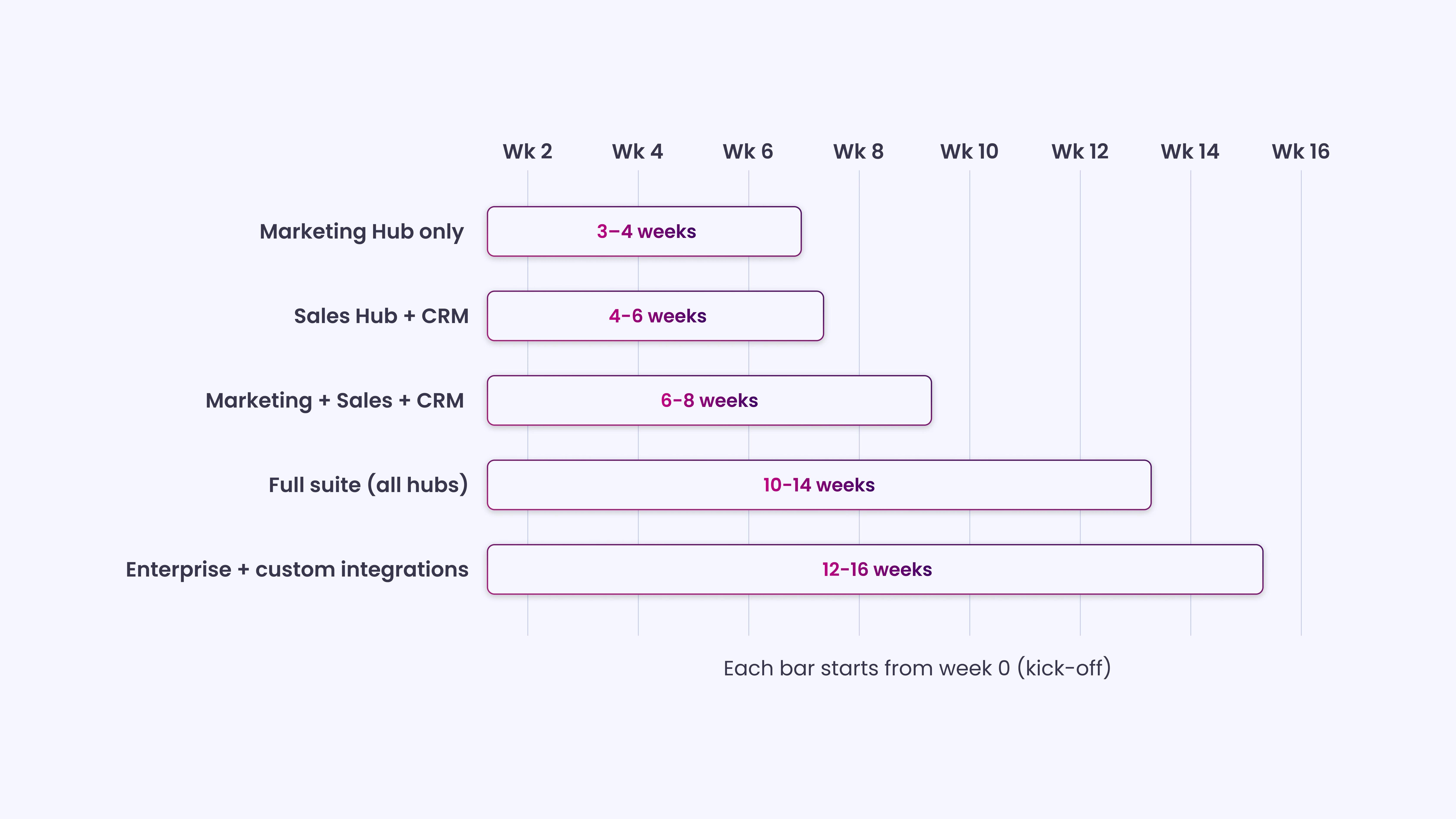
HubSpot onboarding with a certified partner typically takes 4-8 weeks for a standard implementation covering Marketing Hub and CRM. Complex implementations involving multiple hubs, custom integrations, or large-scale data migrations can extend to 10-16 weeks. HubSpot’s own onboarding fee covers 90 days, which should be enough to complete core configuration, training, and initial adoption check-ins.
Most HubSpot onboarding projects take 6 to 12 weeks, from kick-off through full team adoption. Simple setups for small teams can be completed in four weeks. Complex implementations, including large data migrations, Salesforce integrations, or multi-team rollouts, routinely take 12-16 weeks.
The timeline varies based on three main factors: the complexity of your data migration, the number of integrations being configured, and how quickly your team can complete reviews and approvals. Projects stall most often not because of technical complexity, but because internal stakeholders are slow to respond.
Implementation Type and Typical Timeline
Here’s what you can typically expect based on your HubSpot setup:
| Implementation Type | Typical Timeline |
| Marketing Hub only | 3–4 weeks |
| Sales Hub + CRM | 4–6 weeks |
| Marketing + Sales + CRM | 6–8 weeks |
| Full Suite (all Hubs) | 10–14 weeks |
| Enterprise with custom integrations | 12–16 weeks |
Phase Breakdown
Each onboarding phase varies in duration depending on your team and setup:
| Phase | Typical Duration | What Affects This |
| Pre-Onboarding Preparation | 1–2 weeks | How quickly you audit and map existing data and processes |
| Portal Configuration | 1–2 weeks | Number of custom properties, pipelines, and integrations |
| Data Migration | 1–2 weeks | Volume of records, data quality, and number of sources |
| Automation & Workflow Setup | 1–2 weeks | Number of workflows, complexity of logic, and review cycles |
| Reporting & Dashboards | 1 week | Number of custom reports, clarity of KPIs |
| Training & Enablement | 1–2 weeks | Team size, number of roles, and documentation requirements |
Total (Standard):6-10 weeks
Total (Complex):10-16 weeks (Salesforce migration, enterprise multi-team, heavy customization)
What Extends the Timeline
- Data migration:Auditing and cleaning existing data takes time. A contact database of 50,000 records with inconsistent fields and missing lifecycle stages can take 2-3 weeks to clean and import.
- Integration complexity:Simple HubSpot-to-Google integrations take an hour; bidirectional Salesforce syncs with custom field mapping, historical data transfer, and lead routing can take 2-3 weeks.
- Stakeholder availability:Slow approvals or delayed IT access (DNS, email authentication) can add days or weeks to the project.
What Can Run in Parallel
- While Phase 3 (data migration) is ongoing, HubSpot admins can start building workflows and dashboards (Phases 4 and 5) using sample or structured test data.
- Running these phases in parallel compresses the timeline without sacrificing accuracy.
- Training (Phase 6) should only start after core setup and data migration are complete. Half-built portals confuse teams and require re-training.
6 Common HubSpot Onboarding Mistakes (And How to Avoid Them)
Avoid these common pitfalls to ensure a smoother HubSpot onboarding experience:
1. Importing Data Before Cleaning It
Teams are eager to see their contacts inside HubSpot as quickly as possible. The assumption is that data cleanup can happen after the import. In practice, it almost never does.
Once dirty data is inside HubSpot, it spreads. Workflows enroll the wrong contacts. Reports pull inaccurate numbers. Sales reps see duplicate or incomplete records and lose confidence in the CRM. Cleaning 50,000 records inside HubSpot is significantly harder than cleaning them in a spreadsheet before import.
The fix:Treat data cleanup as a non-negotiable step before migration begins. At minimum, deduplicate records, standardize field formats, remove records that haven’t engaged in the past 24+ months, and confirm lifecycle-stage assignments. Budget at least three to five business days for this work, depending on the database size.
2. Configuring HubSpot to Match HubSpot’s Defaults, Not Your Process
Most teams start by exploring HubSpot’s demo environment or following the setup wizard step by step. The result is a portal that mirrors HubSpot’s example pipeline and default properties rather than the company’s actual sales motion.
If your pipeline stages don’t match how your team actually sells, reps won’t update deals accurately. If your properties don’t match what your team needs to qualify and segment leads, the data will be incomplete. You end up with a tool that looks functional on the surface but produces useless reports.
The fix:Before configuring anything, document your actual process. Map every deal stage with a written definition. List every data field your team needs to qualify a lead or close a deal. Use this documentation , not HubSpot’s defaults, as the blueprint for your configuration.
3. Skipping the Integration Testing Phase
Connecting tools in HubSpot is often quick. The integration switches on, data starts flowing, and the team assumes it’s working correctly. Full testing gets skipped because things “seem fine.”
Integration errors are often invisible until they cause serious problems, deals that don’t sync to Salesforce, contacts that get enrolled in the wrong workflow because of a bad integration trigger, or revenue data that doesn’t reconcile between systems. These issues are harder to diagnose after they’ve been running for weeks.
The fix:Test every integration with a defined test protocol before declaring it live. Create a small batch of test records, run them through each integration, and verify that every field maps correctly and every trigger fires as expected. Document what each integration does and what it doesn’t sync, so your team understands the boundaries.
4. Running the Same Training for Every Role
It’s faster to bring everyone into one room (or on one video call) and run a single HubSpot walkthrough. The assumption is that a general overview will be enough for each team to figure out the rest.
A marketing manager and a sales development rep use almost completely different parts of HubSpot. Running the same training for both wastes half of each person’s time and leaves both undertrained on the features that actually matter to them. The result is low adoption and a support burden on the admin.
The fix:Run separate training sessions for each role: one for marketing (campaigns, forms, workflows, reporting), one for sales (pipeline, sequences, tasks, meetings), and one for admins (user management, properties, integrations, reporting). Keep each session focused, practical, and short, 60 to 90 minutes maximum. Follow up with written documentation.
5. No Designated HubSpot Admin After Launch
During onboarding, there’s always someone driving the process, a consultant, an agency, or an enthusiastic internal champion. After go-live, that person moves on. Nobody takes ownership of maintaining the portal.
HubSpot portals deteriorate without active maintenance. Contact databases get messy. Workflows break when lead scoring models change. New team members don’t get properly trained. Reports stop reflecting current KPIs. Within six months, the portal is a mess, and the team has reverted to spreadsheets.
The fix:Before go-live, formally designate a HubSpot admin, someone who owns the portal, manages user access, reviews data quality monthly, and fields questions from the team. This doesn’t need to be a full-time role, but it needs to be someone’s explicit responsibility. Document their responsibilities and give them the time to execute them.
6. Treating Onboarding as a One-Time Event
There’s a natural tendency to treat onboarding as a project with a start and an end date. Once the checklist is complete and the team is trained, the project is “done.”
HubSpot is constantly evolving. Your business processes change. Your team grows. New hubs are added. Workflows that were accurate six months ago may no longer reflect your current process. A portal that doesn’t get reviewed and updated becomes a liability rather than an asset.
The fix:Build a quarterly HubSpot review into your team’s calendar from day one. Review data quality, workflow performance, report accuracy, and team adoption metrics every 90 days. Treat HubSpot as a living system that requires ongoing management, not a one-time setup.
HubSpot Onboarding with a Partner vs. DIY vs. HubSpot Direct
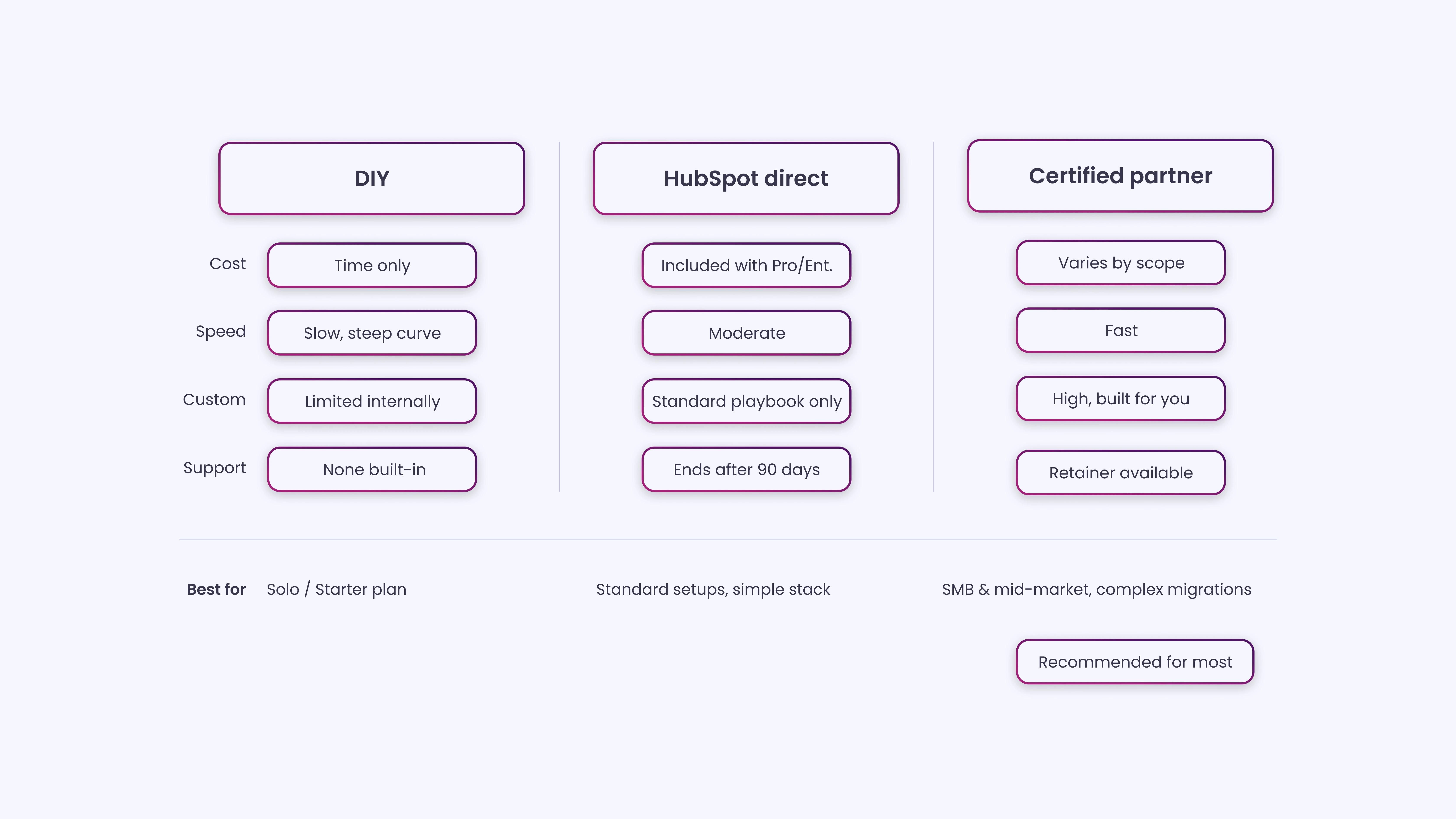
There are three ways to approach HubSpot onboarding, and each one involves real trade-offs.
The right choice depends on your team’s technical capacity, budget, timeline, and the complexity of your implementation.
| DIY | HubSpot Direct | HubSpot Partner | |
| Cost | Low (time only) | Included with Pro/Enterprise | Varies by partner and scope |
| Speed | Slow (learning curve) | Moderate | Fast (experienced team) |
| Customization | Limited by internal knowledge | Limited to HubSpot’s standard playbook | High, built around your process |
| Ongoing support | None built in | Ends after the onboarding period | Available as a retainer |
| Best for | Solo operators, Starter plan users | Standard implementations with limited complexity | SMB and mid-market teams with process complexity |
HubSpot Direct onboarding is included with Professional and Enterprise subscriptions. You get a HubSpot onboarding specialist who guides you through their standard implementation playbook over a series of calls.
It works well if your business is relatively direct, has a standard pipeline, common integrations, and a team that’s comfortable with new software. Where it falls short is in customization: HubSpot’s specialists follow a defined process that isn’t tailored to your specific sales motion or data model.
An Elite-tier HubSpot Partner brings a different set of capabilities. Instead of following HubSpot’s standard playbook, an experienced partner maps your existing processes first and builds the HubSpot configuration around them.
They’ve typically run dozens of implementations across different industries and know where the edge cases are, which integrations behave unexpectedly, and how to structure workflows that your team will actually use. The additional investment reflects the depth of work and the fact that you’re not paying for time spent learning how to use HubSpot from scratch.
If your implementation involves a CRM migration from Salesforce or Microsoft Dynamics, complex multi-team workflows, or significant custom object configuration, a partner will save you far more time than their fee represents.
Learn more about INSIDEA’sHubSpot Onboarding Services
How to Measure HubSpot Onboarding Success
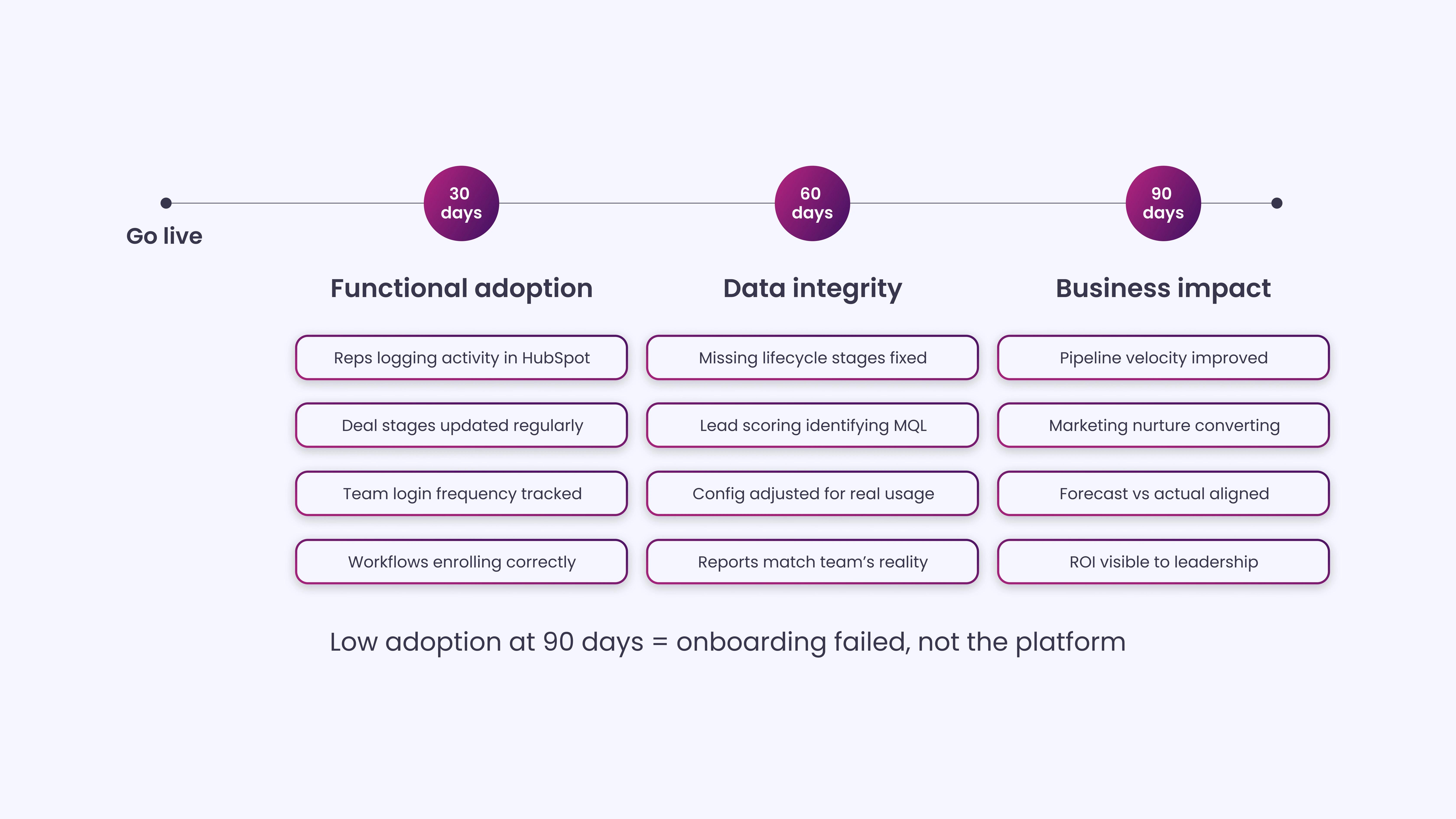
A successful HubSpot onboarding isn’t one where every item on the checklist is marked complete. It’s one where your team is actively using the platform, your data is accurate, and your reporting is giving leadership real visibility into the pipeline and performance. Here’s how to measure it.
30-Day Metrics (Functional Adoption)
At 30 days post-launch, the focus is on whether the platform is being used as intended. Check that your sales reps are logging activity in HubSpot rather than in a separate spreadsheet. Confirm that deal stages are being updated as deals progress.
Verify that your marketing workflows are enrolling contacts correctly and that your email open and click rates are tracking. Look at user login frequency; if half your team hasn’t logged in within the past two weeks, that’s an adoption problem that needs immediate attention.
60-Day Metrics (Data Integrity and Process Fit)
At 60 days, focus on data quality and whether your HubSpot configuration still fits how your team operates. Run a report on contact records with missing lifecycle stages or deal records with missing close dates. Review whether your lead scoring model is identifying the right leads and whether the contacts scoring highest are actually converting to customers.
If you find consistent gaps between what HubSpot shows and what your team reports in meetings, that’s a sign that the configuration needs adjustment.
90-Day Metrics (Business Impact)
At 90 days, you should be able to answer: Is HubSpot improving the performance of your sales and marketing operation? Compare pipeline velocity (average time from lead creation to close) with your pre-HubSpot baseline. Review whether marketing-sourced leads are converting at a higher rate now that nurturing workflows are in place.
Check forecast accuracy: Is HubSpot’s revenue projection within a reasonable range of actual closed revenue? These are the metrics that determine whether your onboarding produced real business value.
Important Note:If your team isn’t actively using HubSpot 90 days after onboarding, the onboarding failed, not the platform. Low adoption at the 90-day mark is almost always a sign of one of three things: the configuration doesn’t match how your team works, training wasn’t role-specific enough, or nobody owns the portal post-launch.
What Comes After HubSpot Onboarding?
Onboarding gets you to a functioning portal with a trained team. That’s the beginning of the work, not the end of it.
After onboarding, HubSpot requires ongoing management to stay accurate, effective, and aligned with your business as it evolves. That means monthly data hygiene reviews, quarterly workflow audits, regular updates to your lead scoring model as your ICP shifts, and continuous training for new team members. It also means staying up to date with HubSpot’s product updates. HubSpot releases new features frequently, and many of them are worth incorporating into your existing setup.
Most companies underestimate the ongoing maintenance burden. The teams that get the most out of HubSpot long-term are the ones that treat it as a system that needs regular attention, not a tool that runs itself once it’s configured.
There’s also the matter of growing into HubSpot’s more advanced capabilities. Many companies start with Marketing Hub and Sales Hub, then add Service Hub once their support volume justifies it. Others start with a basic CRM setup and graduate to custom objects, advanced reporting, and sophisticated automation as their processes mature. This evolution requires ongoing strategic input, not just technical upkeep.
Maximize HubSpot Value With Expert Support from INSIDEA
Selecting the right partner sets the foundation, but turning HubSpot into a system that generates results requires structured processes, clear workflows, and hands-on support. As a Certified HubSpot Elite Solutions Partner, INSIDEA brings the experience needed to get this right from the start.
INSIDEAhelps businesses implement and optimize HubSpot to generate qualified leads, improve conversions, and align marketing, sales, and operations.
Here are the services we provide:
- HubSpot Onboarding:Set up users, permissions, lifecycle mapping, and integrations to get teams productive quickly.
- HubSpot Management:Ongoing support, workflow optimization, and dashboard reporting to maintain operational clarity.
- HubSpot Consulting:Lifecycle ownership, attribution frameworks, forecasting, and executive-level reporting for revenue alignment.
- HubSpot Migrations&White-Label Solutions:Clean data transfers, custom integrations, and partner-branded delivery for consistent execution.
When HubSpot is set up thoughtfully, teams can focus on growth, decision-making, and campaign execution with confidence.

 How INSIDEA works