

Most B2B companies invest in HubSpot but never move past basic usage. Marketing runs campaigns. Sales manages deals. Customer success works separately. Each team uses the platform, but not in a way that connects the full revenue process.
The result is familiar. Leads move through the system without clear definitions. Handoffs between teams break. Reports do not match what is happening on the ground.
RevOps addresses this, but only when HubSpot is set up to support it from the start. That means structuring your data correctly, aligning lifecycle stages across teams, and building processes that reflect how revenue actually moves through your business.
This blog provides a practical RevOps framework for HubSpot, so you can move from disconnected usage to a system where every team works from the same foundation.
| Quick Answer Box
What is RevOps in HubSpot? Revenue Operations (RevOps) is the alignment of marketing, sales, and customer success around shared data, processes, and goals, managed through a single CRM. In HubSpot, this means configuring Marketing Hub, Sales Hub, Service Hub, and Operations Hub so every team works from the same data, follows consistent lifecycle stages, and tracks the same revenue metrics. Without this alignment, teams operate in silos, and reporting becomes unreliable. |
What RevOps Actually Means in Practice?
Revenue Operations is the operational alignment of marketing, sales, and customer success so they function as one revenue-generating unit rather than three separate departments with separate goals. That alignment shows up in three places: shared data, shared process definitions, and shared performance metrics.
It is not a job title you post on LinkedIn to signal maturity. Hiring a “Head of RevOps” without changing how your teams operate is a waste. It is also not a software purchase.
Buying Operations Hub or upgrading to an Enterprise plan does not make you a RevOps organization. And it is not a rebranding of your marketing strategy. Marketing ops, demand gen, and RevOps serve distinct functions and address distinct problems.
The three core problems RevOps is built to solve:
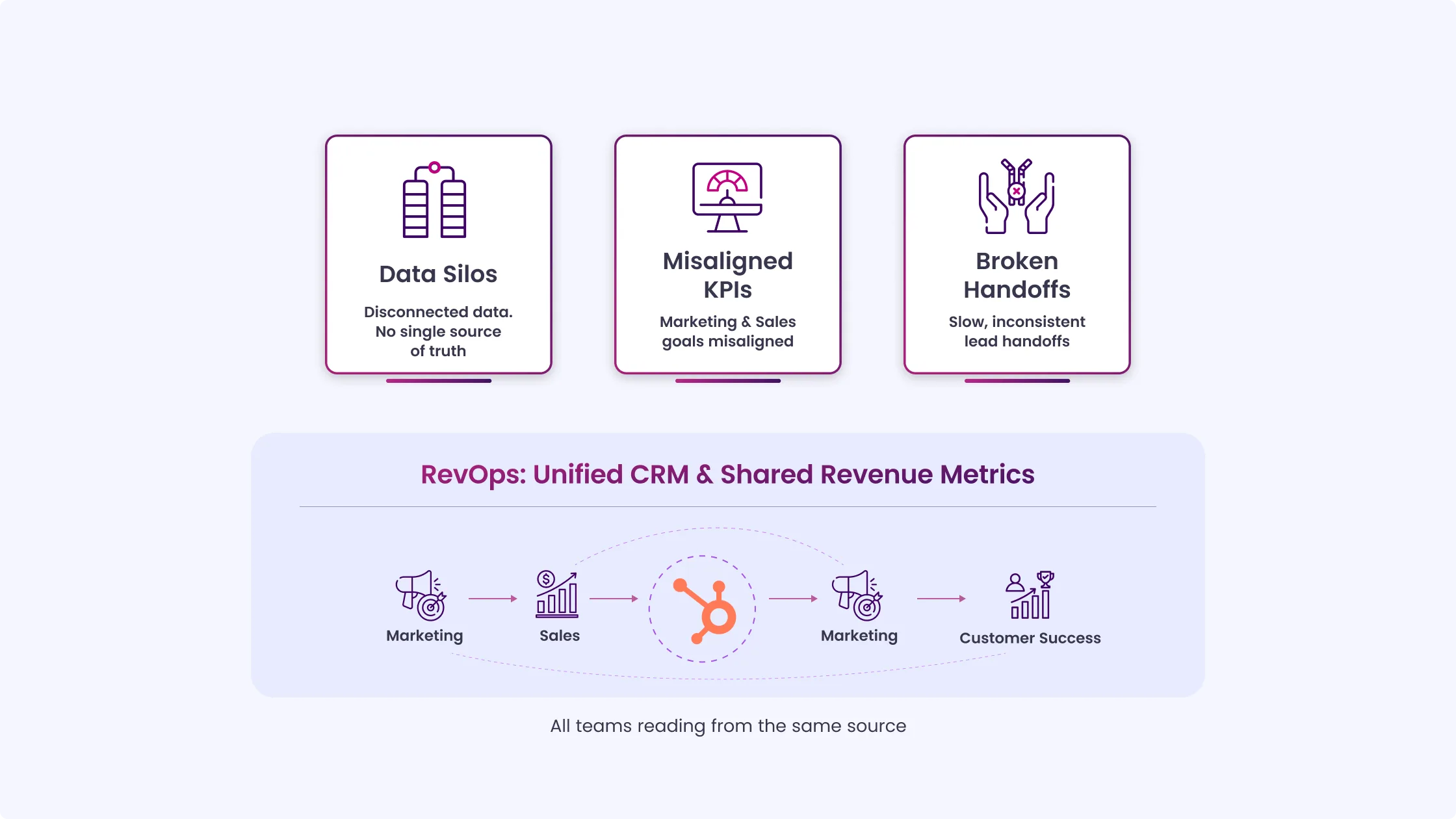
1. Data silos: Marketing tracks leads in one view. Sales tracks deals in another. Customer success uses a third tool entirely. Nobody agrees on the same number in the same meeting. RevOps consolidates this into a single data model, with all teams reading from the same source.
2. Misaligned KPIs: Marketing is measured on MQLs. Sales is measured by closed revenue. These two metrics can work against each other; marketing optimizes for volume, sales complain about quality, and nothing gets resolved because both teams are technically hitting their numbers. RevOps introduces shared metrics that tie marketing activity to actual revenue outcomes.
3. Broken handoffs: The gap between when marketing passes a lead to sales and when sales actually work on it is where revenue gets lost. Without defined handoff criteria, response time standards, and automated routing, leads sit in queues, follow-ups are inconsistent, and attribution becomes a guessing game.
HubSpot is well-suited to RevOps because it centralizes contact, company, deal, and ticket data in a single unified CRM. Marketing Hub activity, Sales Hub engagement, and Service Hub tickets all live on the same contact record.
Operations Hub adds data governance tools, field mapping, data sync, and programmable automation that keep the CRM clean as it scales. The architecture supports RevOps. The configuration is where most companies fall short.
The Revenue Funnel vs. the RevOps Model
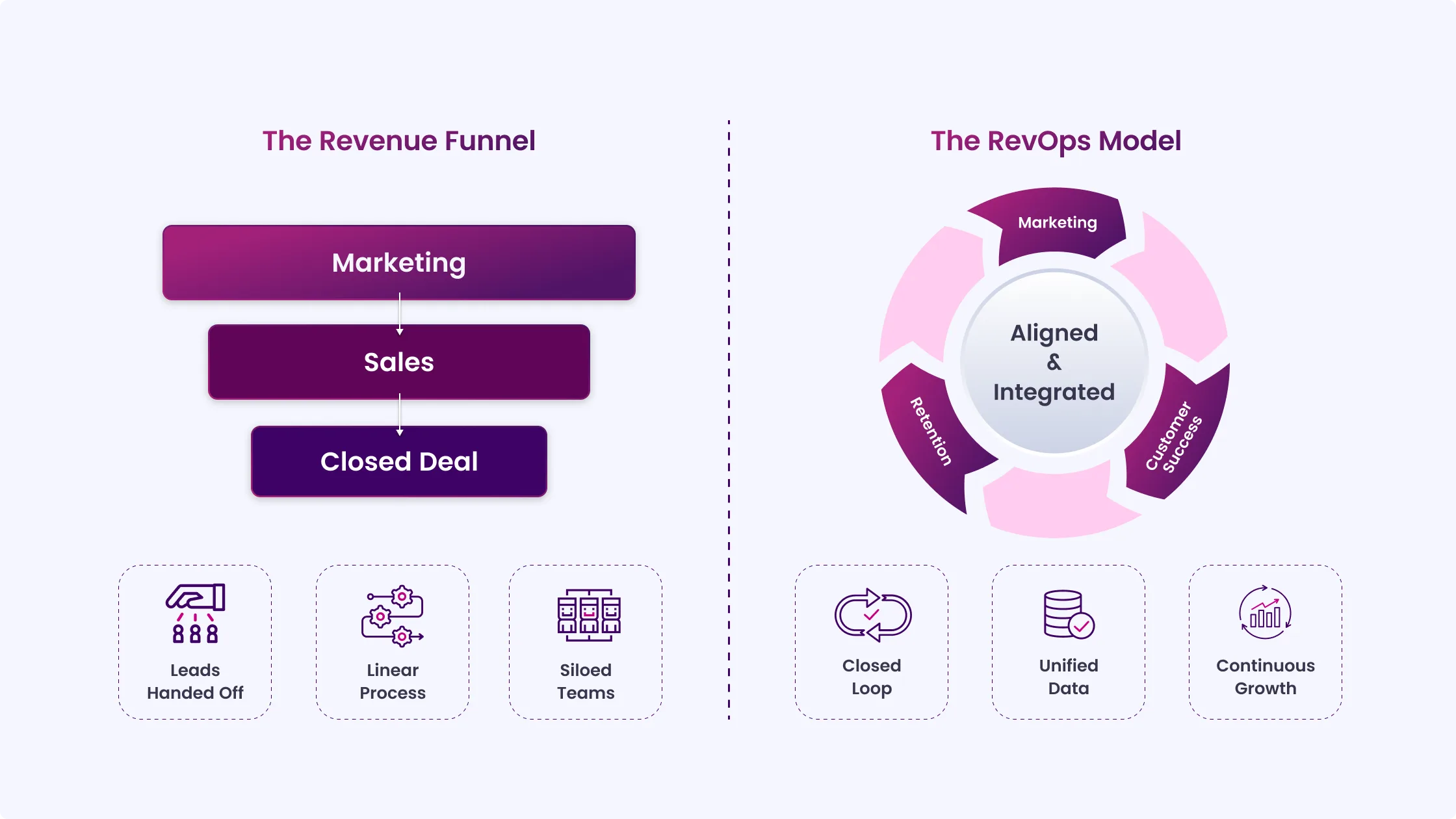
Most teams still operate on a straight-line funnel where marketing passes leads to sales, sales close them, and the journey effectively ends there. RevOps replaces that sequence with a connected system where every stage feeds the next.
| Old Revenue Funnel | RevOps Model |
| Marketing generates leads and hands them to Sales | Marketing, Sales, and Customer Success work from shared lifecycle stages |
| Sales owns deal closure and revenue outcome | Revenue responsibility is shared across the entire journey |
| Each team defines success in isolation | One agreed definition for MQL, SQL, and Opportunity across teams |
| Reporting stops at each team’s boundary | Reporting connects the full path from first touch to renewal |
| Customer insights stay within support or success teams | Product usage, support tickets, and NPS feed back into marketing and sales decisions |
| Attribution is fragmented and partial | Attribution reflects the full revenue journey |
The INSIDEA RevOps Framework for HubSpot
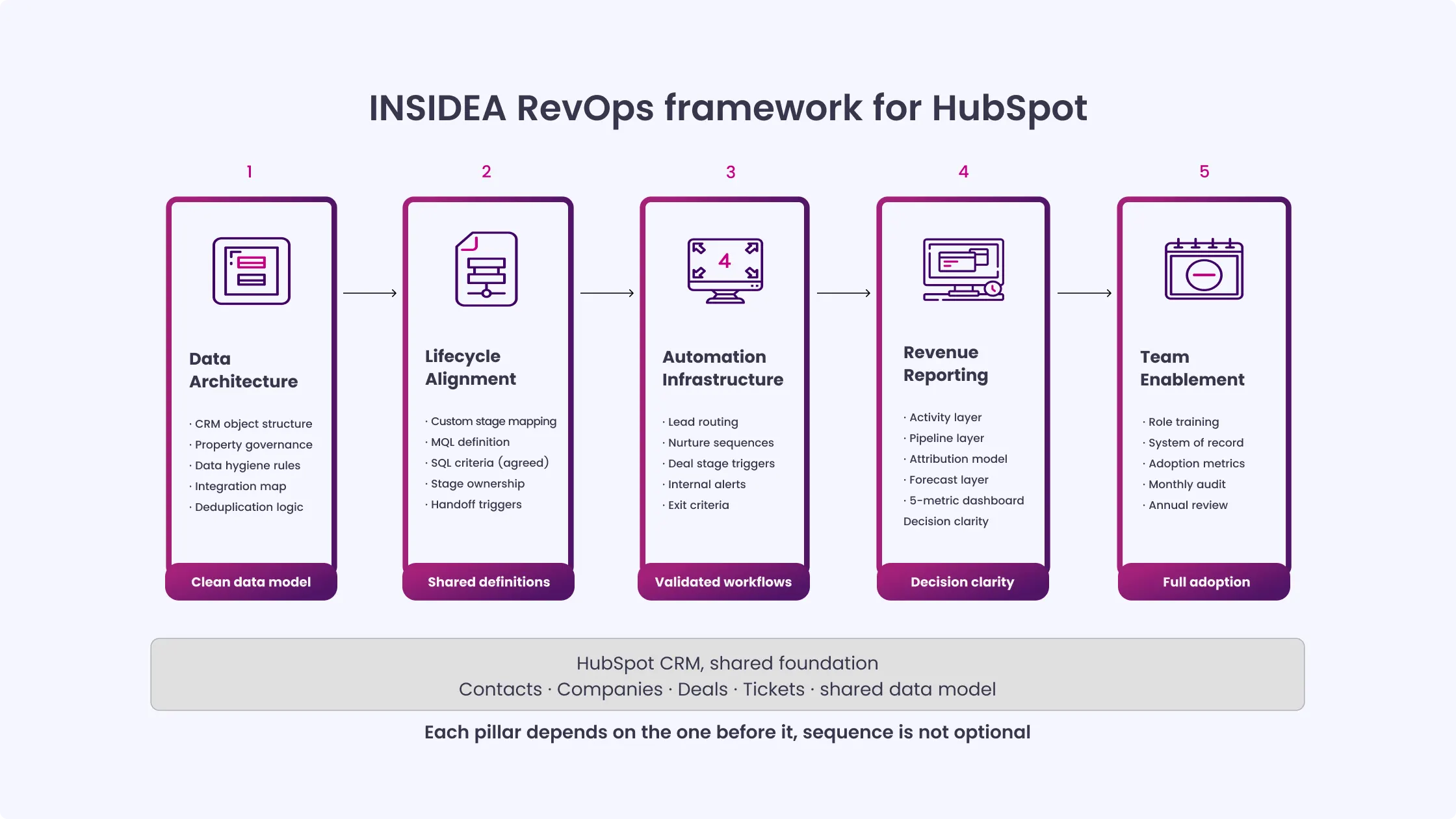
The INSIDEA RevOps Framework organizes HubSpot implementation around five pillars:
1. Data Architecture
2. Lifecycle Alignment
3. Automation Infrastructure
4. Revenue Reporting, and
5. Team Enablement.
Each pillar must be built in sequence. You cannot build reliable automation on top of a broken data architecture. You cannot accurately report on a pipeline that lacks agreed-upon lifecycle definitions. The order matters.
Pillar 1: Data Architecture
Data architecture is the foundation of everything that follows. It defines what your CRM objects represent, who is responsible for them, and how data moves in and out of HubSpot.
CRM Object Structure
HubSpot’s native objects, Contacts, Companies, Deals, and Tickets, are not self-explanatory.
A “Contact” might be a decision-maker, a technical user, or a billing contact at the same company. A “Deal” might represent a new logo, an upsell, or a renewal.
Before any configuration happens:
- Document what each object represents in your business
- Define who owns each object operationally
- Map how enterprise accounts with multiple stakeholders are structured
- Decide whether Custom Objects are needed for accounts, subsidiaries, or product lines
These decisions shape everything downstream.
Property Governance
HubSpot allows anyone with permissions to create properties.
Without governance, the system quickly becomes inconsistent:
- Multiple versions of “Lead Source.”
- Several formats of “Industry.”
- Records filled with missing or unusable data
Property governance means:
- Defining required properties at each lifecycle stage
- Restricting who can create new properties
- Standardizing naming and structure
This is not IT work. It belongs to whoever manages HubSpot day-to-day.
Data Hygiene Rules
Deduplication must be defined before importing any data.
HubSpot deduplicates primarily by email, but real B2B data is rarely clean:
- Shared inboxes
- Role-based emails
- Missing identifiers
Define:
- Deduplication logic
- Required fields per stage
- Validation rules for critical properties
If reps can move deals without the main fields like close date or company size, pipeline reporting breaks immediately.
Integration Architecture
HubSpot rarely operates alone.
Map:
- Every system sending data into HubSpot
- Every system receiving data from HubSpot
- Ownership of each data flow
- Sync direction and frequency
- Conflict rules when systems disagree
A common failure occurs when two tools update the same property with different values, and no system is designated the source of truth. Operations Hub helps control this, but only if the structure is designed first.
Common Configuration Mistake
Importing large contact lists without a property map.
Typical outcome:
- Duplicate or inconsistent properties for the same field
- Missing values across major records
- No reliable segmentation or reporting
Fixing this later takes far more effort than designing it correctly up front.
Pillar 2: Lifecycle Alignment
Lifecycle alignment depends more on agreement than configuration. Even a perfect HubSpot setup fails if teams disagree on definitions.
Lifecycle Stages
HubSpot provides default stages, but most B2B companies do not fit neatly into them.
Before setup:
- Map your actual buyer journey
- Define each stage using measurable behavior
- Align marketing and sales on definitions
MQL Definition
“Feels like a good fit” is not a usable definition.
A structured MQL example:
- 50+ lead score points
- 20 points: decision-maker role
- 15 points: target company size
- 10 points: pricing page visit
- 25 points: demo request
This creates clarity and structured debate instead of subjective judgment.
SQL Definition
This is where most friction appears.
Sales rejects leads marketing considers qualified.
Define SQL using:
- Budget indicators
- Authority signals
- Clear need
- Defined timeline
Once agreed, configure HubSpot around this definition, not defaults.
Stage Ownership
Each transition must have:
- One owner
- One trigger
Example:
- Marketing: Lead → MQL
- Sales: MQL → SQL
Both teams define stages, but only one triggers movement.
| If marketing and sales disagree on what an MQL is, no CRM configuration will fix it. Automation built on unclear definitions only speeds up conflict. |
Pillar 3: Automation Infrastructure
Automation in HubSpot reflects process design. If the process is weak, automation only amplifies the issue.
Automation Layers
Four core layers:
- Lead routing
- Nurture flows
- Deal stage automation
- Internal system updates
Each should run independently with clear naming.
Build Order
Follow this sequence:
- Lifecycle stages first
- Lead assignment second
- Nurture flows third
- Deal automation last
Skipping this order creates broken logic across workflows.
Golden Rule: Only automate processes already tested manually.
Common Failures
- Circular enrollment: The workflow keeps retriggering itself due to property updates.
- Missing re-enrollment logic: Re-engaged leads never re-enter workflows.
- No exit conditions: Customers continue receiving prospect emails.
- No ownership: Workflows exist with no clear reason or maintainer.
Pillar 4: Revenue Reporting
Reporting is not about dashboards. It is about decision clarity.
Reporting Layers
- Activity: Calls, emails, meetings, tasks.
- Pipeline: Deal movement, velocity, conversion rates.
- Attribution: First-touch, last-touch, and multi-touch models for different decisions.
- Forecast: Projected revenue based on weighted pipeline.
Attribution Setup
Requires:
- Consistent UTM usage
- Accurate source tracking
- Correct model selection per use case
Inconsistent tagging leads to unusable attribution reports.
Pipeline Reporting
Focus on:
- Deal velocity
- Stage conversion rates
- Average deal size by source
These indicate where revenue slows or breaks.
Executive Dashboard
Limit to five metrics:
- Pipeline coverage
- MQL to SQL conversion
- Revenue forecast vs target
- Customer acquisition cost
- Net revenue retention
Anything more reduces usage.
| Too many reports lead to zero decisions. Reporting only works when it directly influences action. |
Pillar 5: Team Enablement
Adoption depends on how well HubSpot is integrated into daily workflows, not just on setup.
Role-Based Training
- Marketing: campaigns, lists, scoring
- Sales: deals, activity logging, sequences
- Ops: workflows, properties, reporting
- Leadership: dashboards and interpretation
System of Record
- HubSpot is the only place teams rely on for customer and revenue data.
- No separate spreadsheets, no duplicate trackers, no offline lists.
- If it is not recorded in HubSpot, it is not considered valid for operations or reporting.
Adoption Metrics
Track:
- Daily active users
- Deal field completion rate
- SLA-based lead response rate
Drops indicate process or training issues.
Ongoing Enablement
- Monthly admin reviews
- Quarterly workflow audits
- Annual data structure review
Systems lose accuracy without regular maintenance.
How RevOps Implementation Changes by Company Stage?
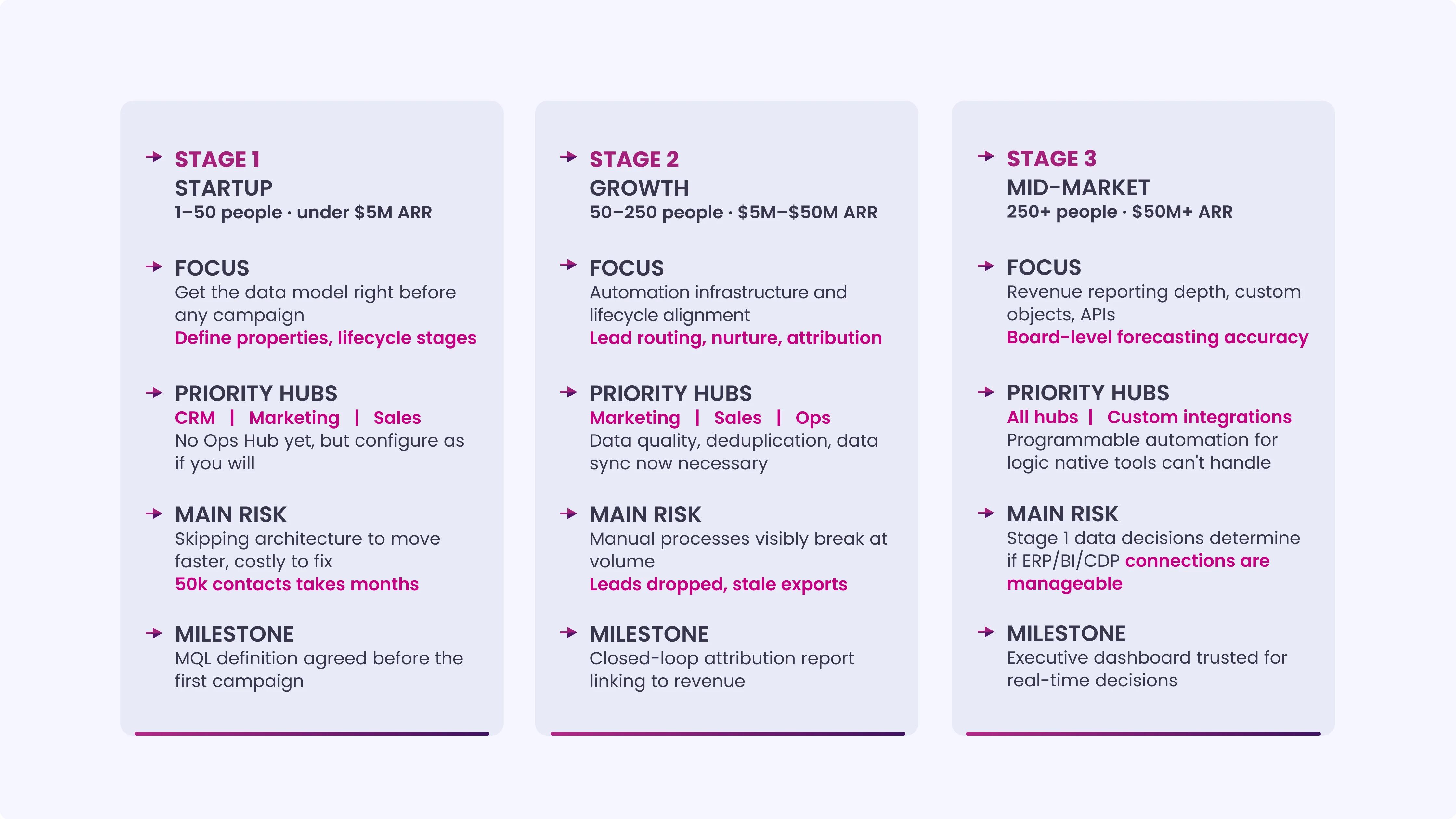
RevOps looks different depending on where your company is. A 20-person startup implementing HubSpot for the first time has different priorities than a 300-person company trying to bring order to a HubSpot instance that’s been running untouched for four years.
Stage 1: Startup / Early-Stage (1-50 employees, under $5M ARR)
At this stage, the temptation is to skip the architecture work and get into the market fast. Resist it. Cleaning up data architecture at 5,000 contacts takes a weekend. Cleaning it up at 50,000 contacts with three years of campaign history layered on top takes months.
Focus: Get the data model right before you send a single campaign. Define your contact and company properties, decide on your lifecycle stages, and document your MQL definition, even if you’re only generating 20 leads a month. The discipline you build now becomes the infrastructure your growth runs on.
Priority Hubs: Start with the core CRM, Marketing Hub, and Sales Hub. You don’t need Operations Hub at this stage, but you should configure HubSpot as if you will need it later, clean property names, consistent field values, and no workarounds.
Milestone: Agreement on the MQL definition before the first campaign goes live. If marketing and sales can agree on this with 20 people, they won’t have a three-year-old argument to undo when you’re at 200.
Stage 2: Growth Stage (50-250 employees, $5M-$50M ARR)
At this stage, the volume of leads and deals is high enough that manual processes visibly break. Reps are dropping leads. Marketing doesn’t know which campaigns are working. Reporting is done in spreadsheets pulled from HubSpot exports, which means the data is always a week old and always wrong.
Focus: Automation infrastructure and lifecycle alignment. You now have the volume to support sophisticated lead routing, nurture sequences, and deal-stage automation. You also have enough data to build meaningful attribution reporting.
Priority Hubs: Full Marketing Hub, Sales Hub, and Operations Hub. Operations Hub’s data quality tools, duplicate management, field formatting automations, and data sync become necessary as your CRM grows and integrations multiply.
Milestone: Your first closed-loop attribution report showing marketing’s contribution to closed revenue. When a sales leader can look at a HubSpot dashboard and see that 40% of this quarter’s closed revenue originated from a specific content campaign, the conversation about marketing budget changes permanently.
Stage 3: Mid-Market / Scaling (250+ employees, $50M+ ARR)
At this stage, HubSpot is rarely operating in isolation. It connects to an ERP, a BI tool, a customer data platform, and possibly a product analytics system. The data architecture decisions made in Stage 1 either make this manageable or turn it into an IT project.
Focus: Revenue reporting sophistication, custom object architecture, and API integrations with external systems. Executive reporting needs to pull from HubSpot and other data sources into a single view. Forecasting needs to be accurate enough to inform board-level decisions.
Priority Hubs: All Hubs plus custom integrations. At this stage, Operations Hub’s programmable automation, custom-coded workflow actions, is often necessary to handle logic that HubSpot’s native automation can’t execute without workarounds.
Milestone: An executive RevOps dashboard that shows pipeline coverage vs. target, forecast vs. target, and MQL-to-revenue contribution, pulling data that the leadership team trusts enough to make decisions from in real time rather than waiting for a weekly report deck.
The 6 Most Common RevOps Failures in HubSpot
Most RevOps setups fail due to poor decisions made before any HubSpot configuration begins.
1. Building Automation Before Agreeing on Lifecycle Definitions
This is the most common and most expensive mistake. Teams build lead routing workflows, nurture sequences, and deal-stage triggers before aligning on lifecycle definitions. Marketing and sales then operate on different interpretations of the same stages.
Everything must be rebuilt once definitions get corrected. The cost is not only rework. It also includes weeks of incorrect data already written into HubSpot.
2. Using HubSpot’s Default Lifecycle Stages Without Customization
HubSpot’s default stages are generic. They do not reflect your actual buyer journey.
“Lead,” “MQL,” and “SQL” have no meaning until you define them. Without customization, contacts remain in “Lead” status for years, with no logic to move them forward.
Reports built on undefined stages produce unreliable output.
3. Running Parallel Reporting in Google Sheets Alongside HubSpot
When teams export HubSpot data into spreadsheets for “real reporting,” HubSpot stops being the system of record.
Two versions of truth appear:
- One in HubSpot
- One in spreadsheets
Over time, they diverge. Decisions shift to spreadsheets, and CRM data loses trust.
Fixing this requires making HubSpot reporting accurate, complete, and easy enough that exports stop altogether.
4. No Data Governance Owner
Without ownership, HubSpot degrades predictably.
New properties appear without standards. Workflows go unaudited. Duplicate records increase. Lists become outdated.
Within months, the CRM becomes as messy as the system it replaced.
Data governance needs a clear owner with ongoing responsibility, not a one-time setup task.
5. Over-automating at the Expense of Personalization
Automation that removes human judgment harms sales relationships.
A rigid sequence with no variation or behavioral response signals lack of attention to the prospect.
Automation should remove manual effort, not replace decision-making.
High-value deals, enterprise accounts, and re-engagement flows still need human intervention.
6. Not Connecting Service Hub to the Revenue Loop
Customer success data often stays separate from marketing and sales.
Support tickets, satisfaction scores, renewal risk signals, and product usage data are recorded in HubSpot but not used across teams.
As a result:
- Marketing targets customers who already have unresolved issues
- Sales misses early signs of churn before renewal
- Expansion efforts run without context from the support history
The system stays disconnected even though all the data exists in HubSpot.
HubSpot RevOps Metrics: What to Track at Each Stage
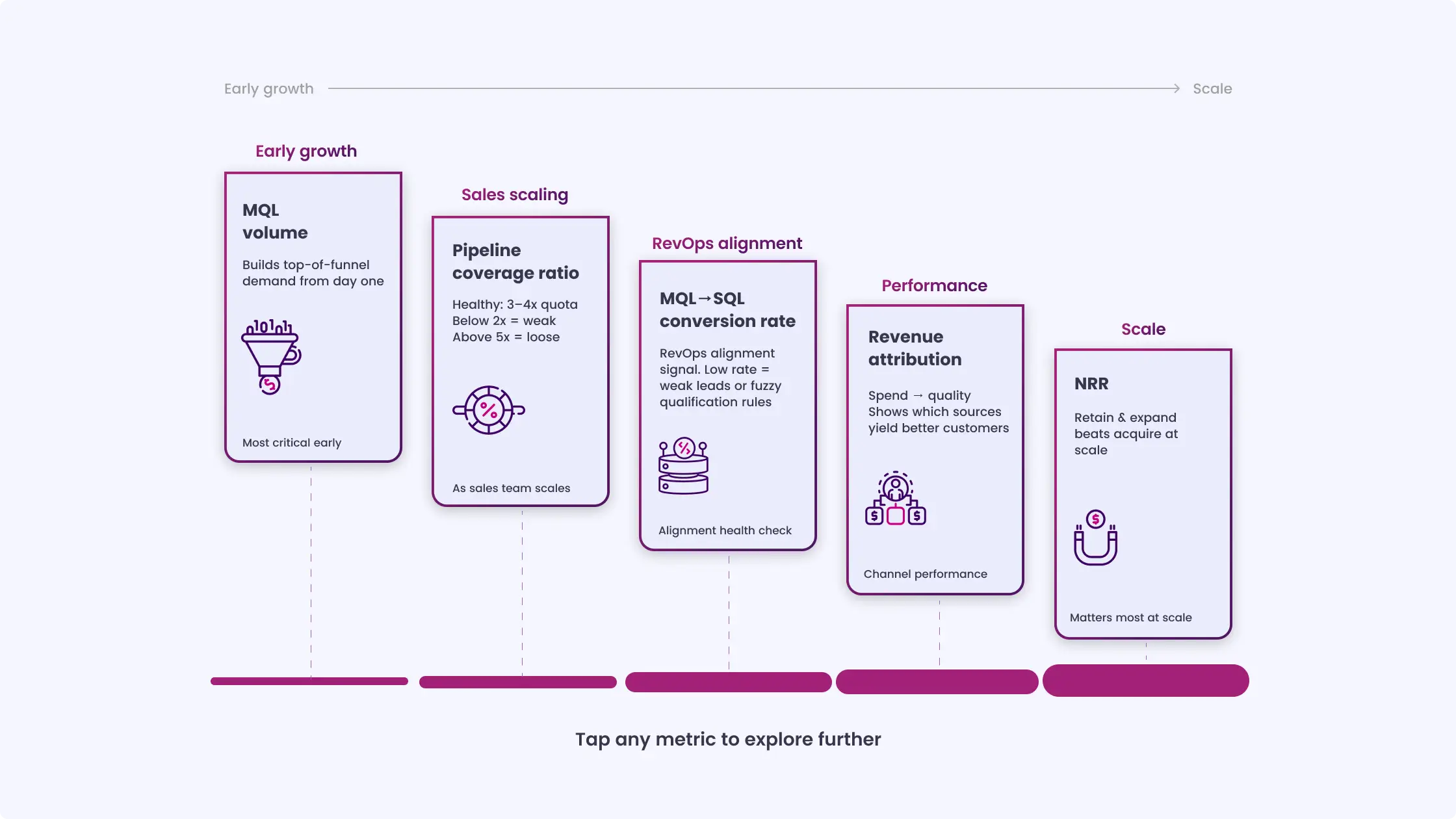
The metrics below define how each stage of RevOps performance is measured across teams:
| Metric | What It Measures | Which Team Owns It |
| MQL Volume | Top-of-funnel marketing output | Marketing |
| MQL-to-SQL Rate | Lead quality and sales/marketing alignment | Both |
| SQL-to-Opportunity Rate | Sales qualification effectiveness | Sales |
| Pipeline Coverage Ratio | Forecast health (target: 3–4x quota) | Sales + Ops |
| Average Deal Velocity | How fast deals move through the pipeline | Sales |
| Customer Acquisition Cost | Total cost to acquire one customer | Marketing + Finance |
| Revenue Attribution by Source | Marketing’s contribution to revenue | Marketing + Ops |
| Churn Rate | Customer success effectiveness | Customer Success |
| Net Revenue Retention | Growth from existing customers | All |
A note on how to use this table:
How INSIDEA Implements RevOps for B2B Clients
INSIDEA works with B2B companies at different stages of HubSpot maturity. Some teams start with their first HubSpot setup. Others already use the platform but struggle with inconsistent data, unclear definitions, and disconnected reporting.
The engagement follows the five-pillar framework outlined in this guide. Every project begins with a HubSpot audit across five areas: data architecture, lifecycle definitions, automation setup, reporting structure, and team adoption. The audit identifies the weakest area first, then defines the implementation plan around it.
INSIDEA holds HubSpot accreditations across Marketing Hub, Sales Hub, Service Hub, and Operations Hub. This allows full-platform implementation across functions, not isolated setup work within a single hub. Most projects begin with a single core area and expand as teams see how connected systems improve visibility into revenue activity.
Clients have used this approach to build their first closed-loop attribution model after years of disconnected reporting, reduce lead response times through structured routing logic, and replace multiple spreadsheet-based reports with a single HubSpot dashboard used in weekly leadership reviews.
If your current HubSpot setup feels fragmented, or if you are setting it up for the first time and want a structured approach, the INSIDEA HubSpot consulting team can guide the next steps based on your setup and goals.
Maximize HubSpot Value With Expert Support from INSIDEA
Selecting the right partner sets the foundation, but turning HubSpot into a system that generates results requires structured processes, clear workflows, and hands-on support.
INSIDEA helps businesses implement and optimize HubSpot to generate qualified leads, improve conversions, and align marketing, sales, and operations.
Here are the services we provide:
- HubSpot Onboarding: Set up users, permissions, lifecycle mapping, and integrations to get teams productive quickly.
- HubSpot Management: Ongoing support, workflow optimization, and dashboard reporting to maintain operational clarity.
- HubSpot Consulting: Lifecycle ownership, attribution frameworks, forecasting, and executive-level reporting for revenue alignment.
- HubSpot Migrations & White-Label Solutions: Clean data transfers, custom integrations, and partner-branded delivery for consistent execution.
When HubSpot is set up thoughtfully, teams can focus on growth, decision-making, and campaign execution with confidence.

 How INSIDEA works


