

Most people still treat Core Web Vitals as a Google ranking checkbox. That view held up when search results were the main entry point for content. Now, systems like ChatGPT, Perplexity, Google AI Overviews, and Microsoft Copilot process hundreds of millions of queries. Visibility no longer stops at rankings. It depends on whether AI systems can access and read your pages.
Google’s own research shows that when page load time increases from 1 second to 3 seconds, the bounce rate increases by over 53%. The same performance gaps affect how reliably machines extract content from pages.
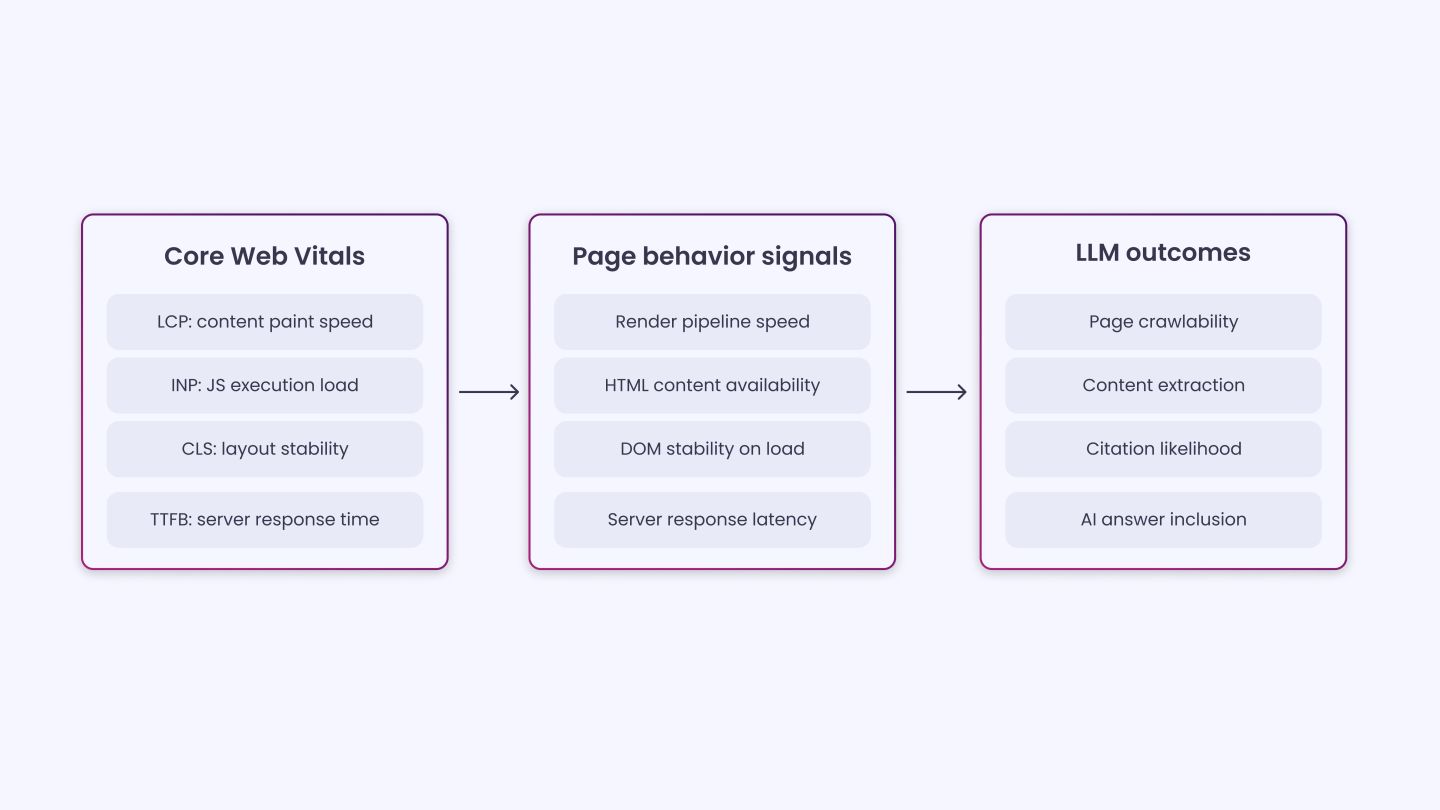
Core Web Vitals are often treated as surface metrics. In practice, they reflect deeper technical conditions, such as slow rendering, unstable layout, and JavaScript-heavy delivery. These conditions decide whether AI crawlers capture full content or miss parts of it.
Pages that load in clean HTML and render content early allow AI systems to read and interpret without friction. Pages that do not often lead to missing sections or incomplete outputs in AI-generated responses.
This blog explains how Core Web Vitals relate to LLM visibility, what they signal about page structure, and how they affect content access for AI systems.
How LLM Crawlers Read and Process Web Pages?
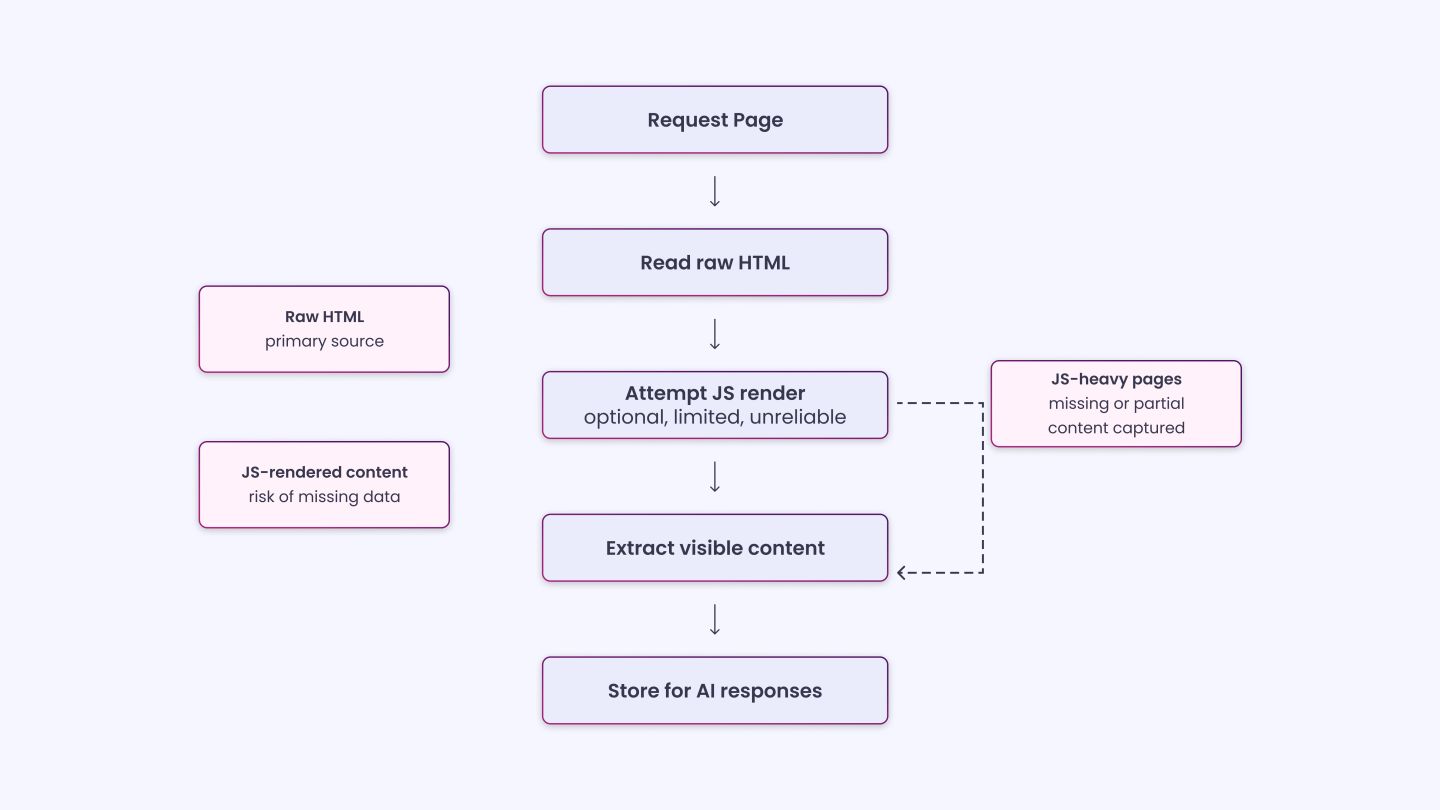
Before getting into the specific metrics, it helps to understand how these bots work, because CWV problems affect them very differently than they affect a real browser.
AI crawlers like GPTBot and ClaudeBot scan and harvest site data to train LLMs or inform real-time answer engines. Their focus isn’t ranking; it’s knowledge extraction and snippet creation. And most AI crawlers don’t execute JavaScript. If your site relies heavily on client-side rendering, critical information may be invisible to these bots.
When AI crawlers fetch a page, they capture the raw HTML and record the immediate text and markup. They may attempt a secondary render to process JavaScript, but many modern frameworks, such as React, Angular, and Vue, rely heavily on client-side rendering. If the main content, links, or structured data only appear after JavaScript executes, some crawlers struggle to reconstruct the page accurately.
This is precisely where CWV problems show up as extraction failures. A high LCP score often means your main content arrives late, which, for a crawler operating without a browser runtime, may mean the content never arrives at all.
During a 2025 audit of the eCommerce site Lulu and Georgia, product names were visible to users but completely absent from the raw response HTML, an invisible LCP problem with real crawlability consequences.
What this means for you:
|
LCP, INP, and CLS Explained Through an LLM Lens
These three metrics explain how a page behaves when it loads, and what gets captured during that process, including how fully and accurately the content is rendered.
LCP (Largest Contentful Paint)
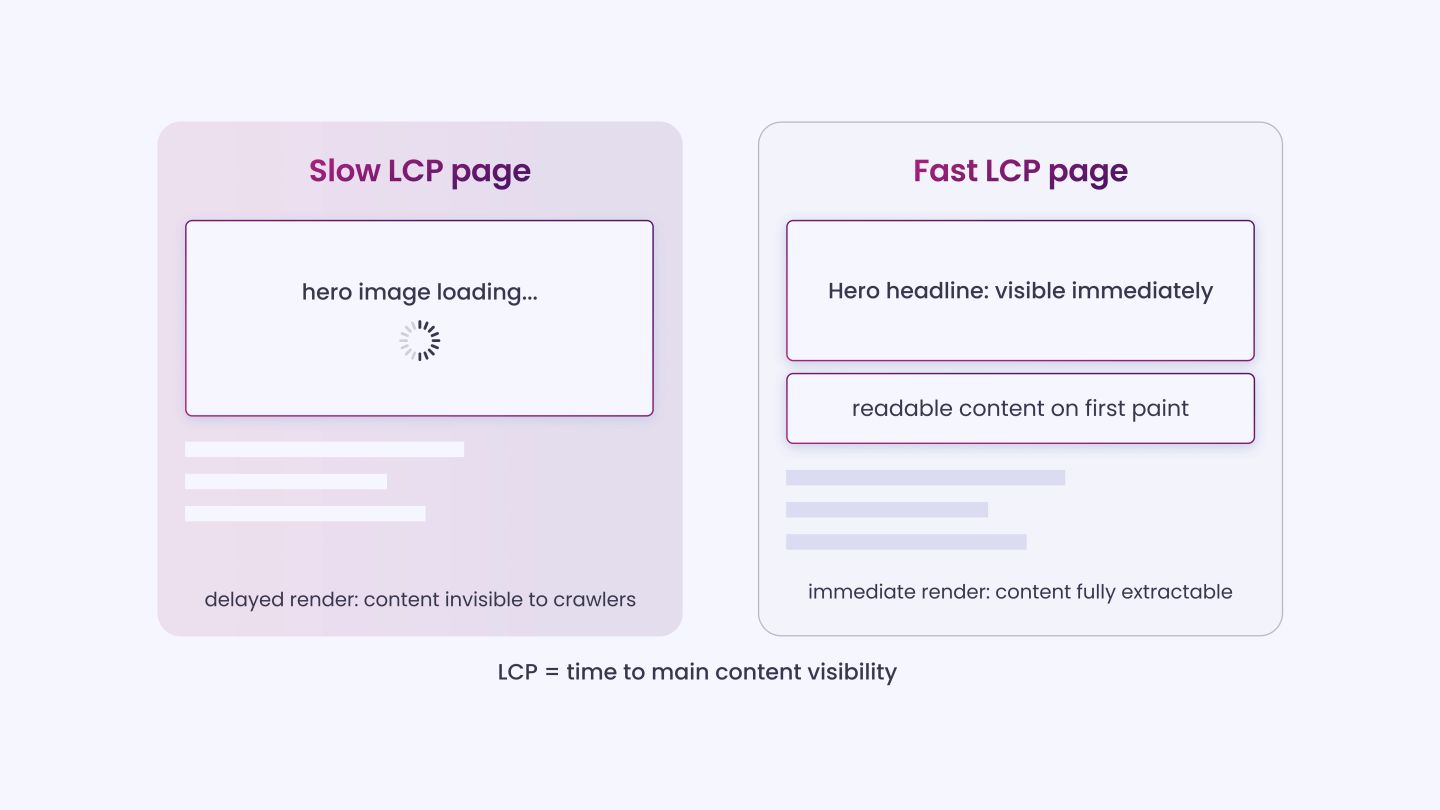
LCP measures the time it takes for the main content of a webpage to become visible to users. A good LCP score is under 2.5 seconds, and the Core Web Vitals report in Search Console is the primary tool for measuring it.
For LLMs, LCP is the most directly relevant metric of the three. When LCP is poor, it almost always means the main content element, typically a hero image, H1, or lead paragraph, is either render-blocked, fetched late, or loaded via JavaScript.
Each of those causes reduces what an AI crawler can extract from the page. Delayed paint means the main content isn’t visible when crawlers fetch the page, and missed paint means missed extraction. A bad LCP score is essentially a content-invisibility problem dressed up as a speed problem.
To improve LCP:
|
INP (Interaction to Next Paint)
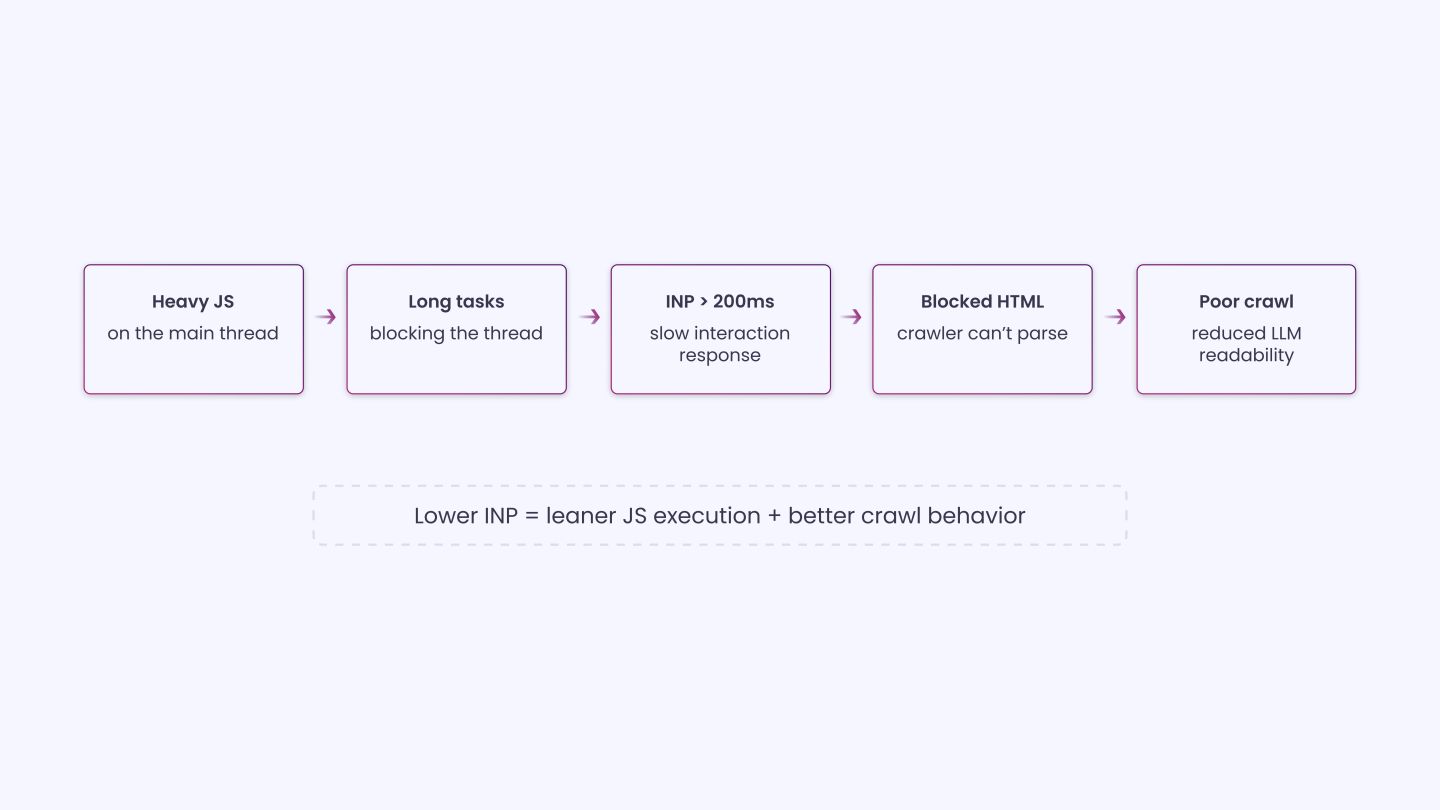
INP replaced First Input Delay (FID) in March 2024. INP measures the time it takes for a website to respond after a user interacts, such as clicking a button or filling out a form. A good INP score is below 200ms, while over 500ms is considered poor.
Improving INP requires reducing JavaScript execution time, minimizing long tasks, and deferring non-essential scripts.
AI crawlers don’t click buttons, so INP doesn’t affect them directly. But the connection matters more than it appears. A high INP score almost always indicates heavy blocking JavaScript on the main thread. That same JavaScript is what prevents crawlers from reading content during the initial HTML parse.
Fix the JS overhead, and you improve both INP and crawlability simultaneously, which means INP functions as an indirect signal of how JS-heavy and crawler-unfriendly your page actually is.
To improve INP:
|
CLS (Cumulative Layout Shift)
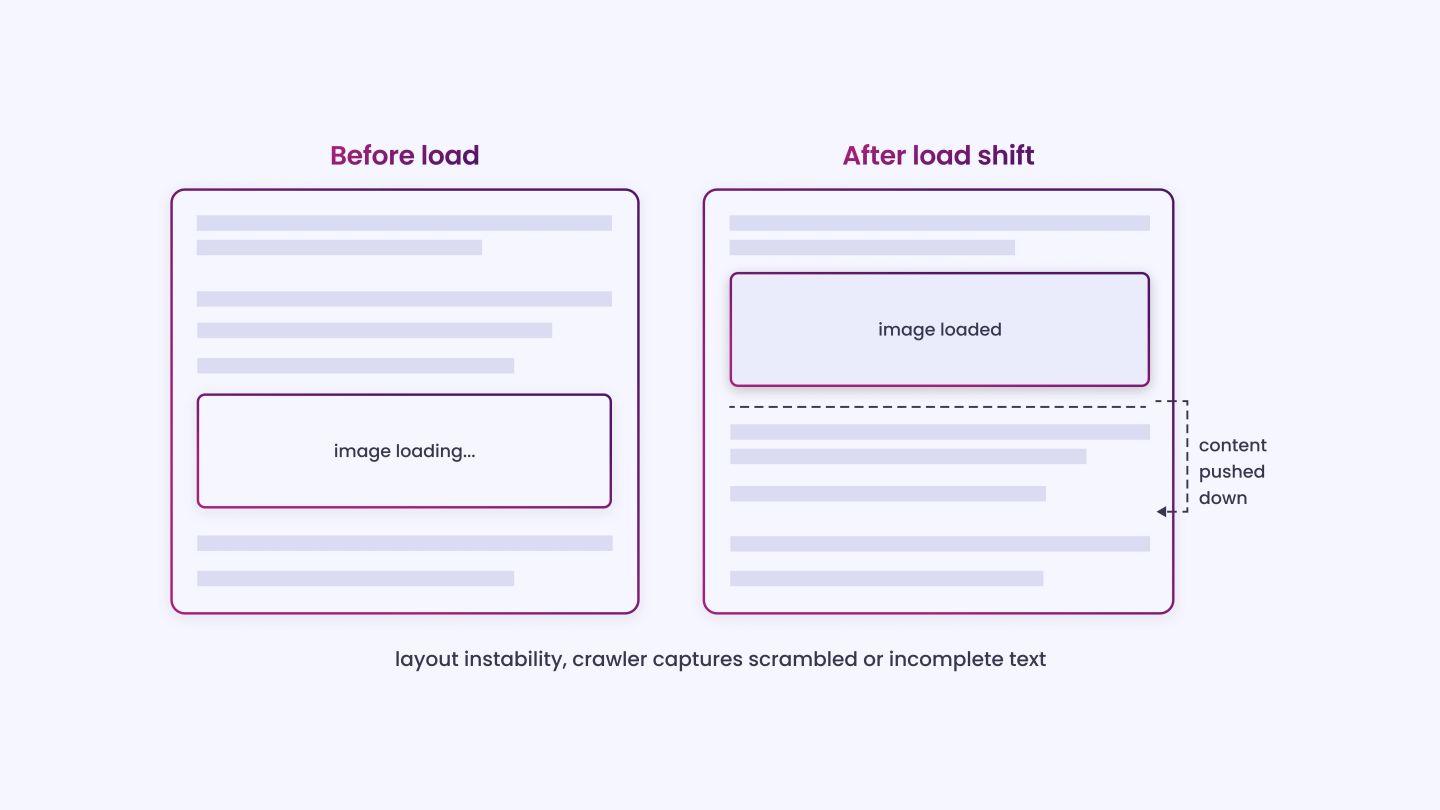
CLS measures visual stability. A CLS score under 0.1 is required. Tools like PageSpeed Insights can help determine whether your site meets this threshold.
Of the three Core Web Vitals, CLS has the most nuanced effect on LLM extraction. High CLS contributes to lower confidence scores for crawlers, which can influence how they interpret ambiguous content or resolve conflicting signals.
Unstable DOM shifts can cause incomplete or scrambled text to be captured. When a page’s layout is still shifting during load, a crawler capturing mid-shift HTML may end up with content in the wrong order, overlapping text nodes, or elements that reference positions that no longer exist.
The result is garbled or incomplete extraction, even if the page eventually renders correctly for a human visitor.
To improve CLS:
|
TTFB and Its Direct Impact on LCP and Crawlability
| What is TTFB?
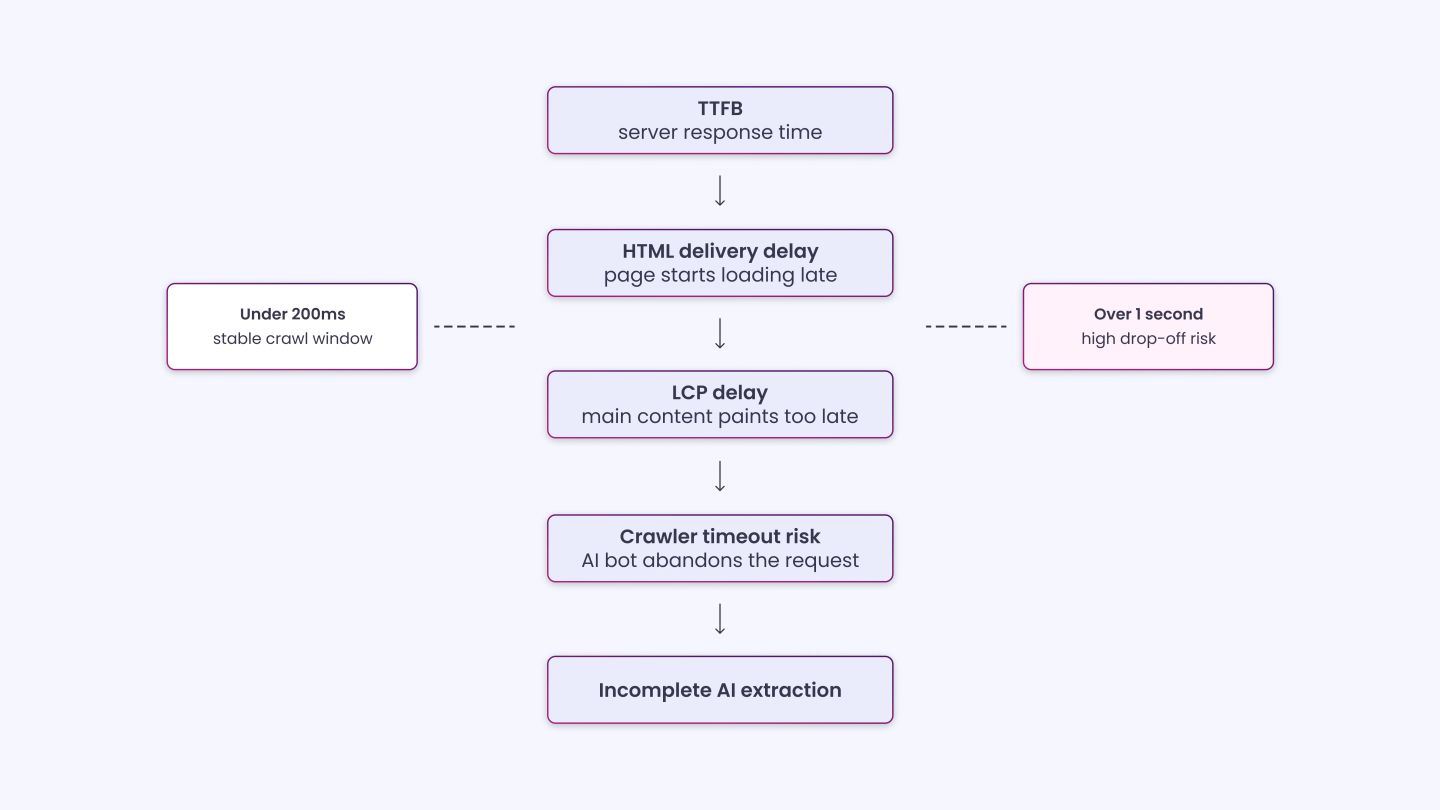
TTFB (Time to First Byte) is the time a server takes to respond after a request is made. It reflects how quickly a page starts loading. |
TTFB isn’t officially one of the three Core Web Vitals, but it’s the upstream metric that determines whether your LCP can ever score well. Google’s own research confirms TTFB directly impacts LCP: you cannot achieve a good LCP if your server is slow to respond. For LLM crawlers specifically, a poor TTFB is more damaging than for a standard browser request.
AI systems operate under strict latency budgets. When ChatGPT or Perplexity need to fetch real-time information to answer a query, they can’t wait around. If your server takes too long to respond, the crawler moves on, and your carefully crafted content, your company’s narrative, and your product descriptions never enter the AI’s knowledge base.
Unlike traditional search crawlers, AI bots operate with strict compute budgets and tight timeouts of one to five seconds. Targeting TTFB under 200ms, keeping HTML payloads under 1MB, and maintaining Core Web Vitals in the “good” range help fast sites get crawled more deeply and cited more often.
The practical implication is direct. If TTFB is slow, your LCP is also slow, because LCP timing starts from the moment the browser or crawler sends the request. A 1.5-second TTFB alone will almost guarantee an LCP above 2.5 seconds, regardless of how well-optimized your images are. Fixing TTFB is the prerequisite to fixing LCP.
To improve TTFB:
|
Server-Side Rendering vs. Client-Side Rendering
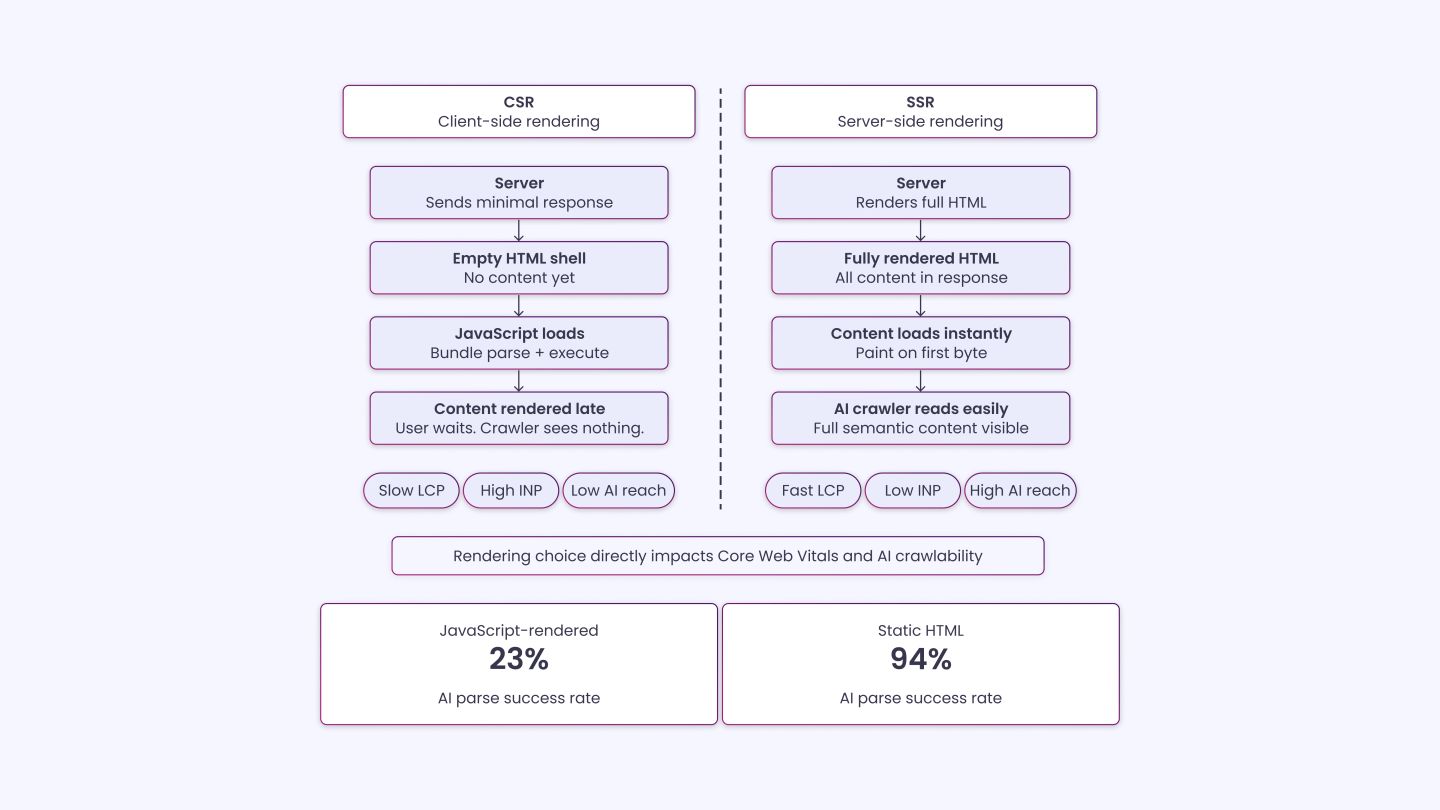
The SSR vs. CSR decision sits at the root of your LCP and INP scores, which is why it belongs here alongside the CWV discussion.
When a page uses client-side rendering, the server returns a nearly empty HTML file and hands content generation over to JavaScript. From a CWV perspective, this directly delays LCP because the largest contentful paint won’t occur until JS has fetched data and written it to the DOM. It also tends to generate more long tasks on the main thread, worsening INP.
For AI crawlers that don’t execute JavaScript, CSR means the page is essentially empty on arrival.
Static HTML with schema markup has a 94% parse success rate, while JavaScript-rendered content has only a 23% parse success rate, based on data across 500-plus brands.
That gap directly reflects the LCP crawlability problem. If your site is a SPA built entirely in React or Angular, you have two practical paths:
- SSR (Server-Side Rendering): Frameworks like Next.js or Nuxt.js render full HTML on the server before sending it to the client or crawler, which dramatically improves LCP because the main content is available immediately in the first byte of response.
- Pre-rendering/Static Generation: Tools like Prerender.io or static site generators produce fully rendered HTML files that any crawler can read instantly, with no JS execution required and no LCP penalty.
Structured Data and Schema Markup
Once your CWV baseline is solid and your pages are reliably crawlable, structured data is what helps an LLM understand what the content actually means. Think of it this way: Core Web Vitals get your content through the door, schema markup tells the LLM what to do with it once it’s inside.
Microsoft’s Principal Product Manager at Bing confirmed at SMX Munich in March 2025 that schema markup helps Microsoft’s LLMs understand web content, an official statement from a major AI platform confirming they use structured data as part of how their models interpret pages.
As of 2025, only about 12.4% of all registered domains have implemented Schema.org structured data. That leaves a large gap between sites that communicate clearly with AI systems and those that rely solely on unstructured text.
It’s worth being clear-eyed here: some research has found that schema markup alone does not directly correlate with how often a domain gets cited in LLM-generated responses, with visibility remaining consistent across varying levels of schema adoption. Schema is a supporting signal, not a citation guarantee.
Its real value is in reducing ambiguity so LLMs can accurately extract and attribute your content, which matters most when your CWV performance is already strong enough to get the page crawled in the first place.
Schema types worth prioritizing:
- Article / BlogPosting with datePublished and author (Person schema) for E-E-A-T signals.
- FAQPage for question-and-answer content that maps to the way LLMs retrieve answers.
- Organize your homepage to establish entity identity across AI knowledge graphs.
- BreadcrumbList to help crawlers understand your site hierarchy.
Always implement schema in JSON-LD format, placed in the <head> of each page. It’s easier for AI systems to parse, and it is Google’s officially recommended format.
Tools to Measure and Monitor All of This
You can’t fix what you can’t see. Here are the tools to track everything:
- Google Search Console: The Core Web Vitals report shows LCP, INP, and CLS by page group, using real-user data.
- PageSpeed Insights: Combines lab data (Lighthouse) and field data (CrUX) for any URL.
- Chrome DevTools / Lighthouse: Diagnose long tasks, render-blocking resources, and JS execution time.
- WebPageTest: TTFB waterfalls, connection timing, and third-party script auditing.
- Chrome UX Report (CrUX): Real user performance data at the origin or URL level.
- Screaming Frog/Sitebulb: Crawl your site to identify pages with missing schema, redirect chains, or slow server response.
For LLM-specific visibility tracking, tools like Bing Webmaster Tools and emerging platforms like Am I Cited and Erlin can give you a view into where your pages are or aren’t being surfaced in AI answers.
A Practical Checklist Before You PublishUse this before publishing or auditing any page you want indexed by LLMs:
|
Final Thoughts on Core Web Vitals and LLMs
Core Web Vitals weren’t designed with LLMs in mind, but that’s exactly what makes them so relevant now. Each metric, LCP, INP, and CLS, is really a window into a deeper technical problem: slow content delivery, JavaScript-heavy rendering, and unstable DOM construction.
Those are the exact problems that cause AI crawlers to abandon pages, extract incomplete content, or skip your site entirely. Fast TTFB, server-rendered HTML, stable layouts, and clean schema don’t just help Google rank your pages.
They determine whether AI crawlers can access, process, and ultimately cite your content. Most sites still treat performance and LLM visibility as separate problems. They’re not. The same technical discipline that improves your Core Web Vitals is what makes your content machine-readable and determines what the world sees.
INSIDEA
Ready to get found by people and AI?
Search and answer-engine visibility that compounds, built to be cited.

 How INSIDEA works




