




TL;DR
|
When someone asks an AI assistant a question about your product or business, the model does not consult a stored index of your site. It fetches information on the spot, and if your most important pages are buried under complex HTML, JavaScript, or navigation menus, the AI simply skips them or pulls inaccurate information. That is the specific problem llms.txt was created to address.
Proposed in September 2024 by Jeremy Howard of Answer.AI, llms.txt is a lightweight Markdown file that sits at the root of your domain and gives AI language models a clean, structured summary of your website’s most useful content.
LLM traffic has grown from 0.25% of search queries in 2024 to 10% by the end of 2025, which means how AI reads your site has become a real consideration for content owners, developers, and businesses alike.
This blog explains exactly how to create, structure, and publish an llms.txt file, with practical examples for every level of technical comfort.
How llms.txt Helps AI Understand Your Website?

Before writing the file, it helps to understand what it is solving.
Large language models operate within context windows, so they cannot process an entire website in one go. When an AI retrieves information from your site in real time, it encounters full HTML pages loaded with navigation bars, cookie banners, scripts, and ads. Parsing all of that accurately is difficult, and the signal-to-noise ratio is poor.
llms.txt solves this by providing a single, clean Markdown document that summarizes what your site is about and links directly to the most important pages. Think of it the way you would think of a well-organized table of contents, written in plain text so that any AI system can read it without confusion.
It is worth being clear about what it does not do:
- It does not affect Google rankings or traditional SEO.
- It does not block AI from accessing other parts of your site (that is, robots.txt’s role).
- It is not an official standard ratified by any standards body. It is a proposed convention gaining real traction.
How the llms.txt File Is Structured?
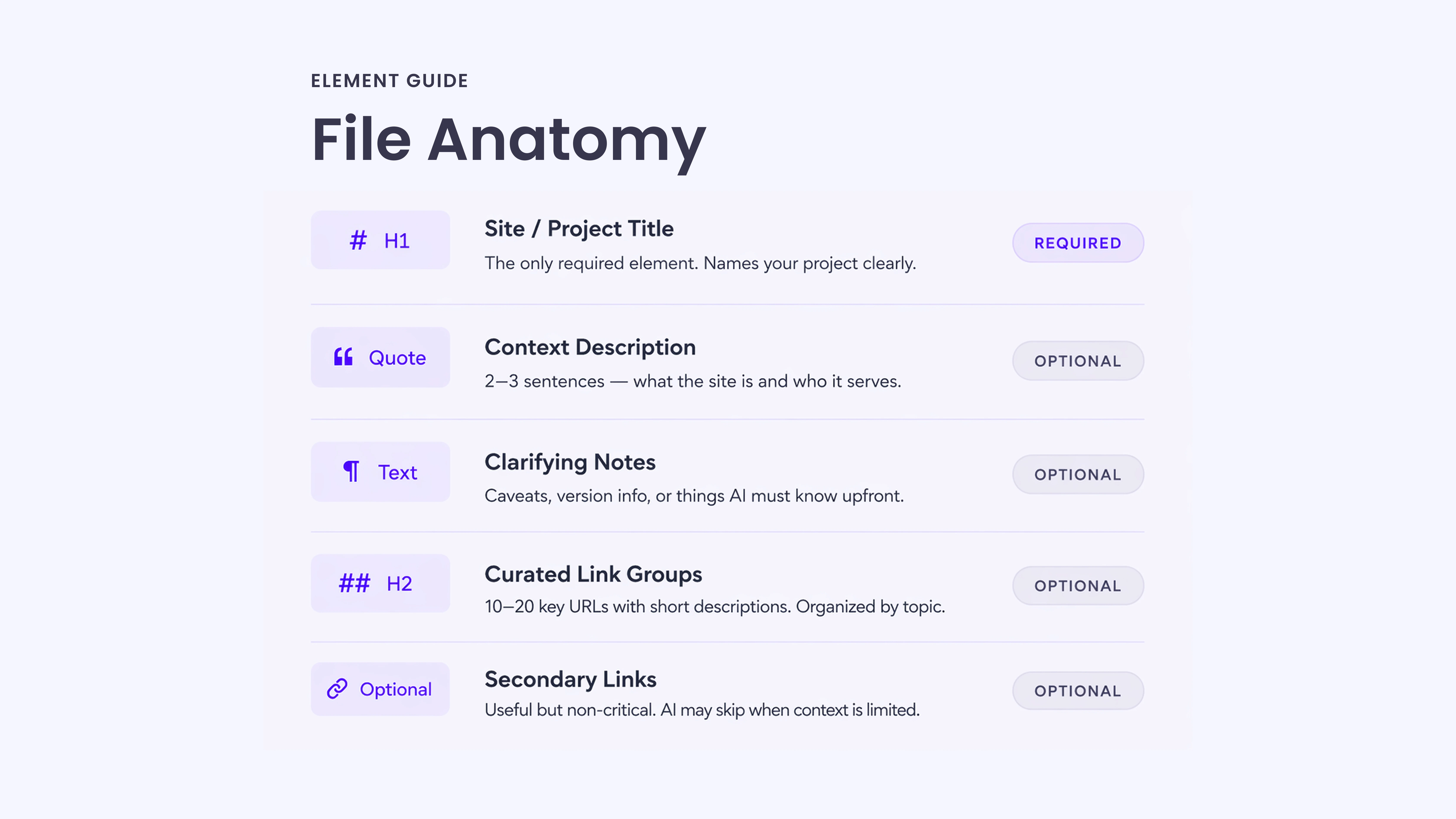
The llms.txt specification follows a simple Markdown format with a defined order of sections. The structure is important because it helps AI systems interpret the file consistently.
Only the H1 title is required. Everything else is optional, but the order should be followed for clarity and proper parsing.
Required Element
# Title
This is the name of your project or website. It is the only mandatory part of the file.
Optional Elements (in Order)
> Blockquote Description
A short summary of your site. Ideally, two to three sentences that explain what the site is about and who it is for.
Additional Detail Paragraphs
Plain Markdown text or bullet points are used to provide extra context. This is where you add clarifications, caveats, or anything important the AI should understand before using the links.
Avoid adding extra headings in this part.
Content Sections (H2 Format)
## Section Name (Link Groups)
These sections organize your main pages into logical groups.
Each link follows this format:
Page Title: Short description of what the page contains.
This helps AI prioritize the most relevant content.
Optional Section
## Optional
A reserved section for secondary or less important links.
These pages are useful but not critical. If the AI has a limited context space, it can safely skip this section.
Basic Template Example# Site or Project Name > Brief description of what this site is and who it is for. Any important notes or caveats go here as plain paragraphs or bullet points. ## Section Name – [Page Title](https://yoursite.com/page): Brief description of what this page covers. ## Optional – [Secondary Page](https://yoursite.com/other): Less critical but useful reference. |
A Step-by-Step Guide to Create Your llms.txt File
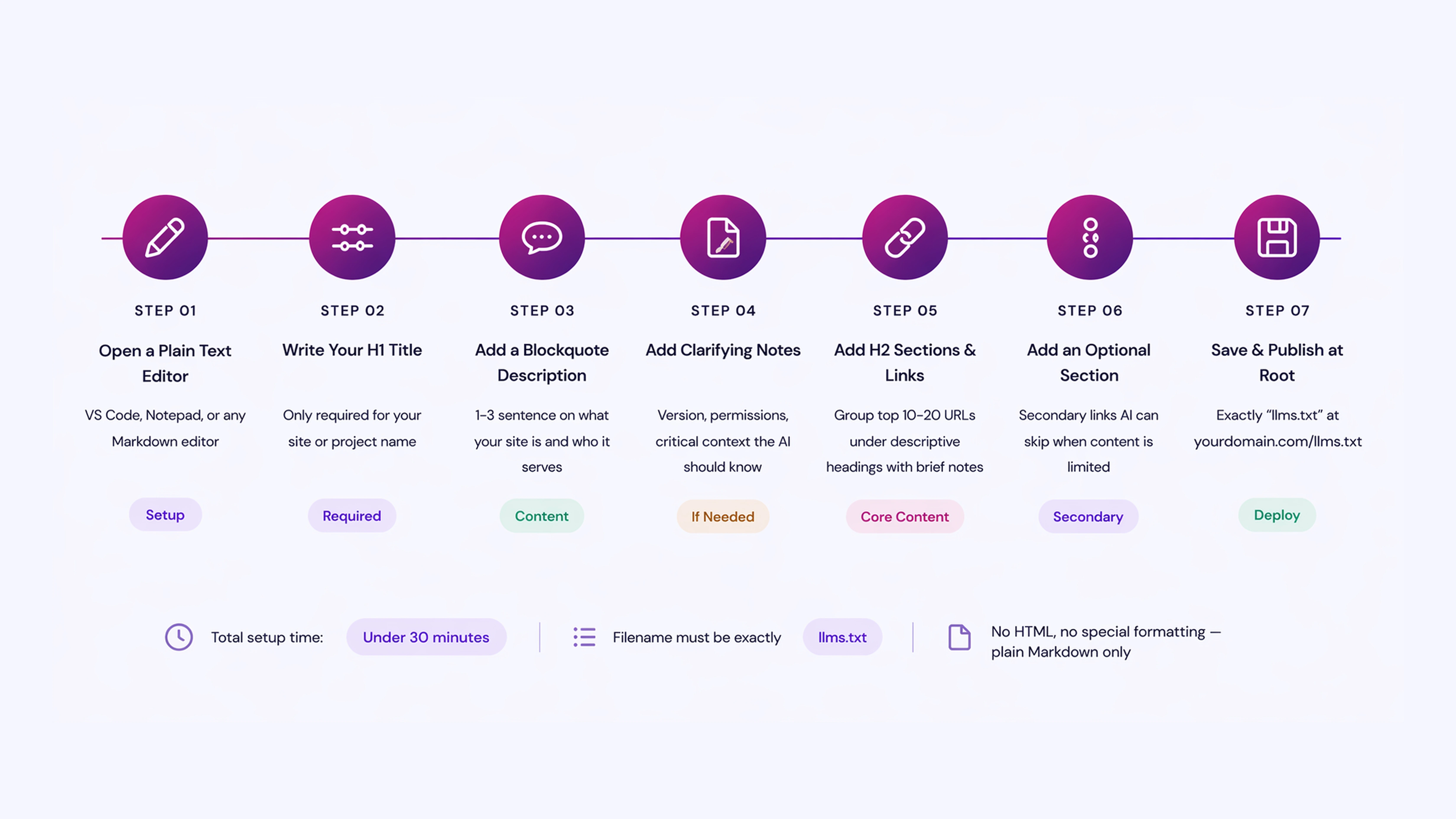
Here’s a simple step-by-step process to create your llms.txt file:
Step 1: Open a Plain Text Editor
Use any editor that saves plain text files: VS Code, Notepad, Sublime Text, or even a simple online Markdown editor. The file must be saved as llms.txt, not llms.md or anything else. The naming convention is fixed.
Step 2: Write Your H1 Title
Start with your site or project name:
# Acme Documentation
This is the only required line in the entire file. Everything after this is optional but adds significant value.
Step 3: Add a Blockquote Description
Directly below the title, add a short blockquote (one to three sentences) that captures what the site is about:
Acme provides API documentation and developer guides to help build payment integrations. This site covers authentication, webhooks, error handling, and SDKs for Python, Node.js, and Ruby.
This blockquote acts as a context primer for the AI before it reads any links.
Step 4: Add Clarifying Notes (If Needed)
If there are common misunderstandings about your product, version conflicts, or things the AI should know upfront, add them here as plain paragraphs or a bullet list:
- The v1 API is deprecated. All documentation below refers to v2.
- Authentication uses OAuth 2.0 only. API keys are no longer supported.
Step 5: Add H2 Sections with Curated Links
Group your most important URLs under descriptive H2 headers. Each link should include a brief description after a colon:
## Getting Started
|
## API Reference
|
Be selective. Include the pages that genuinely help someone understand your site. Do not paste your entire sitemap here.
Step 6: Add an Optional Section for Secondary Content
If you have supplementary content that is useful but not essential, put it under ## Optional:
## Optional
- [Changelog](https://acme.com/docs/changelog): Version history and release notes.
- [Migration Guide](https://acme.com/docs/migration): Instructions for moving from v1 to v2.
AI systems can skip this section when working with limited context.
Step 7: Save the File as llms.txt
The filename must be exactly llms.txt. Lowercase, with the dot-txt extension. No variations.
Where to Add Your llms.txt File on a Website?
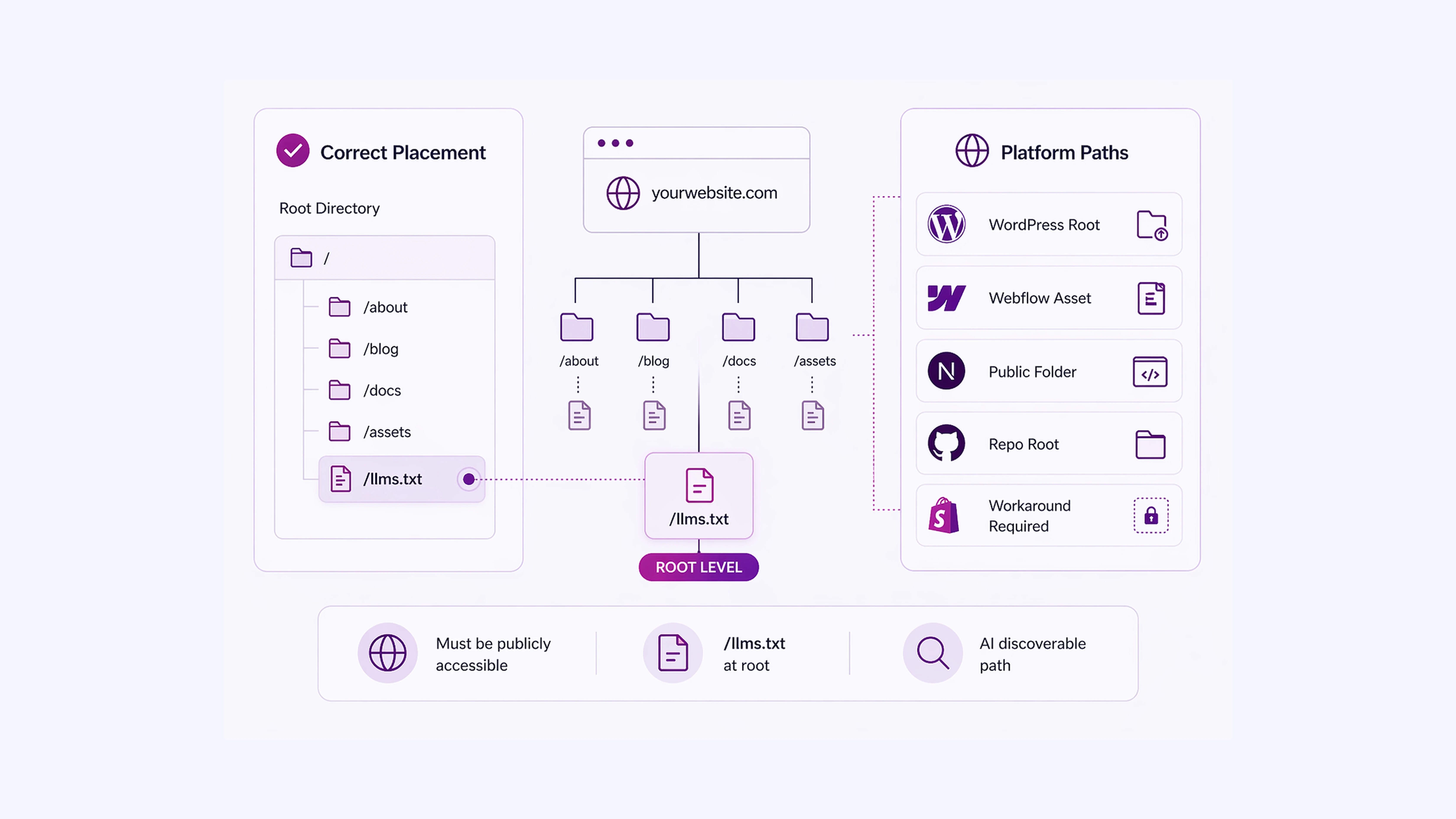
The file must be accessible at:
| https://yourdomain.com/llms.txt |
For most static sites, this means placing it in the root directory of your site’s public folder.
For common platforms:
- WordPress: Upload it via FTP or a file manager plugin to the root of your public_html directory.
- Webflow: Use the Assets panel or a custom code injection to serve the file at the root URL.
- Next.js / Gatsby: Place it inside your public/ folder.
- GitHub Pages: Add it to the root of your repository.
- Shopify: Custom file hosting requires a workaround since Shopify restricts root-level files. Some developers use a redirect or a serverless function to serve the file.
You can also create companion .md files for individual pages. The convention allows adding .md to any page URL (for example, yoursite.com/docs/intro.md) to serve a clean Markdown version of that page, which is easier for AI to read than HTML.
A Practical llms.txt Example (SaaS Documentation)Here is what a complete, practical llms.txt file looks like for a developer tool: # Stripe Stripe is a payment processing platform with APIs for accepting payments, managing subscriptions, handling payouts, and building financial products. Stripe’s API follows RESTful conventions. All requests require authentication using your secret API key in the Authorization header. ## Core Documentation
## Guides
## Optional [Changelog](https://stripe.com/docs/changelog): Latest API updates and deprecations. This structure gives an AI model everything it needs to answer product questions accurately and point users to the right resource. |
llms.txt vs. robots.txt vs. sitemap.xml
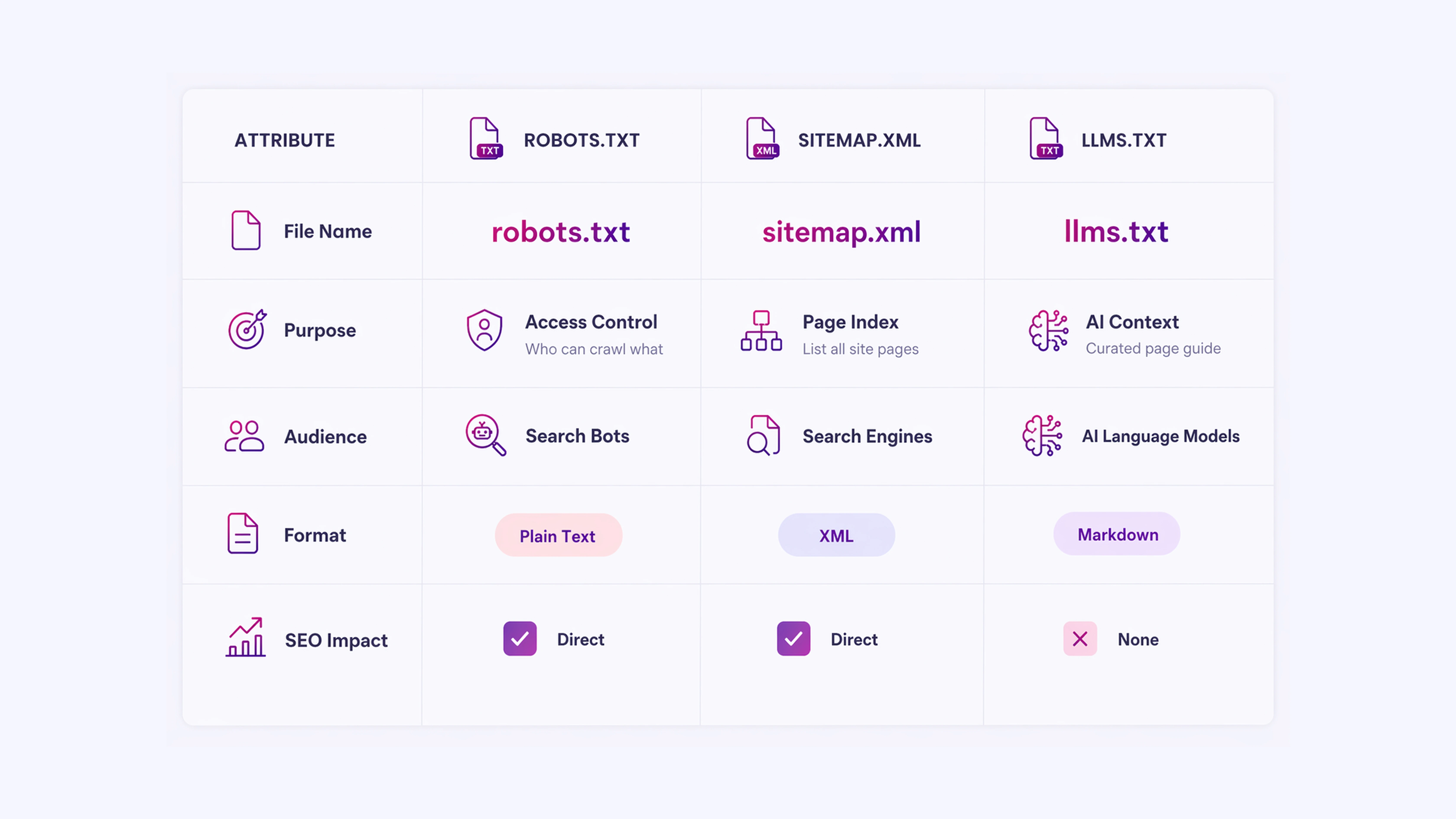
These three files coexist and serve different audiences:
| File | Purpose | Audience |
| robots.txt | Controls which pages search crawlers can access | Search engine bots |
| sitemap.xml | Lists all indexable pages on the site | Search engines |
| llms.txt | Provides curated context and priority links | AI language models |
robots.txt sets access rules. sitemap.xml maps the full site. llms.txt explains what the site means and which parts of it matter most to an AI reading it in real time. They do not overlap in function.
What to Avoid When Building an llms.txt File

Pasting your entire sitemap as links. llms.txt is meant to be curated. Fifty links with no descriptions give an AI model less signal, not more. Aim for ten to twenty highly relevant links with clear notes.
Writing vague descriptions: “This is our blog” is not useful. “How-to guides for setting up integrations, debugging errors, and managing accounts” is.
Using HTML instead of Markdown: The file must be plain Markdown. HTML tags, custom scripts, or special formatting will confuse parsers.
Wrong file name: LLMs.txt, llm.txt, or llms.md will not be found. The name must be exactly llms.txt.
Treating it as a security tool: llms.txt does not prevent AI models from reading other parts of your site. If content restriction is the goal, robots.txt is the appropriate file.
The Value of Implementing llms.txt
Creating an llms.txt file takes under thirty minutes for most sites. The structure is simple: a title, a short description, grouped links to your most useful pages, and optional secondary content.
The value is clear: when AI systems can read a concise, well-organized summary of your site instead of parsing complex HTML, they produce more accurate responses about your content.
The standard is still gaining formal adoption, and no major AI platform has publicly confirmed full support for it. But with over 844,000 sites already using it, including organizations like Anthropic, Cloudflare, and Stripe, it has moved well past the experimental phase.
Adding an llms.txt file is a low-effort, low-risk action that positions your site well as AI-driven content access continues to grow.
Improve How LLMs Rank & Represent Your Content With INSIDEA

AI systems are no longer just indexing websites. They are interpreting them in real time, deciding what to surface, summarise, or skip entirely.
If your site is not structured for that layer, your most important pages may never be seen in AI-generated responses.
INSIDEA helps you design and implement content structures such as llms.txt so your website is readable, prioritized, and correctly interpreted by AI systems.
Here is how we help:
- llms.txt Strategy & Implementation: We create a structured llms.txt file tailored to your website architecture, ensuring your most valuable pages are clearly defined, grouped, and prioritized for AI retrieval.
- AI Content Structuring & Mapping: We map your website into logical content clusters so that AI systems understand context, hierarchy, and relevance across your pages.
- Website AI Readability Audit: We evaluate how your site is currently interpreted by LLMs and identify gaps in which important content is overlooked or misread.
- Information Architecture Optimization: We refine how your content is organized so both AI systems and users can navigate and extract meaning without friction.
FAQs
| 1. Does llms.txt improve my Google search ranking?
No. llms.txt has no effect on traditional search engine rankings. It is not read by Googlebot and has no connection to Google’s indexing or ranking systems. Its purpose is limited to helping AI language models understand your site content at inference time. |
| 2. Do AI systems like ChatGPT or Claude officially support llms.txt?
As of early 2026, no major AI platform has publicly confirmed official support for the llms.txt standard. However, Anthropic (which builds Claude) has published its own llms.txt file, and the convention is widely enough adopted that AI developers are expected to add formal support as the standard matures. |
| 3. How often should I update my llms.txt file?
Update it whenever your site’s structure changes significantly, new key pages are added, old pages are deprecated, or product scope changes. There is no automated refresh mechanism, so it requires manual maintenance. Treating it like a changelog or documentation index makes updates more manageable. |
| 4. Can I have multiple llms.txt files for different sections of a large site?
The specification allows for llms.txt files at subpaths (for example,/docs/llms.txt) in addition to the root file. For large sites with distinct product areas, keeping section-level files alongside the root file is a practical way to keep content scoped and readable. |
| 5. What is the difference between llms.txt and llms-full.txt?
Some implementations include a companion llms-full.txt file that contains the complete content of all linked pages in a single document, rather than just links. This is useful when you want to give AI systems the full text upfront rather than requiring them to follow links. It is not part of the official specification but is a common extension of the convention. |









