

Framer began as a prototyping tool for designers, a version many SEOs still remember. That early version no longer exists.
In August 2025, Framer raised $100 million in Series D funding at a $2 billion valuation. It now serves over 500,000 monthly active users, including brands like Scale AI, Perplexity, Miro, and Bilt. The platform has grown into a full website builder with a CMS, hosting, analytics, and SEO tools.
Framer provides a strong technical foundation for SEO and AEO. Its server-rendered pages improve crawlability, and the CMS supports structured content that can be indexed efficiently.
Framer has limits for large-scale content operations. Manual schema implementation is required, custom canonical links are limited to non-Enterprise plans, and the CMS lacks advanced blog features, including categories, tags, and author pages.
This blog details Framer’s capabilities and constraints, showing how to use its technical setup to improve search visibility and AEO readiness.
How Framer’s Rendering Infrastructure Affects SEO and AEO?
Framer sites are React apps that pre-render HTML on the server, making content fully accessible to crawlers. Pages deliver complete HTML in the initial response, so headings, text, and metadata are immediately visible.
AI crawlers like GPTBot, ClaudeBot, and PerplexityBot read this HTML without executing JavaScript. Framer’s pre-rendering ensures all content is available on first request, meeting the technical baseline required for SEO and AEO.
This approach removes the visibility issues common to client-side-rendered React apps. The trade-off is limited server customization compared to Next.js or Webflow, but for most marketing pages, it is sufficient.
What Framer Handles Automatically for SEO?
Before examining where Framer falls short, it is worth being specific about what the platform provides out of the box, because the list is longer than most people expect.
The Automatic SEO Infrastructure
Framer generates and maintains an XML sitemap that updates on every publish, adds self-referencing canonical tags to every page automatically, generates SSL certificates with no manual setup, and provides per-page control over meta titles, descriptions, and Open Graph tags.
For most marketing sites, this is not a problem. For sites that need to add custom user-agent directives, authentication keys for external search engines, or precise crawl delay instructions, the default is limited.
On Pro plans and above, you can upload a fully custom robots.txt file through Site Settings> Well-Known Files, giving you complete control when the default needs adjustment. The Free plan does not support this.
Core Web Vitals Performance
Framer sites are some of the fastest on the web and keep getting faster. According to the HTTP Archive Core Web Vitals Report, 63% of all Framer sites currently have a green CWV report.
That figure sits above WordPress, which passed Core Web Vitals on approximately 43% of sites in the same period, and it is within the competitive range of Webflow.
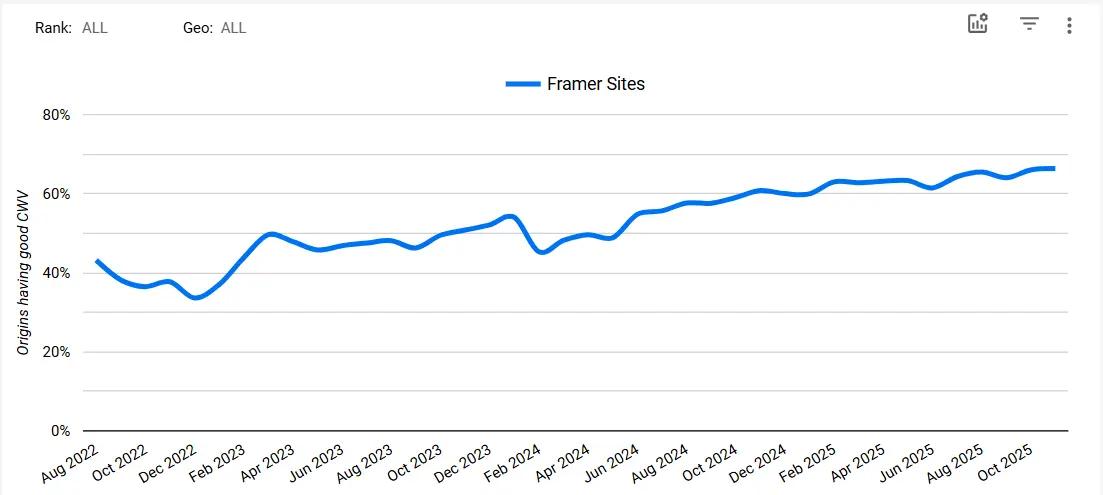
The performance comes from global CDN delivery, built-in image optimization, and HTTP/3 hosting, all of which Framer manages at the infrastructure level without requiring plugin management or hosting decisions from the site owner.
There is one important caveat. Framer projects that lean heavily on animations or prototype-like components introduce JavaScript overhead, which can destabilize CLS and INP as complexity grows. Framer makes it easy to add animations, and overusing them is the primary reason Framer sites underperform on Core Web Vitals. The platform gives you strong defaults, but design choices can override them.
URL Control
Framer provides clean URLs out of the box, with full URL customization. No unusual URL structures or poor site architectures here. You have full control over slugs on both static and CMS pages. Framer also supports 301 and 308 redirects natively on Pro plans and higher, and automatically generates them when you change a URL.
Framer SEO Limitations
Despite strong defaults, Framer has specific SEO limitations to be aware of:
- robots.txt Cannot Be Fully Edited: Framer auto-generates and maintains the robots.txt file. Custom user-agent directives, authentication keys, or precise crawl delays are limited. A partial workaround exists via Well-Known Files on certain plans.
- Canonical Tags Below Enterprise Plan: Custom canonical links aren’t available on plans below the Enterprise plan. Self-referencing tags handle most use cases, but multi-domain or syndicated content setups require higher-tier plans.
- Schema Markup Requires Manual Implementation: No native schema generation. All types, such as Article, FAQPage, HowTo, SpeakableSpecification, Product, BreadcrumbList, must be added via JSON-LD in custom code. Validation is essential.
- CMS Limitations for Large Content Operations: Limited blog features, SEO controls, and collection/item caps. Pro plan allows 10 CMS Collections and 2,500 items; Scale plan allows 20 collections and 10,000 items (expandable to 40,000). No native per-item noindex toggle; 302 redirects not supported.
- Extra Technical Steps Required: Manual configuration needed for noindex, temporary redirects, and dynamic schema generation. Teams without technical experience may find these challenging.
How Framer Supports AI Citations?
This is the section most Framer guides skip entirely. Getting ranked in traditional search results and getting cited in AI Overviews, ChatGPT, and Perplexity require different things. Here is how Framer maps to each AEO requirement.
Framer Delivers Complete Content to Bots
The most fundamental AEO requirement is that AI crawlers can read your content. Framer satisfies this by default through pre-rendering. GPTBot, ClaudeBot, and PerplexityBot all receive complete HTML on the first request.
This removes the most common AEO failure point: content that only exists after JavaScript execution. You do not need to configure anything on Framer to achieve this. It is built into the platform.
Ensures Bots Can Read Your Content
Framer actively monitors and supports crawl access for all major bots by default, including GoogleBot, GoogleOther, BingBot, GPTBot, AhrefsBot, and PerplexityBot. This is not a passive default that can drift.
Framer monitors the bot traffic and crawler errors directly, meaning AI crawlers are supported at the infrastructure level rather than merely permitted. However, if your site runs behind Cloudflare, that changes the equation. Cloudflare recently changed its default configuration to automatically block AI bots. If you use Cloudflare, your AI crawler access may have been shut off without you realizing it.
Since Framer’s robots.txt cannot be fully edited through the standard interface, adding explicit allow directives for GPTBot, ClaudeBot, and PerplexityBot requires either using Framer’s Well-Known Files feature or a reverse proxy setup. This is a technical step that most Framer sites have not taken, and it is worth prioritizing if AI citation is a goal.
Implements Schemas for AI Citation
The schemas that matter most for AEO are FAQPage, Article, SpeakableSpecification, and HowTo. All four can be implemented on Framer through custom JSON-LD. None are generated automatically outside of whatever Framer adds to certain page types in the background.
SpeakableSpecification deserves specific attention. It tells AI assistants and voice search systems exactly which content blocks to extract as cited answers. On a page with a clear Quick Answer block marked with SpeakableSpecification, an AI system does not have to guess which paragraph represents the answer to the query. You point it directly at the right content.
Most Framer sites have not implemented this schema. That is a competitive gap for sites that do. Add it as a JSON-LD block in the page’s custom code head section, targeting your Quick Answer paragraph, your FAQ answers, and any definition-style content on the page.
Content Structure for RAG-Based AI Systems
Most AI answer engines use Retrieval-Augmented Generation. They chunk page content, retrieve the most relevant chunks, and pass them into a language model to generate a response. Pages structured for this process, meaning short paragraphs, question-format headings, and a direct answer within the first 100 words, perform consistently better in citation selection.
Framer imposes no restrictions on content structure. The Quick Answer blocks, question-format H2s, and concise paragraphs that help RAG systems extract citations are entirely editorial decisions. The platform does not limit what you can write or how you can organize it.
Deploys llms.txt for Page Prioritization
llms.txt is a Markdown file placed at your domain root that tells AI systems which pages to prioritize and how to attribute your content. On Framer, you can deploy it as a static file through the Well-Known Files feature or via a reverse proxy.
The honest state of llms.txt adoption in 2026: evidence of AI crawlers proactively fetching llms.txt is mixed across platforms, with almost zero confirmed activity from ClaudeBot or PerplexityBot. However, when you paste an llms.txt URL directly into major AI tools like ChatGPT, Claude, Gemini, or Perplexity, they read it correctly.
Implement it because adoption is growing, and the cost of adding it is low. Do not treat it as the primary lever for AI citation. Content structure, schema, and E-E-A-T signals carry significantly more weight at this point.
Framer vs. Webflow vs. WordPress for SEO and AEO
Platform comparisons depend heavily on what you are building. Here is a direct comparison across the dimensions that actually determine SEO and AEO outcomes.
Framer vs. Webflow
For aggressive long-term SEO strategies involving blogs, evergreen content, and organic traffic, the community generally agrees that Webflow is overall better suited than Framer, although Framer can be more than sufficient for reasonable SEO on a simple website.
The performance gap is real but narrower than most people assume. Webflow sites tend to deliver slightly faster and more consistent page load performance than Framer sites, especially as a project scales, while both builders can perform well on simpler or optimized builds in real-world testing.
For structured data, Webflow requires custom code implementation, just as Framer does, but offers more server-level flexibility and canonical control on standard plans. For large-scale CMS operations with complex content hierarchies, Webflow’s more mature CMS handles it better.
Where Framer wins is design velocity and animation capability. Design-driven teams building marketing sites and landing pages ship faster in Framer, and the Core Web Vitals baseline is strong for simple builds. For content-heavy growth strategies, Webflow is the better call.
Framer vs. WordPress
WordPress gives full control over every SEO element, including server-level configuration, editing robots.txt, custom canonicalization, and a plugin ecosystem that handles schema at scale with tools like Yoast and RankMath.
The trade-off is maintenance overhead. WordPress Core Web Vitals performance depends on the quality of your hosting provider, caching configuration, and installed plugins. A poorly configured WordPress site runs significantly slower than a Framer site that requires no configuration at all.
For teams with a developer and complex SEO requirements, WordPress provides a higher technical ceiling. For teams without a developer who need strong default performance and a clean editorial workflow, Framer delivers more reliable baseline results.
Decision Matrix
|
Steps to Optimize a Framer Site for AEO
Understanding the platform is only useful when translated into actions. Here is what to do, in order.
Step 1: Confirm AI Crawler Access
Check whether your site runs behind Cloudflare. If it does, log into your Cloudflare dashboard, navigate to Security, then Bots, and confirm that GPTBot, ClaudeBot, and PerplexityBot are not blocked by WAF rules or bot fight mode settings. This step alone resolves the most common reason Framer sites are invisible to AI search systems.
Step 2: Add a Quick Answer Block to Every Informational Page
Write a two to three-sentence direct answer to the page’s primary question and place it within the first 100 words. This is the content chunk RAG-based systems pull first when generating a response. Format it as a short, standalone paragraph that reads clearly without surrounding context.
Step 3: Implement FAQPage Schema on Main Pages
In the Framer page settings, open the custom code section and add a JSON-LD FAQPage block. Write three to five questions with concise answers under 100 words each. Validate using the Google Rich Results Test before publishing. The FAQ page is consistently one of the schemas most associated with AI Overview appearances.
Step 4: Add Article Schema to Blog Posts
For every blog post in your Framer CMS, use the variable syntax to dynamically generate Article schema, including headline, datePublished, dateModified, author name, and image. Use {{Title | json}} and similar expressions to ensure JSON-safe formatting for each CMS variable. Validate a sample post through the Rich Results Test to confirm it renders correctly before scaling.
Step 5: Add SpeakableSpecification to FAQ and Definition Pages
Implement SpeakableSpecification as a custom JSON-LD block in the page head. Target your Quick Answer paragraph and your FAQ answer blocks using cssSelector references. This tells AI assistants exactly which content to extract as a spoken or cited response. It takes under 30 minutes per page, and most Framer sites have not done it.
Step 6: Format Headings as Questions
Format H2 and H3 headings as the actual questions your audience types into AI tools. Framer does not restrict heading format in any way. This is a content decision, not a platform one, but it is one of the clearest signals AI systems use to identify citation-worthy content.
Step 7: Deploy llms.txt via Well-Known Files
Create a plain Markdown file with your site name, a short description, your sitemap URL, and a list of your 20-30 most important pages, each with a brief description. Deploy it through Framer’s Well-Known Files feature or via your reverse proxy. Keep it under 50 links and update it quarterly when content changes.
Note that Well-Known Files requires a Pro plan or above. The Free plan does not support this feature.
Mistakes That Limit Framer Sites in SEO and AEO Results
Even with a capable platform, execution errors limit what Framer can achieve. These are the errors that appear most consistently.
- Overusing Animations on Public Pages: Heavy animations or prototype-like components introduce JavaScript overhead, destabilizing CLS and INP. Audit hero sections, scroll effects, and above-the-fold components. Remove or defer animations delaying LCP.
- Hiding Content Behind Interactive Components: Overlays, tabbed sections, accordions, sliders, or hidden CMS content may be invisible to crawlers unless they are present in the initial HTML.
- Skipping Schema Validation After CMS Updates: JSON-LD using CMS variables can break if fields are renamed, removed, or empty. One syntax error can make Google discard the schema. Test with Rich Results after updates.
- Publishing Thin CMS Pages at Scale: Thin or templated content harms domain quality. AI evaluates depth across the domain, not individual pages. Shallow pages reduce citation potential.
- Assuming the Robots.txt Default Is Sufficient: Defaults may change via Cloudflare or platform updates. Quarterly audits of crawler access prevent visibility gaps.
Who Should Use Framer for SEO and AEO
Framer suits design-focused marketing sites and landing pages. Its pre-rendering delivers full HTML to AI crawlers, Core Web Vitals are strong, and per-page meta controls cover most needs.
Limits exist: robots.txt cannot be fully edited, custom canonicals require Enterprise, schema requires manual JSON-LD, and the CMS lacks advanced blog features and support for large-scale content.
For marketing pages and portfolios, Framer offers fast workflows and solid defaults. For large blogs, documentation, or deep technical SEO, these limits matter.
AEO success depends on implementation. The infrastructure supports citations, but schema, content structure, crawler configuration, and Quick Answer blocks must be added manually. Sites that do will compete; those that don’t will rank but not get cited.
Optimize Your Framer Site for SEO and AEO with INSIDEA
Building a fast, visually polished Framer site is only the starting point. Even well-developed Framer sites frequently miss the schema implementation, content structuring, and AI crawler configuration that determine whether pages get cited in AI-generated answers.
INSIDEA helps organizations close that gap. We handle the technical implementation, AI-specific optimization, and performance monitoring so your Framer site is discoverable in both traditional search and AI-driven answers.
Here is how we help:
- Technical SEO Audit and Fixes: Review rendering settings, crawler access, URL structure, canonical configuration, and sitemap integrity to confirm search engines and AI crawlers see exactly what you intend.
- Schema Markup Implementation: Add FAQPage, Article, HowTo, SpeakableSpecification, and Organization schema as correctly validated JSON-LD, both on static pages and dynamically across CMS collections.
- AEO Content Structuring: Quick Answer blocks, question-format headings, and semantic content architecture built to match how AI systems chunk and retrieve information for generated responses.
- Core Web Vitals Optimization: Audit animations, above-the-fold components, and third-party scripts. Identify and resolve LCP, CLS, and INP issues specific to Framer’s rendering behavior.
- Content Clustering and Topical Authority: Build a pillar-and-cluster architecture that signals domain depth to AI systems and improves citation likelihood across an entire topic area.
- Performance Monitoring: Track AI Overview impressions, citation share across Perplexity, ChatGPT, and Google AI Overviews, and Core Web Vitals over time to measure impact and adapt as AI algorithms evolve.
With INSIDEA handling technical execution and AI-specific optimization, your team can focus on creating content worth citing.

 How INSIDEA works




